User Folder Hidden

My user folder has become hidden - I'm able to access it using previously set up alias, but in normal finder usage it can't be seen.


I can make it visible using terminal... "defaults write com.apple.finder AppleShowAllFiles YES"


... so I know it's there...


How come it's hidden all of a sudden? How can I un-hide it?


Imac (27 Inch, Mid 2010) El Capitan 10.11.16


Thanks in advance

Posted on Jan 24, 2017 9:00 AM

Reply
11 replies

Jan 25, 2017 4:18 AM in response to keg55

Really appreciate your help...


Here's the terminal output:


Last login: Wed Jan 25 10:59:11 on ttys000

rickwebb:~ rickwebb$ ls -alO /Users/rickwebb

total 112

drwxr-xr-x@ 25 rickwebb staff hidden 850 24 Jan 16:36 .

drwxr-xr-x 6 root admin - 204 1 Jan 1980 ..

-r-------- 1 rickwebb staff - 7 7 Sep 2015 .CFUserTextEncoding

-rw-r--r--@ 1 rickwebb staff hidden 34820 25 Jan 11:05 .DS_Store

drwx------ 8 rickwebb staff - 272 24 Jan 18:31 .Trash

drwxr-xr-x+ 4 rickwebb staff - 136 31 Jan 2011 .adobe

-rw------- 1 rickwebb staff - 2042 25 Jan 12:13 .bash_history

drwxr-xr-x 31 rickwebb staff - 1054 25 Jan 12:13 .bash_sessions

drwx------+ 3 rickwebb staff - 102 1 Feb 2011 .cups

drwx------ 13 rickwebb staff - 442 24 Jan 11:35 .dropbox

-rw-r--r--+ 1 rickwebb staff - 4616 14 Jun 2011 .htaccess

-rw-r--r-- 1 rickwebb staff - 155 4 Dec 2014 .imagineer_log.txt

drwxr-xr-x+ 3 rickwebb staff - 102 20 Feb 2014 Applications

drwx------+ 23 rickwebb staff - 782 25 Jan 10:42 Desktop

drwx------+ 67 rickwebb staff - 2278 19 Jan 12:38 Documents

drwx------+ 170 rickwebb staff - 5780 24 Jan 11:59 Downloads

drwx------@ 43 rickwebb staff - 1462 25 Jan 10:28 Dropbox

drwx------+ 68 rickwebb staff - 2312 25 Jan 11:38 Library

drwx------+ 4 rickwebb staff - 136 3 Feb 2011 Movies

drwx------+ 16 rickwebb staff - 544 20 Jul 2015 Music

drwx------+ 159 rickwebb staff - 5406 7 Sep 13:17 Pictures

drwxr-xr-x+ 6 rickwebb staff - 204 25 Aug 2015 Public

drwxr-xr-x+ 5 rickwebb staff - 170 31 Jan 2011 Sites

drwxr-xr-x+ 19 rickwebb admin - 646 24 Jan 09:51 Work

drwxrwxrwx@ 53 rickwebb staff - 1802 11 Apr 2016 ••• FRANK FONTS

rickwebb:~ rickwebb$

And here's a screengrab from Finder...
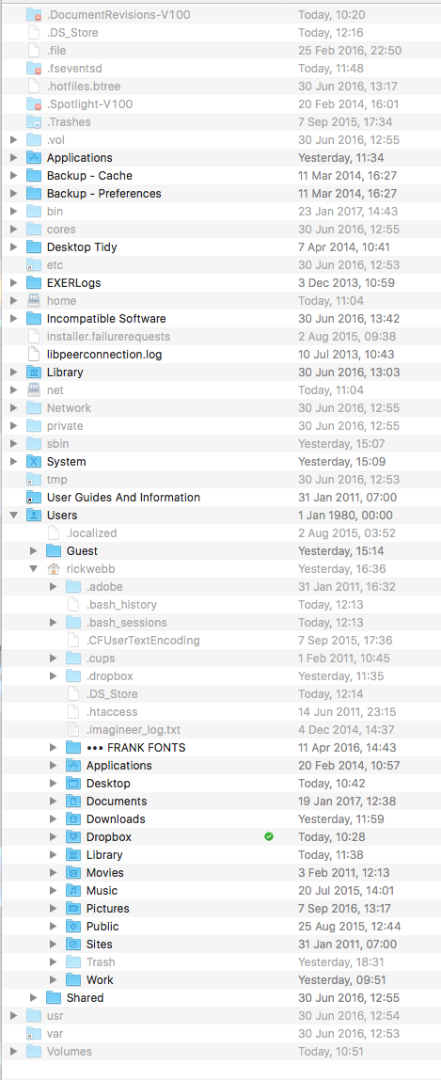
User uploaded file

Jan 24, 2017 10:34 AM in response to Bluesinlondon

Do you mean it is hidden in the /Users folder, as opposed to just in the Sidebar (as keg55 asks).


If it is hidden in /Users, try this command in Terminal (just copy and paste):

chflags -nohidden ~/


If that doesn't show your home folder in /Users, run this command in Terminal and post the line of the output corresponding to your home folder (name is at the end of the line).

(if you feel you need to edit out your user name, then paste the output in TextEdit and edit your user name, first).

ls -alO /Users

Jan 25, 2017 3:04 AM in response to Barney-15E

Thanks Barney,


It's hidden on the Users folder, not just the sidebar.


"chflags -nohidden ~/" reveals it, but greyed out


Here's the output from "ls -alO /Users"...


ls -alO /Users rickwebb

ls: rickwebb: No such file or directory

/Users:

total 0

drwxr-xr-x 6 root admin - 204 1 Jan 1980 .

drwxrwxrwx 38 root wheel - 1360 25 Jan 10:28 ..

-rw-r--r-- 1 root wheel - 0 2 Aug 2015 .localized

drwxrwxrwx+ 12 Guest _guest - 408 24 Jan 15:14 Guest

drwxrwxrwt 14 root wheel - 476 30 Jun 2016 Shared

drwxr-xr-x@ 25 rickwebb staff hidden 850 24 Jan 16:36 rickwebb

rickwebb:~ rickwebb$

Any thoughts?


Jan 25, 2017 6:05 AM in response to Bluesinlondon

That's really weird. I've never seen my Home (user) folder with an icon other than a blue folder like the others in your screenshot. And it's evident that the other folders within your rickwebb home folder are visible.


Can you do another screenshot after the following terminal command which will hide ALL hidden files? Just open Finder and screenshot the whole Finder window. Make sure the right pane has the /Users folder in it expanded so we can see all the user folders inside and the Sidebar in the left pane.


defaults write com.apple.finder AppleShowAllFiles -boolean false ; killall Finder

This thread has been closed by the system or the community team. You may vote for any posts you find helpful, or search the Community for additional answers.

User Folder Hidden

Welcome to Apple Support Community
A forum where Apple customers help each other with their products. Get started with your Apple Account.

