Does Time Machine Work?

Is any data available showing the percentage of mac computers keeping consistent hourly backups for more than a few weeks? My model indicates the number is less than 10%, but my model is likely to be off by +20%/-5%.

Mac Pro, macOS Sierra (10.12), Dual 6-core 3.3GHz Xeon 64GBRam

Posted on Jan 26, 2017 10:00 PM

Reply
32 replies

Feb 15, 2017 3:01 PM in response to danallenhouston

None of my Macs use only one Time Machine destination. Most of them back up to at least three separate devices, so my TM preferences don't show the time of the next scheduled backup. To show that I'd have to temporarily remove all backup destinations but one.


Here is a Time Machine log excerpt filtered for the word "Created" over the previous 24 hours. That's probably much more valuable because it shows a record of actual, completed backups.


(For some reason I couldn't post the log, so here's a screenshot of it including whatever "invalid characters" it contained)


User uploaded file

One backup appears to to missing, at about 0420 this morning. I can only guess that it had nothing to back up at that time.


The backup at 1552 yesterday may have been a manual backup that I did out of curiosity, at or about the time I posted my previous reply. I don't care enough to recall or be certain of that. If my most recent backup is recent, that's all I need to know.


If your Mac isn't doing what mine is, it's not surprising. Everyone's activities are different. You probably don't use your Macs the same way I use mine.

Jan 28, 2017 10:18 PM in response to cwindom8

cwindom8,


Your description is a perfect match with published material, including information presented by OSX. Here is a picture of where it says exactly what you said, taken from my screen. So far so good.


User uploaded file


So I have been using my computer all day. The energy saver is set to not let the computer sleep.


So if I have been here with the computer for 10 hours, how many hourly backups should be on this computer right now? 9? 10? 11?


The number I have in that time frame is....two.


User uploaded file


User uploaded file


User uploaded file


How many on your Time Machine?

Feb 14, 2017 5:57 PM in response to danallenhouston

Here are the results of this test (**** cue drum roll please ****)

................................................

..................................................

....................................................

.......................................................

...........................................................

...............................................................

...................................................................

...............................................................

...........................................................

.......................................................

................................................

..................................................

....................................................

.......................................................

...........................................................

...............................................................

...................................................................

...............................................................

...........................................................

......................................................

................................................

..................................................

....................................................

.......................................................

...........................................................

...............................................................

...................................................................

...............................................................

...........................................................

.......................................................


AND THE SURVEY SAAAYYYYYS......


User uploaded file

Feb 15, 2017 2:29 PM in response to John Galt

What I said was completely wrong and what you said is 100% correct.


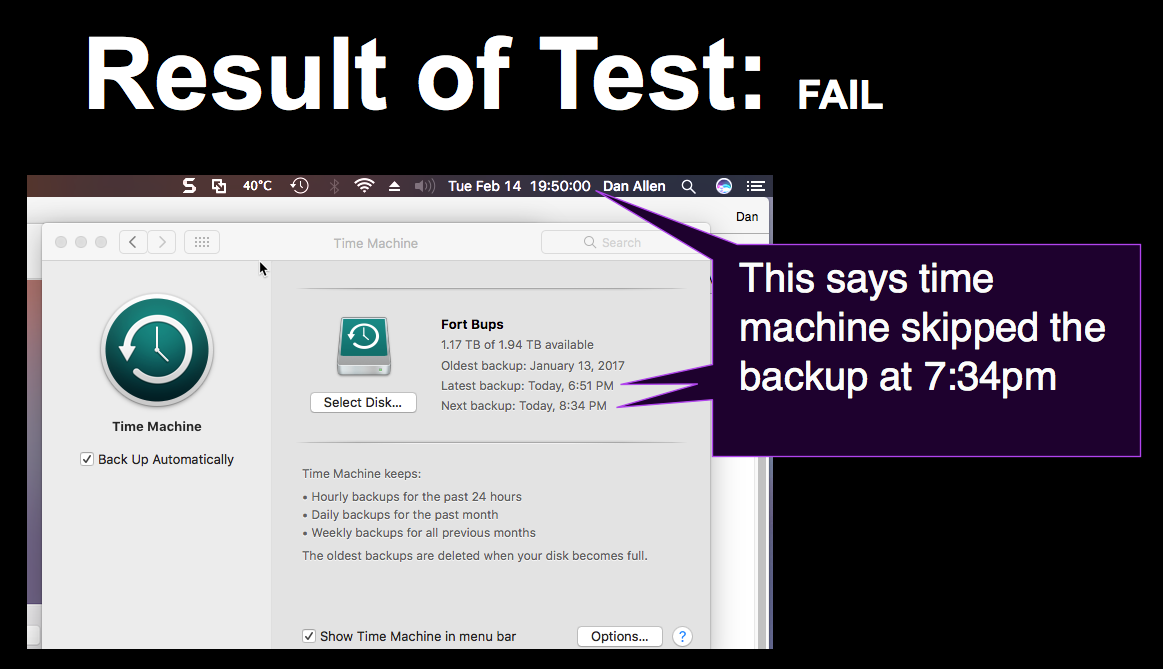
The hourly backups are only for the previous 24 hours. I should be able to see 24 backups, one for each of the last 24 hours. Instead, what I see is scheduled backups happening on occasion, usually skipped.


User uploaded file


I have an app that makes its own backups, proving that my Mac is running when Time Machine is skipping hourly backups.


**** waiting for the next scheduled backup to see if it runs. ****

Feb 15, 2017 6:50 PM in response to John Galt

John Galt wrote:


It's the output of a crude bash script that I wrote to extract Time Machine log entries.


The macOS version is the current one.


Do you mind posting that bash script?


From terminal I can see hourly local snapshots, but not so nicely, it helps to drag the window wider:

(maybe you had something to do with this script?)


log show --predicate 'subsystem == "com.apple.TimeMachine"' --info

User uploaded file

Feb 15, 2017 9:13 PM in response to John Galt

John Galt wrote:


That's all there is to it, but using the --last option limits its output to the specified time period. Otherwise log extracts its entire history and will take forever. The rest is just filtering for the desired string and formatting. "Created" is just as good as any number of other indications that TM actually finished.


The log entries will be different for desktops vs. portables and I did not bother to include a check for which one (which is a good question since the OP didn't indicate which he has, and TM on portables includes local snapshots).


Thanks John Galt— this gets me much closer !

verifying the hourly Time Machine Local Snapshots from the log files:

User uploaded file

Feb 16, 2017 7:18 AM in response to leroydouglas

Wow, my jaw is dropped. That log show command is pretty handy, eh? Thank you for posting that. It is huge.


User uploaded file

User uploaded file


But there is more. Since I had never seen that command, I inquired of Mr. Google who took me to this fascinating article which attributes its insights on log show to none other than John Galt. I don't think he was referring to the fictional John Galt, since transistors had not been invented when John Galt walked and flew from the pages of Atlas Shrugged. The convergence of the topic, that article, John Galt's contribution on this thread, and your mention of John having been a possible contributor to some relevant geekness leads me to believe that the John Galt of this thread is one of the OSX giants and I gather you are no midget and I am just glad I am not getting stepped on.


Just some amazing context.


So, who are you guys? 🙂😎😀😮😕➕😁

Jan 29, 2017 8:41 AM in response to danallenhouston

danallenhouston wrote:

Is any data available showing the percentage of mac computers keeping consistent hourly backups for more than a few weeks? My model indicates the number is less than 10%, but my model is likely to be off by +20%/-5%.


I can tell you, for a robust back up strategy you need more than just Time Machine. It does work well for what it does seamlessly in the background. I would not recommend trying to micro manage or interpolate the nuance of hourly backups.


I would recommend letting it work for a while and see how it levels out over time. It is fairly painless just to let it do it's thing.


You can read more on backups here, Time Machine and Local Snapshots included: How to create a boot clone

Feb 16, 2017 5:15 PM in response to danallenhouston

That particular script cited in that article is even more crude. I don't use it any more and I don't recommend anyone else does either. The cut command is a poor choice for formatting, besides, there have already been changes to log as well as Time Machine that have already rendered it outdated. The reason I created it was that Sierra introduced a new unified logging system that precludes simply using grep with system.log as was possible with previous OS X versions. We can anticipate that similar uses for system.log will soon be outdated also, if they aren't already.


An updated general purpose script follows, but beware it is for desktops only (since local snapshots apply to portables) and it is likely to become outdated upon the very next Sierra update:


clear; printf '\e[3J' && log show --predicate 'subsystem == "com.apple.TimeMachine"' --info --last 48h | grep -F 'eMac' | grep -Fv 'etat' | awk -F']' '{print substr($0,1,19), $NF}'


It extracts certain relevant Time Machine - related activity for the previous 48 hours. To change that period change that value. It's not the only way to extract TM logs but it works for my needs. It might not apply to the needs of others.

Jan 29, 2017 7:03 AM in response to danallenhouston

But Time machine will only make a backup of your 'data', not any system related files (i.e. it only considers files within your User folder). So if you do not make any changes (e.g. over night), no backups will be created.

If you have a file open and are editing it, unless you make constant saves, it will not be flagged for backup until you Save/Close it.

You will also see that there is only one backup per day for days beyond 24 hours ago. So you have one per day from 2017-01-26 backwards, where the hourly backups for those days have been aggregated.

Jan 29, 2017 8:05 AM in response to danallenhouston

Time Machine only backs up what has changed. If there were no changes to the file system, nothing will be backed up in the hourly backup. Unless Apple has changed this, it will not back up open files. If you start editing a document and leave it open all day, it will not be backed up until you close it. In the past it would not back up an open iPhoto Library. I do not know if that still applies with Photos.


This site is a bit old, now, as the author passed away a few years ago, but it has quite a lot of still relevant information on Time Machine: http://pondini.org/OSX/Home.html

This thread has been closed by the system or the community team. You may vote for any posts you find helpful, or search the Community for additional answers.

Does Time Machine Work?

Welcome to Apple Support Community
A forum where Apple customers help each other with their products. Get started with your Apple Account.



