XServe 3.1 - latest OS - best sever OS - HDD recommendations

Hi fellow XServe Users,


since 2004 a trustworthy XServe G5 runs as a Fileserver and Filemaker Server here in our tiny company. It serves us very well, current uptime is just shy of 500 days and it's enough for our 5 clients here in the office.


Now I managed to ebay a Xserve 3.1 with 3 drive bays and OSX Server 10.5 as well as 10.6. ( for 360,- € )

(single 2,26 GHz CPU - 12GB RAM - 3 drives 2TB+1TB+1TB )

so this will hopefully last us for the next 10 years in the same role. Main reason to look around was that the G5 can only run old Filemaker versions whereas the clients (mostly 10.11) can't run these legacy Filemaker Clients anymore.


I'm currently checking the XServe 3.1 and am wondering


1) what Server OS to run it under. According to MacTracker it should be able to run OSX 10.11 which would allow me to buy macOS Server 5.2 in the App store and be pretty much up to date. Any opinions here ? I'm a true part time admin and there is no fancy stuff in our network, the router does DHCP the Server is purely fileserver and needs to run Filemaker 12 (or 13 or 14) new addition would be a dropbox client (right now available from 10.6 upwards).


2) what Harddrives can I put in ? It is equipped with the 3 listed below, but not trusting the used drives I would like to start fresh and max out the storage space if affordable.

Disk 1:Hitachi HDS721010KLA330, Kapazität: 1 TB

Disk 2: WDC WD1002FBYS-43P1B0, Kapazität: 1 TB

Disk 3: Toshiba MG03SCA200, Kapazität: 2 TB


Mactracker lists 3 x 3.0 Gbps Serial ATA (SATA) for this model, I recall for the old XServeG5 I had to get Harddrives that can be jumpered (hardware) to force SATA 3,0 Gbit/s (rather than leave them at SATA 6,0 Gbit/s and rely on backward compatibility of the drive) else they had issues.

If anyone can recommend current drives that are known to be compatible and work I would be very grateful.


3) SSD ?

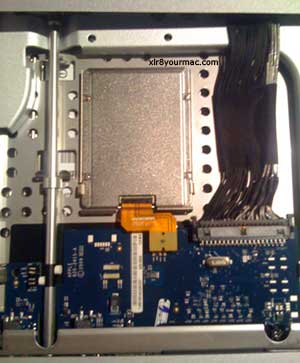
In this german article and this XServe User guide they mention the (optional ?) install of a (128GB) SSD, where is that located if it's there and could it be added if it's not there ?


Any pro admin comment is very welcome,


kindest regards Jo


PS: just so you see how low our requirements are, current config is listed below and performance is ok most of the time :-)

OS: OSX Server 10.5.8

model: Xserve G5 RackMac3,1

CPU: 1 x 2 GHz

RAM: 1 GB ⚠ (even I was surprised that I hadn't upped this at some point in time) :-)

Xserve, OS X Server

Posted on Feb 17, 2017 5:17 AM

Reply
6 replies

Oct 5, 2017 3:35 AM in response to IndEdit

Yes, you can get this going. I made a bootable USB stick from the El Capitan Image. It takes ages to boot but then you can create a clean install on a known working Xserve boot drive. If you want to go later than El Capitan there is a tool to enable it - you cant boot later than El Capitan until that has been run. El Capitan is supported though so you should be able to make it work as it and unless you particularly need to go later I would suggest staying there. Download El Capitan from the purchased tab in App Store, then follow any of the internet tutorials on making a USB boot disk, then boot from the USB stick and the installer will eventually come up. Choose the new disk and patiently wait for it to complete... I have 5 Xserve 3,1's running Sierra with a patch to make them boot. Apart from some missing tools for energy settings (which can be set by booting the USB and making the changes), and ipmitool being missing they work fine. Sierra is really the end or the road though. If I can keep them running until new Pro hardware that isn't an iMac comes from Apple that will be good enough for me.

Oct 4, 2017 12:38 PM in response to clickshoot

Hey guys,


I'm having an issue where I can't even get our Xserve 3,1 (2009) to recognize El Capitan software to boot from (it's currently on 10.6.8). I've even cloned a 10.11 server install to an external drive which mounts in 10.6.8 but doesn't see it as a boot drive.


Is there a way to get a clean install of 10.11 or higher to run on an Xserve? I don't really want to try and update throught the App Store, but id I have to make an intermediate step to get this stuff to work so be it.


All help is appreciated.

Feb 17, 2017 12:50 PM in response to greeny62

small update


1) I'm still open to recommendations regarding the Server Software version best for an XServe 3.1


2) as for HDDs, was in touch with OWC and they claim that these 2TB Toshibas are the biggest ones that fit the XServe 3.1 and they also claim the drives firmware works fine https://eshop.macsales.com/item/Toshiba/DT01ACA200/ . We'll see, I ordered 2 for a laugh.


3) as for the SSD, here is an article How to: Installing an Apple OEM SSD drive into an Xserve (2009) with parts and all. I'm curious how the connector of such an SSD is called, Mactracker calls it SATA interface bit it's obviously not the standard 2,5" drive SATA connector....


Jo

Jun 22, 2017 6:36 AM in response to greeny62

I have an Xserve 3,1 and after some cooperative work with a friend of mine with the same Xserve this is how we have them set up currently,


OS: OSX Sierra 10.12.5 (it took some help to get this to work check this link out http://dosdude1.com/sierrapatch.html) Then in that I am running Server 5.3.1

CPU: 2 x 2.26 Quad Core Intel Xenon

Memory 48GB 1066MHz DDR3

Startup disk: Samsung 850 EVO SSD on a OWC Mercury Accelsior S PCIE card

Drive Bays 1 to 3: Seagate Constellation ES 2TB SAS drives (my box has the Apple raid card I hear you can run higher than 2TB drives if you have the non raid card they are not easy to find at an affordable price)

Sonnet Tempo SATA E2P PCIE running to a 10 bay hot swap drive raid array


I am looking at swapping that Tempo card for a MAXPower RAID mini-SAS 6G-2e card and a different array as my data connections on there are finicky. I also saw a post of a guy that replaced his optical drive with a OWC data doubler and put his startup SSD in its place. Its a good idea if you are not going to use the optical drive.


I skipped trying to find the original SSD that went in there they were too expensive as you had to get one with a ZIF connector.

This thread has been closed by the system or the community team. You may vote for any posts you find helpful, or search the Community for additional answers.

XServe 3.1 - latest OS - best sever OS - HDD recommendations

Welcome to Apple Support Community
A forum where Apple customers help each other with their products. Get started with your Apple Account.