Please help - how to get music onto older iphone that has been synched to itunes / apple music

Hi, we have several newer iphones (5/6/7) in the family that all use the same iTunes account. None of the iphones are synched with a pc version of iTunes. Here's what I want to be able to do:


Create a playlist of certain songs from all the newer iphones and synch that playlist with an older iPhone 4.


I enabled Apple Music / sharing on the newer iphones and enabled Apple Music / sharing on my pc's iTunes. So now I have all the music I want showing in my pc version of iTunes and I've created a playlist in there to put certain songs into. How do I then take the older iPhone 4 and upload/synch those specific songs to it. When I try to synch the iPhone 4 to just that playlist it says it can't because Apple Music isn't enabled on the iPhone 4 (because it's not compatible obviously).

But I own these specific songs and none of them were bought via Apply Music itself. Surely there must be a way to get these onto this iPhone 4?


Thanks

iPhone 4, iOS 7.1.2

Posted on Mar 8, 2017 5:16 AM

Reply
1 reply

Mar 8, 2017 6:08 PM in response to scotiwis

Hi scotiwis,

I understand that you are using Apple Music to set up a playlist of music to sync to your iPhone 4. I'm happy to provide some information to help clarify this situation for you.

While you may have purchased these songs previously, adding them to a playlist and accessing that playlist from a separate device would associate those songs instead with Apple Music. To be able to sync the songs to your iPhone 4, you would need those songs downloaded from their source on your computer.

The steps below will help if you bought the music from iTunes or from another source:

Get your music collection on all of your devices - Apple Support

If you bought your entire music collection from the iTunes Store

You can download your past purchases from any device.2 After you redownload your songs or albums, you can find them in the My Music tab of iTunes on your Mac or PC, or in the Music app on your iPhone, iPad, or iPod touch.

User uploaded file

If some or all of your music collection is from sources other than the iTunes Store

You can sync your devices manually using iTunes. When you sync manually, your songs, albums, and playlists copy from one device to another. For example, syncing your iPhone, iPad, or iPod touch with your computer copies any selected music from iTunes on your computer to your iOS device (if it's not already there). Your music collection stores locally on all of your devices.

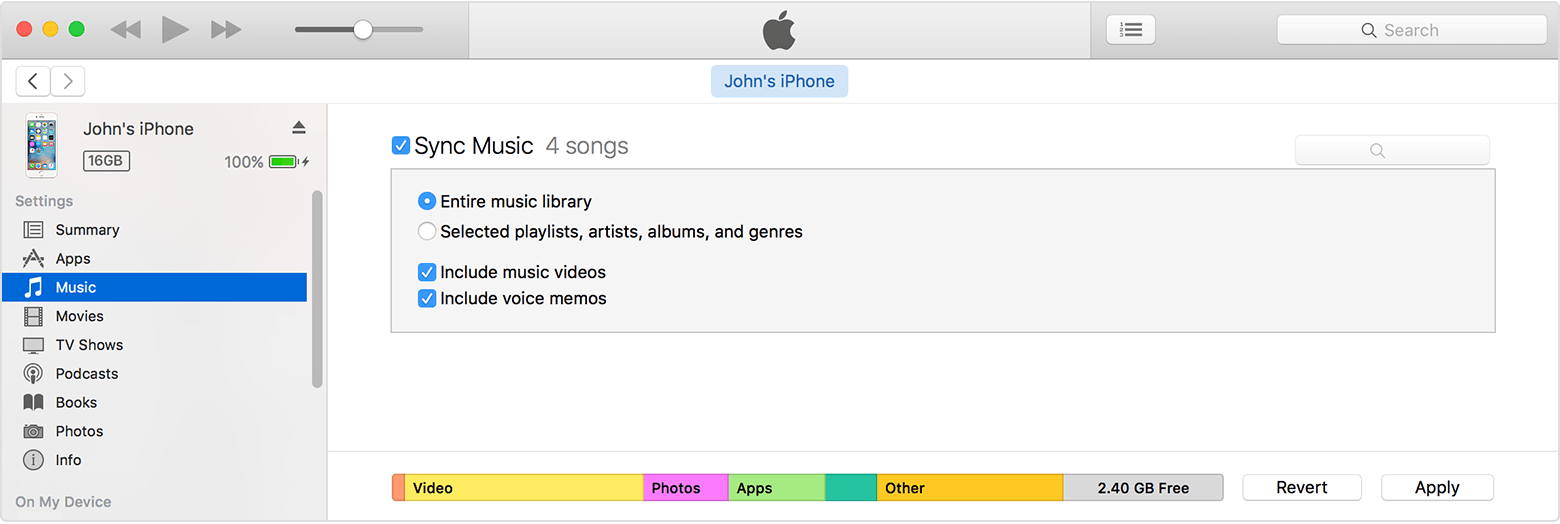
Learn how to use USB to sync the music on your iPhone, iPad, or iPod touch with iTunes on your computer. When you sync with USB, you can choose to sync your entire music library or only selected playlists, artists, albums, and genres.

User uploaded file

Alternatively, you can join Apple Music to play all of your songs, albums, and playlists on all of your devices. When you’re a member, all of the music you already have lives alongside the entire Apple Music library, and you can download music to any of your devices to listen to offline. Apple Music members don't have to manually sync. Learn more about the benefits of Apple Music.


Once you have the supported versions of the songs on your iPhone, then you can sync these songs normally.

Thanks for using the Apple Support Communities. Cheers!

This thread has been closed by the system or the community team. You may vote for any posts you find helpful, or search the Community for additional answers.

Please help - how to get music onto older iphone that has been synched to itunes / apple music

Welcome to Apple Support Community
A forum where Apple customers help each other with their products. Get started with your Apple Account.