when restoring iPhone 5 unknown error 2001 shown me

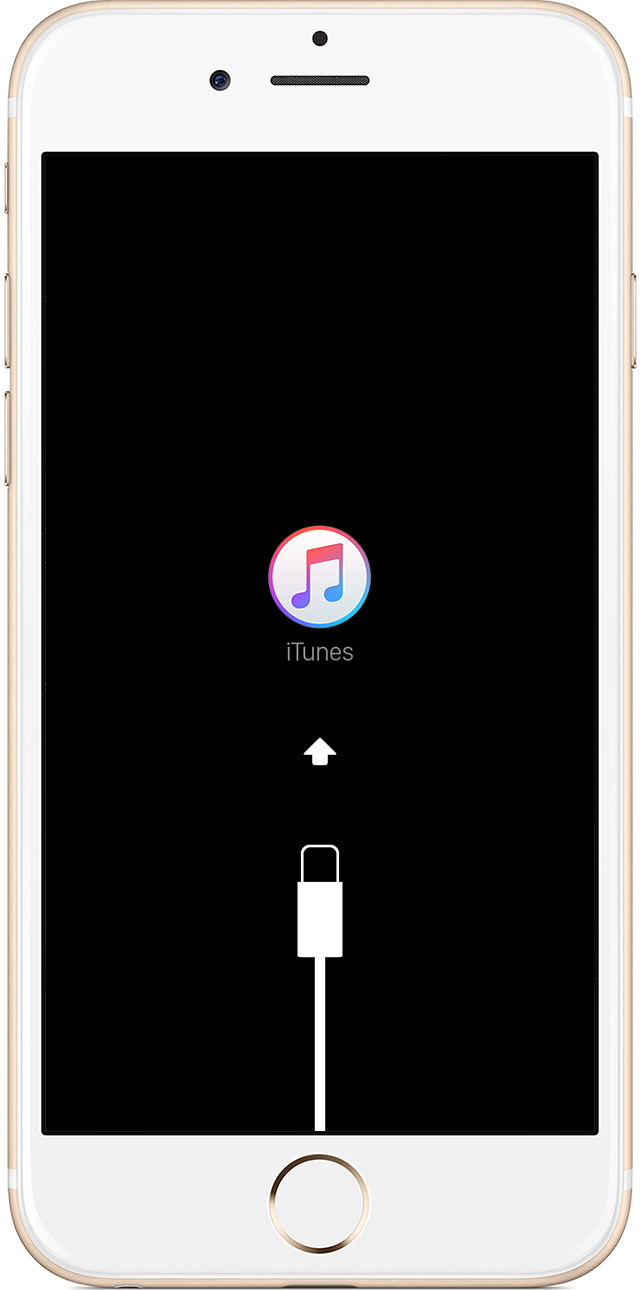
hello, when restore iPhone 5 unknown error 2001,2002 will be shown me in my iPhone i download the beta software iOS 10 and after 10 day when i operating my iPhone then the apple goes in to the blank display and i try a force start then its also not operated then i connected to the charging then its on display apple logo will be appears then blink it and then i connected to my MacBook pro to restore its through the iTunes connector charger will be shown me then i restore to it that time the my iPhone is restore to a new software file is download in to my mac after download the file is will be excluding in to software on it and the finishing the process the iPhone is preparing shown me into the iTunes apple logo title and suddenly there shown the waiting for the iPhone to software that time my iPhone display goes to black and after few seconds the iTunes connector charger will be shown me on my iPhone 5 displays

please help me i am tiered to the after 4 to 5 months....my iPhone will be not be operated for that months...

iPhone 5, iOS 10

Posted on Mar 8, 2017 8:54 AM

Reply
3 replies

Mar 9, 2017 5:24 AM in response to Akshay mahajan

Hi!


Try to follow these steps.


  1. Connect your device to a computer and open iTunes. If you don't have a computer, you can borrow one, or go to an Apple Retail Store or Apple Authorized Service Provider for help.
  2. While your device is connected, force it to restart.
    • On an iPhone 7 or iPhone 7 Plus: Press and hold the Sleep/Wake and Volume Down buttons at the same time.
    • On an iPhone 6s and earlier, iPad, or iPod touch: Press and hold the Sleep/Wake and Home buttons at the same time.
  3. Don't release when you see the Apple logo. Keep holding until you see the recovery mode screen.
    User uploaded file
  4. When you get the option to restore or update, choose Update. iTunes will try to reinstall iOS without erasing your data.
    User uploaded file

iTunes will download the software for your device. If it takes more than 15 minutes, your device will exit recovery mode and you'll need to repeat steps 2 and 3.

More info: If your iPhone, iPad, or iPod touch won't turn on - Apple Support


If you aren't able to turn on your device also following these steps, go to an Apple Store!

https://getsupport.apple.com/ or https://www.apple.com/retail/geniusbar/


Bye

Samuele

Mar 8, 2017 11:10 AM in response to Akshay mahajan

Hi!


Have a look here: Get help with iOS update and restore errors - Apple Support


Check your USB connections

If you see error 4005, 4013, or 4014, learn what to do. If you see one of the errors below, you might have a USB connection issue:

  • 13, 14, 1600, 1601, 1602, 1603, 1604, 1611, 1643-1650
  • 2000, 2001, 2002, 2005, 2006, 2009
  • An error message that includes, "invalid response"

Use these steps to see if the issue is with your USB cable, USB port, or computer. Try again after each step:

  1. Use the USB cable that came with your device. If you don't have it, try a different Apple USB cable.
  2. Switch to a different USB port on your computer. Don't plug into your keyboard.
  3. Plug into a different computer.
  4. If you still see the error, you can check for other USB issues, issues with third-party security software, and issues with hardware.

If the issue continues, contact Apple Support.


Bye

Samuele

This thread has been closed by the system or the community team. You may vote for any posts you find helpful, or search the Community for additional answers.

when restoring iPhone 5 unknown error 2001 shown me

Welcome to Apple Support Community
A forum where Apple customers help each other with their products. Get started with your Apple Account.