Pop-up Menu auto updates

Hello,


I've searched others questions and none of the options worked for me, maybe I've done it wrong.


I have a numbers page, and I've done a pop up menu from a column, I've to use that pop menu in another sheets, the problem is that I need to update(insert more customers) a few times to the dropdown menu and I updated it in the original pop up menu but it doesn't update the options in the other sheets.


Can someone help me?


a screenshot of my pop up menuUser uploaded file


Thanks a lot

MacBook Pro TouchBar and Touch ID, macOS Sierra (10.12.3)

Posted on Mar 11, 2017 4:39 PM

Reply
4 replies

Mar 11, 2017 7:48 PM in response to joao_faia

Hi Joao,


If I'm understanding your description, you have made the list in column B of the table shown, then selected the cells containing the list and changed their format to "Pop-up Menu".


So far, I see no issue.


For simplicity, I'll assume you've placed only one copy of one of the pop-up menu cells on one other Table.


You selected one of the cells containing the menus and Copied, then Pasted it into a cell in another Table (located on another sheet).


At this point, you have two copies of that menu: the original on the first table (plus the ones in the other cells used to make the original), and one made by pasting a copy of the original into a second table.


Each iteration of that menu is independent of all the others—there is no connection between them at all.

Changing one by adding (or removing, or editing) an item has no effect whatever on the other copy.


Using Numbers 3 or later, you can edit one copy of the menu cells in a group, then select the whole group and, using the Cell Inspector, Merge the menus so that the new items are added to all of the group.


Note that a merge will not delete items from the other menus, nor will it change items that have been changed in the edited menu. All items that are missing from any of the menus will be added to each menu that is missing that item.

You may want to do some experimenting (as I did) to determine the effects of various changes to individual menus.
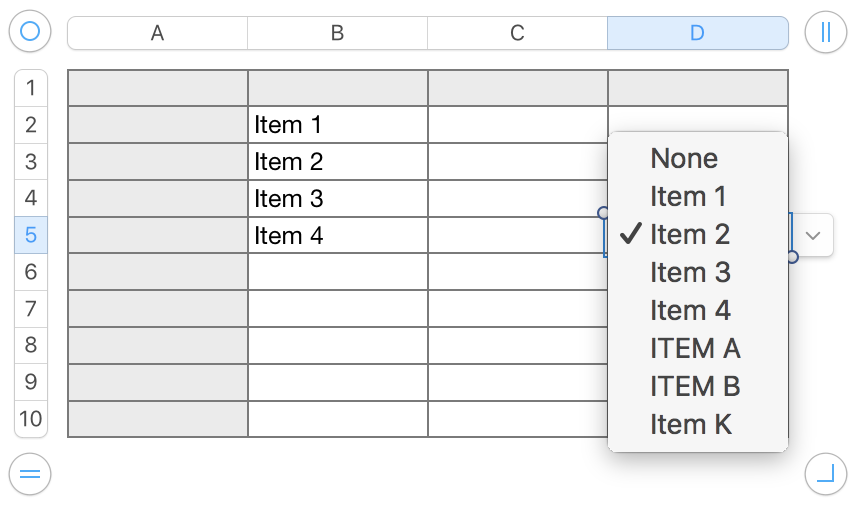
User uploaded file

All cells containing data started with the list in B2:B5. After pasting three into D3:D5 (D5 selected), ITEM A an ITEM B were added to one menu, and in a separate edit, Item 2 in the menu n B4 was edited to Item K.

A merge after each change led to all seven cells containing the menu shown.


Regrds,

Barry

Mar 12, 2017 6:07 PM in response to joao_faia

joao_faia wrote:

I updated it in the original pop up menu but it doesn't update the options in the other sheet


Once you've updated the Pop-Up Menu in one cell, you can update the list in other cells this way:

  1. Select the updated cell together the other cells that you want to have the new menu
  2. Choose "Merge Menu Items" under Data Format.


If you want to update Pop-Up Menu in cells on other sheets (i.e. not cells adjacent to the cell in which you have updated the menu) you can:

  1. Copy-paste (command-c, select a new location, command-v to paste) the cell with the updated menu into the other sheet adjacent to to the cells you want to update
  2. Select the copied cell together with the other cells you want to update, and choose "Merge Menu Items.


Or if you haven't already set specific values using Pop-Up Menu in the other sheet, you can simply copy the updated cell (using command-c), select the cells in the other sheet formatted as Pop-Up Menu, and command-v to paste.


SG

This thread has been closed by the system or the community team. You may vote for any posts you find helpful, or search the Community for additional answers.

Pop-up Menu auto updates

Welcome to Apple Support Community
A forum where Apple customers help each other with their products. Get started with your Apple Account.

