If one AirPod is louder than the other

When I listening to my AirPods it sounds like my right AirPod is slightly louder than the left. I even replaced the left one on an Apple Store, but still having the same issue. Unpair/Pair was another try.


Has anyone else experienced anything like this?


Thanks!!


[Re-Titled by Moderator]

AIRPODS

Posted on Apr 5, 2017 4:47 PM

Reply
Question marked as Top-ranking reply

Posted on Apr 5, 2017 4:53 PM

Hi


It may help to check your settings:


Go to: Settings > General > Accessibility > under "Hearing", check and, if required, adjust the audio volume balance slider between the left and right channels.

1,187 replies

Sep 6, 2019 7:48 AM in response to paulosoaresf

I figured it out, and it worked, if it’s not ear wax you might be hearing stereo videos or music in which one airpod has an instrument and the other has another or one earphone is the main, so go to settings/ general/ hearing/ and turn it to mono so it will not have this surrounding effect:) tell me what you think? Also check if the left and right balance is the same.

Oct 23, 2019 2:44 PM in response to paulosoaresf

Clean whichever AirPod is lower with rubbing alcohol and Q-tips. Be sure to hold the AirPod facing down so that you don’t get alcohol inside of the AirPod. Dry completely with the other end of the Q-tip. What worked best for me was holding the AirPod up to the vacuum hose using the smallest piece and sucked all the debris out. Works like new. Be sure not to let go of the AirPod to where it gets sucked up. That would be horrible.. Clean again and dry completely by repeating step one.

Mar 20, 2020 11:13 AM in response to paulosoaresf

I can also confirm that sucking the air out does work. It sounds weird, but they will be much louder. Also check your settings under accessibility, but if you didn’t change it then it’s most likely fixable by the sucking thing. Also recommend putting a paper towel over the speaker when sucking, and also to do so until there’s air flow through the pod!

Mar 26, 2020 2:53 AM in response to paulosoaresf

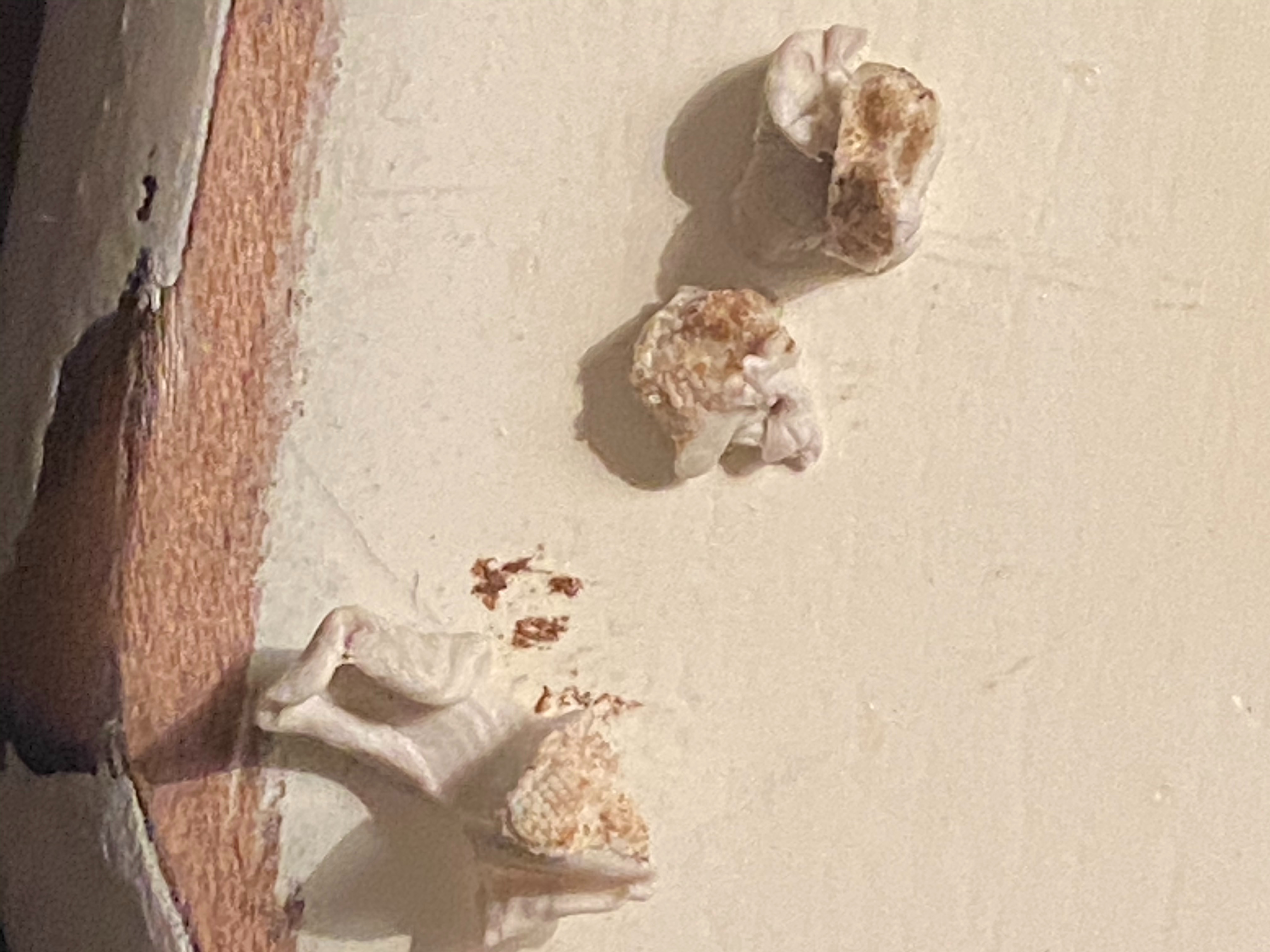
In case you're dealing with AirPods pro, please make sure that the AirPods tips are not blocked by anything.

In my case, I've found out that when I took out one of the tips from it's paper case, I tore by mistake a piece of paper that stack inside one of my tips... :-).

I though I'm getting crazy, after hours of hours of trying any suggestion on the web :-)...

Anyway, check the attached photo to understand the problem.

Jun 14, 2020 1:02 PM in response to paulosoaresf

Don’t know if my problem is the exact same as yours, but you could give this a try anyways. (A little context) Last night I realized that I’d been living with my right AirPod being louder than the left for about a month, and I had neglected to do anything about it. I decided at around midnight yesterday, that it was time for a change. I cleaned my AirPods, and got all of the ear wax and gunk out with a toothpick, very gently and carefully. I cleaned the main speaker, along with all of the other holes. I put them back in and noticed that while they both sounded better and more clear, the left was still much quieter. I then reset them, once again, no change whatsoever. (Solution) Finally, in a desperate attempt to restore my beloved AirPods, I put my mouth around the large speaker on the AirPod, and sucked on it until air came through. I did the same with the other one until I could feel air come through as well. To my joyous surprise, they had the exact same volume, both sounded much more clear and had better bass. No material came out when I sucked, but I went ahead and got a few tiny little bits of earwax out with the toothpick again. This may be disgusting, but it absolutely restored my AirPods!

Jul 23, 2020 10:26 AM in response to paulosoaresf

I had about half volume in might right AirPod and ended up here.


A more effective version of the 'sucking' option for me was to use some electronics duster on smaller, inside screen. Let me explainI first cleaned out the primary screen with a Zeiss cleaning wipe and a Q-tip. Then, while it was still damp, I blasted the smaller screen and a bunch of bits came out of the primary screen. I did this a few times until everything was clean and sound was loud, clear and equal again.


I've no idea if this is a terrible idea, so, your mileage may vary, and I won't take responsibility if you blow up an AirPod, but for me it was a fine solution.

Oct 13, 2020 7:02 PM in response to paulosoaresf

Most people will say to just clean it out, this didnt work for me. However what did work, was i went into settings<accessibility<airpods<audio accessibility settings and then i put them in and played a song while adjusting the balance slider towards the side that was lower (my left airpod) until it sounded about even for me sadly this is the only thing that worked for me as of now.

Jan 18, 2021 11:13 AM in response to paulosoaresf

Sucking out the liquid wax buildup actually works. For me, it was the left that was lower than the right. It was considerable, to the point where you could barely hear anything out of the left side. I think headphones open your ear canal enough to allow that fluid to drain into the headphones. I recommend cleaning them after every use. A paper business card corner works wonders for cleaning around the screen, and also your charging case. -SLY

Aug 18, 2021 11:28 PM in response to paulosoaresf

Weird solution but hear me out: if you have an electric toothbrush, get a replacement brush-head, keep it dry, and when this happens, use the electric toothbrush and make small little sweeps along the speakers of your AirPods. The little bristles will go into the little holes and pull out any gunk without damaging the AirPods. Done it multiple times and mine still work like brand new!

This thread has been closed by the system or the community team. You may vote for any posts you find helpful, or search the Community for additional answers.

If one AirPod is louder than the other

Welcome to Apple Support Community
A forum where Apple customers help each other with their products. Get started with your Apple Account.