Windows 7 identifies itself as Windows 10 under Boot Camp

I am attempting to set up a Windows 7 system under Boot Camp. I have successfully downloaded and obtained the Boot Camp Windows files but when I insert my Windows 7 SR1 ISO disc, Boot Camp identifies it as a Windows 10 ISO and will not use it as it says my computer cannot run Windows 10. I have a 27" iMac mid 2011 Quad core i7 with 16gb RAM and Sierra 10.12.4

Any ideas?

Thanks

iMac (27-inch Mid 2011), Mac OS X (10.7.4)

Posted on Jun 3, 2017 10:11 PM

Reply
2 replies

Jun 4, 2017 11:17 AM in response to Macnabber

Hi there, Macnabber!


Thanks for reaching out to the Apple Support Communities! It sounds like you are having issues installing Windows 7 to your iMac using Boot Camp. First, delete the current ISO and follow the steps in this article to Create an ISO image for Boot Camp from Windows installation media . Even though the article mentions Windows 8 or higher, the steps also work for installing earlier versions of Windows.

Once that is done, check out this article that has the specific steps to Install Windows 7 and earlier on your Mac using Boot Camp .

Perform a new install of Windows 7

Use these steps if you're installing Windows 7 on your Mac for the first time.

  1. Start up your Mac in macOS.
  2. Use the tables at the end of this article to make sure you have a Mac that supports the version of Windows you're installing.
  3. If your copy of Windows came on a DVD, you might need to create a disk image of it to work with Boot Camp.
  4. Connect a 16 GB or larger USB flash drive that you can erase. Leave this flash drive connected to your Mac until Windows installation is finished.
  5. Open Boot Camp Assistant from the Utilities folder (or use Spotlight to find it) and click Continue.
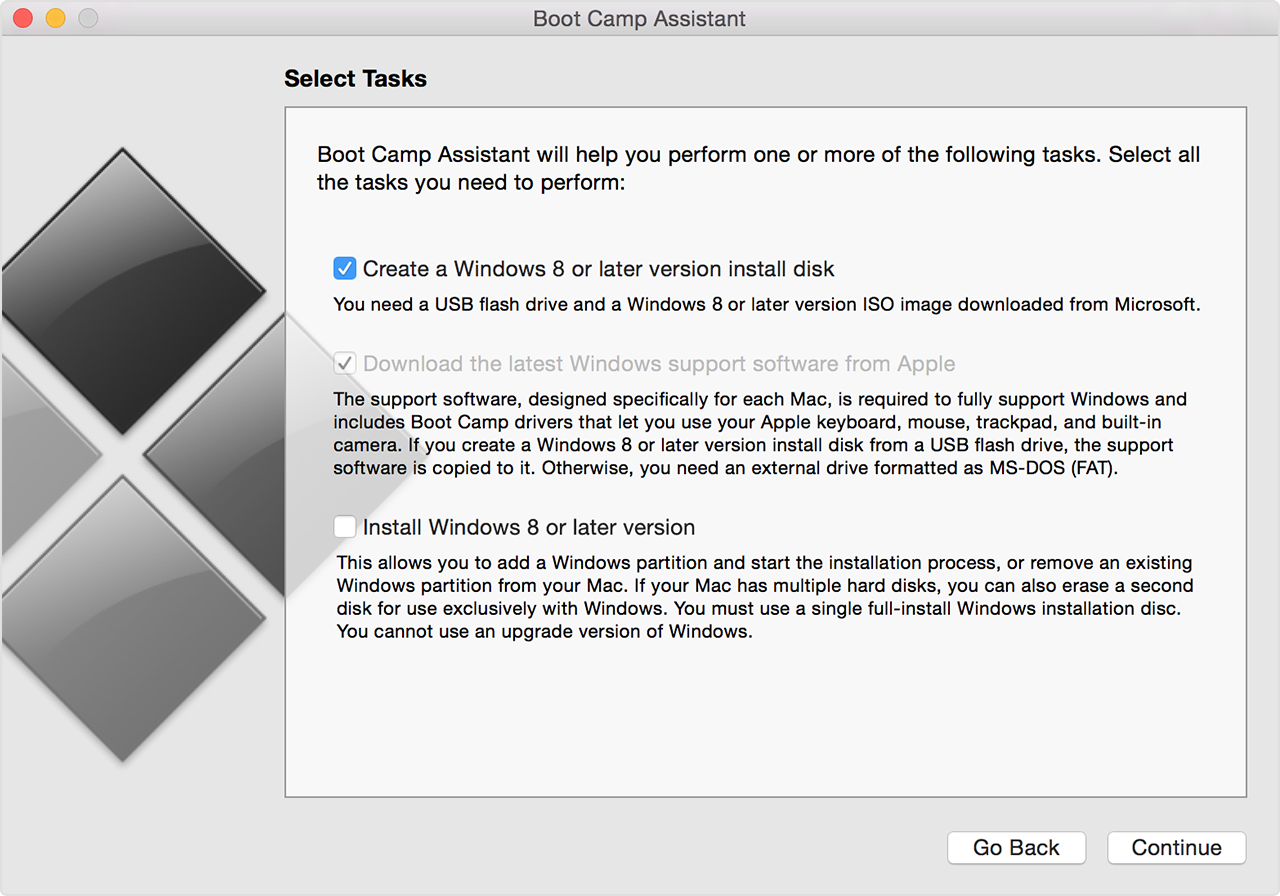
  6. Select only the options to create a Windows install disk and to download the latest Windows support software from Apple. Then click Continue.
    User uploaded file
  7. Insert your Windows install disc, or choose your Windows installation ISO, then click Continue. Boot Camp erases your USB flash drive and prepares it for Windows installation. When you see "Download Support Software for Windows 7", close the Boot Camp Assistant window to quit the app.
  8. Use the tables at the end of this article to find the Windows support software (drivers) you need for the version of Windows and the Mac that you're using.
  9. Click the link in the table to download the related software.
  10. After the file downloads, double-click it from the Finder to decompress (unzip) it.
  11. Open the resulting folder. Locate the following files in this folder and drag them to your USB Flash drive. When prompted if you want to replace the existing items on the flash drive, click Yes:

    $WinPEDriver$ (folder)
    AutoUnattend.xml
    BootCamp (folder)
  12. Open Boot Camp Assistant again, then click Continue.
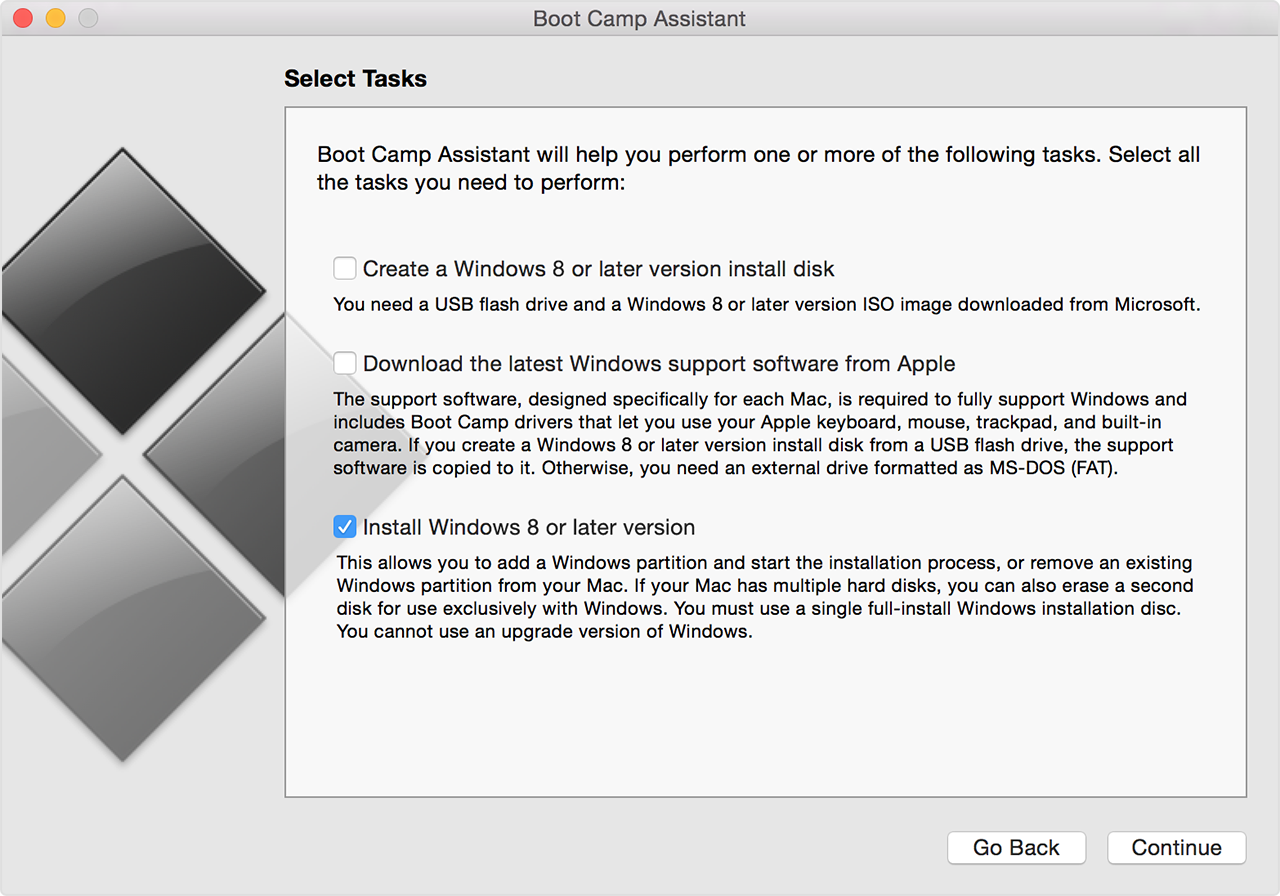
  13. Select only the option to "Install Windows… or later version."
    User uploaded file
  14. Click Install, then follow the onscreen prompts to repartition your drive and install Windows.
  15. When you complete the assistant, your Mac restarts to the Windows installer. When you're asked where you want to install Windows, select the BOOTCAMP partition, then click Drive Options and format your Boot Camp partition.
  16. Follow the onscreen prompts to finish installing Windows.

Let me know the results and take care!

Jun 5, 2017 3:24 AM in response to Macnabber

Apple have moved the goal posts with regards to what versions of Windows are supported on certain Macs and OS X versions and hence Boot Camp Assistant versions. For example Apple no longer list Windows 10 as supported on the Mac Pro 2010 even though it used to be supported and I still have it running on my Mac Pro 2010.


(Hmmm, I wonder if the reason Apple no longer support Windows 10 via Boot Camp on the Mac Pro 2010 is because it completely embarrasses Apple due to the fact that Windows 10 supports 30bit color aka Deep Color and also supports audio via HDMI all with the same identical Mac Pro, video card, monitor and cables whilst OS X even the latest Sierra does not, not to mention the fact that Windows 10 supports the latest AMD and Nvidia cards whereas OS X does not meaning it is potentially possible to get some VR rigs working in Windows 10 via Boot Camp but none work in OS X.)


It therefore sometimes is best to use an older operating system version to do the Boot Camp install. I would suggest Yosemite might be the most suitable version if you still have access to it.


This thread has been closed by the system or the community team. You may vote for any posts you find helpful, or search the Community for additional answers.

Windows 7 identifies itself as Windows 10 under Boot Camp

Welcome to Apple Support Community
A forum where Apple customers help each other with their products. Get started with your Apple Account.