AirPods are connected but cannot hear for phone calls.

My AirPods work for my music fine, but if I want to receive a call or make a call no sound comes from them. I can see that the call connects, but no sound comes from the AirPods. They are 100% charged as well as the case. I can switch to play music and they operate normally.

AIRPODS, iOS 10.3.2

Posted on Jun 22, 2017 11:57 AM

Reply
Question marked as Top-ranking reply

Posted on Nov 2, 2017 11:38 AM

I've had an ongoing exchange with Apple engineering on this issue for about a month. I think the problem is between the AirPods, Apple Watch and other Bluetooth devices (in my case, specifically Tiles) the number of simultaneous Bluetooth connections supported by iPhone hardware is being exceeded. My reasoning is thus:

  • AirPod earpieces are separate, so each one needs its own connection - thus, 2 connections
  • Phone calls (and Siri, BTW) use a different Bluetooth profile - 2 more connections
  • Tile app uses 1 connection for each Tile in range - In my case, in some locations, 5 connections
  • Apple Watch uses 1 control connection plus the audio connections for AirPods - 3 more connections
  • Fitbit ONE uses a connection - 1 more connection

You can see how this adds up.


If I delete the Tile app the problem resolves. Likewise, if I put the watch into Airplane mode it resolves. Both of these actions reduce the number of BT connections. In addition to Apple engineering, I also spoke to Tile's support centre. They were the ones who first suggested this.


If I move away from my cluster of Tiles, the problem seems to go away.

29 replies
Question marked as Top-ranking reply

Nov 2, 2017 11:38 AM in response to ArtAboutYou

I've had an ongoing exchange with Apple engineering on this issue for about a month. I think the problem is between the AirPods, Apple Watch and other Bluetooth devices (in my case, specifically Tiles) the number of simultaneous Bluetooth connections supported by iPhone hardware is being exceeded. My reasoning is thus:

  • AirPod earpieces are separate, so each one needs its own connection - thus, 2 connections
  • Phone calls (and Siri, BTW) use a different Bluetooth profile - 2 more connections
  • Tile app uses 1 connection for each Tile in range - In my case, in some locations, 5 connections
  • Apple Watch uses 1 control connection plus the audio connections for AirPods - 3 more connections
  • Fitbit ONE uses a connection - 1 more connection

You can see how this adds up.


If I delete the Tile app the problem resolves. Likewise, if I put the watch into Airplane mode it resolves. Both of these actions reduce the number of BT connections. In addition to Apple engineering, I also spoke to Tile's support centre. They were the ones who first suggested this.


If I move away from my cluster of Tiles, the problem seems to go away.

Nov 2, 2017 11:30 AM in response to ArtAboutYou

Update to this! I'm guessing you no longer have the question, but if you have an Apple Watch, you have to make sure to "forget the device on your Apple Watch, RESET your watch, as it will remember it anyway. Given that Apple Watch works with the phone via bluetooth, the AirPods wants to be connected to both at the same time...and they will....but it does not work with phone calls. I finally did the above (made sure to never connect the air pods to the watch) and it works fine with phone calls (via the phone). I spent a ton of time with a Genius...was not happy to hear they "never heard of this problem." But after a ton of troubleshooting with them, and more when I got home, I did the above and have not had an issue...other than I can't pair the things with my Watch!

Nov 2, 2017 11:26 AM in response to ncihollis

I'm guessing you no longer have the question, but if you have an Apple Watch, you have to make sure to "forget the device on your Apple Watch, RESET your watch, as it will remember it anyway. Given that Apple Watch works with the phone via bluetooth, the AirPods wants to be connected to both at the same time...and they will....but it does not work with phone calls. I finally did the above (made sure to never connect the air pods to the watch) and it works fine with phone calls (via the phone).

Nov 4, 2017 4:26 PM in response to Rcordova1375

At the moment there is appears to be a conflict between AirPods, Apple Watch and Tiles. One thing that helps, but doesn't fix it, is to go into the Tile app, Settings and turn off Show Phone in Tile List.


After that, it seems to be related to the number of tiles in range of the phone. If it's only one or two it works most of the time.

Nov 14, 2017 5:05 PM in response to KG from Jersey

The simplest solution is to go to the Tile app and turn off Bluetooth. If you need to find a Tile just turn it back on. By leaving it off you will reduce battery drain (the Tile app is a heavy user of power when connected to multiple Tiles). The downside is the crowdsourcing feature that lets you track other Tile user's devices won't work.

Feb 5, 2018 9:15 AM in response to Lawrence Finch

Hello Lawrence,


I have the same issue and your analysis makes complete sense. However, how come it does works for music and other apps that use audio such as YouTube, but not for calls? I also have Tiles and from time to time audio from phone calls are mute on the AirPods. Restarting the iPhone solves the issue... temporarily. Putting the Apple Watch on airplane mode also restores audio to phone calls on the Airpods.


I found this on the chipolo's web site:


Apple's iPhone 7 and iPhone 7 Plus as of right now can only handle 6 Chipolos (no other Bluetooth devices connected) at once...


https://support.chipolo.net/hc/en-us/articles/212718449-Bluetooth-limitation-iPh one-7-iPhone-7-Plus


So, I guess that, if we have 1 Apple Watch, 2 AirPods (1 pair) and 4 Tiles/Chipolos we would already exceed the limit.


It seems that the solution is to either disconnect one of the Tiles/Chipolos (if you have 4) or connect them to another iDevice such as the iPad.


Has anyone found another solution or workaround?

Feb 5, 2018 9:30 AM in response to celio-likes-apples

celio-likes-apples wrote:


Hello Lawrence,


I have the same issue and your analysis makes complete sense. However, how come it does works for music and other apps that use audio such as YouTube, but not for calls?

Music and other audio uses a music Bluetooth profile. Siri and phone audio uses a hands-free profile. Each requires a separate connection. So taking a phone call opens an additional pair of connections from the phone to the AirPods.

Jun 23, 2017 7:26 AM in response to ncihollis

Hello ncihollis,


Thanks for that info and choosing the Apple Support Communities. Based on what you stated, it seems you are having issues with phone calls when using AirPods with your iPhone. If you haven't already, restart your iPhone as iOS clears cached data and does other system optimizations when you turn your device off and on. When your iPhone is back on, then check what option is selected on your iPhone at Settings > General > Accessibility > Call Audio Routing.


Restart your iPhone, iPad, or iPod touch
Call audio routing - iPhone User Guide


If your issue still isn't resolved, please reset your AirPods and pair them with your iPhone again with these steps:

  1. Make sure that your AirPods are charged.
  2. Close the lid, wait 15 seconds, then open the lid. The status light should flash white.
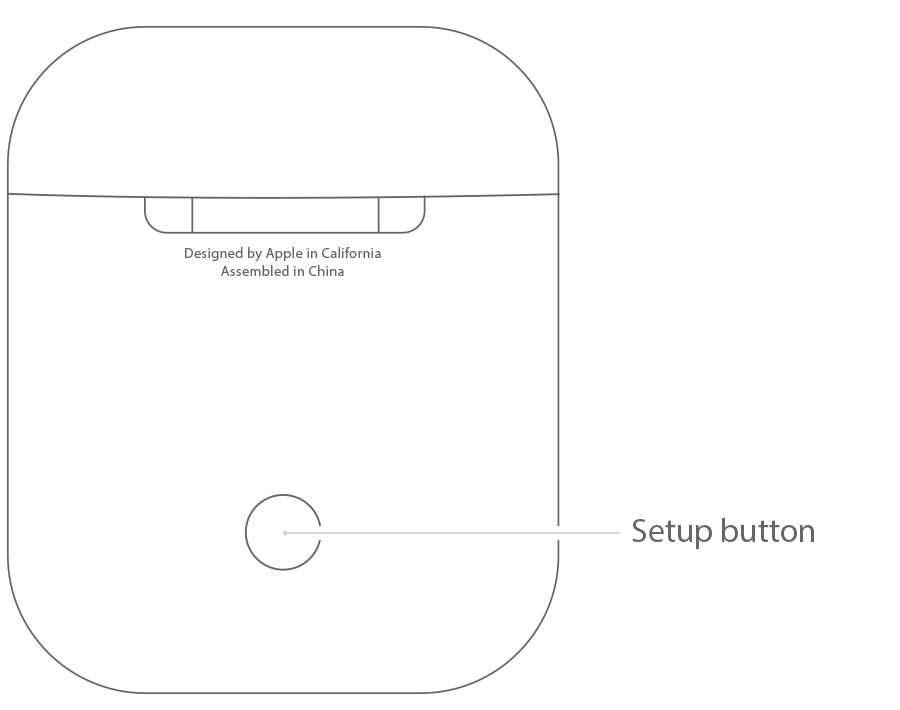
  3. If the status light doesn't flash white, press and hold the setup button on the back of the case until you see the status light flash white.
  4. Still can't set up your AirPods? Press and hold the setup button for at least 15 seconds, until you see the status light flash amber a few times and then flash white.

User uploaded file


Use your AirPods


Cheers!

Nov 7, 2017 8:25 PM in response to Ferdinandperry

If you have an updated version of the Tile app, you can go to the settings, and under options there is a switch for Use Bluetooth. By switching it off, it turns off bluetooth connections to all your tiles only. Connections to your other bluetooth devices will remain connected. I tend to leave this setting off. When I need to find a Tile item, I just switch it back on and it will instantly connect to all tiles within distance. This is a good alternative to putting your watch in airplane mode.

This thread has been closed by the system or the community team. You may vote for any posts you find helpful, or search the Community for additional answers.

AirPods are connected but cannot hear for phone calls.

Welcome to Apple Support Community
A forum where Apple customers help each other with their products. Get started with your Apple Account.