Hi,
Whilst other posters might restate the debate about what is malware and what is a virus the facts are anyone can get Malware and virus are a specific type of malware in the way they work.
The OS X has yet to have a Virus in the wild (where anyone can get it).
There have been proof on concept stuff in labs.
What is more likely is that for some reason you cannot Read and Write to the Keychain in /Library/Keychains
Open A Finder Window.
Use the Go Menu whilst also holding down the ALT key.
This will show the Library you need in the Menu.
Select this and then navigate to the Keychains folder.
In here one is the Login keychain
Highlight this then do a Get Info (CMD + i key together)
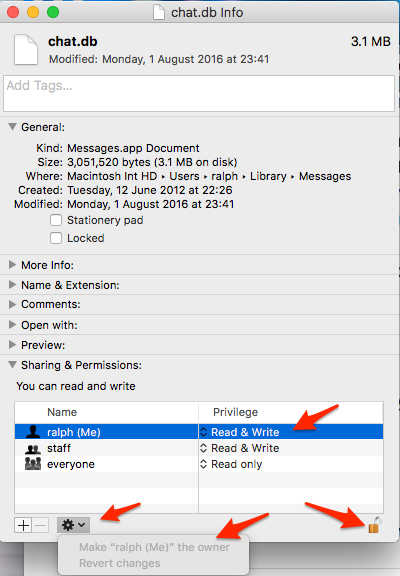
In the info Panel scroll to the bottom.
Here should be your shortname (the Name the computer uses for you in Users/Little House icon
You should have Read and Write Permission.
Highlight this line then Unlock the Padlock and then use the cogwheel type icon under the list.
This should say Make yourShortName (me) the Owner.
If it is greyed out then you already Own it.
If it is dark text then select it to make it yours.
Restart the computer and see if you get the error alert again

9:34 pm Wednesday; July 26, 2017
iMac 2.5Ghz i5 2011 (Sierra)
G4/1GhzDual MDD (Leopard 10.5.8)
MacBookPro 2Gb (Snow Leopard 10.6.8)
Mac OS X (10.6.8),
iPhone 6 iOS 10.x and an iPad (2)



