Mac not respecting primary monitor assignment.

Late 2013 MacPro running Sierra (10.12.6)


I have two displays. One is a thunderbolt Display (4k LG) the other is a 30" "antique" Mac cinema display. When booting from a cold start, the mac selects the cinema display (connected via thunderbolt dock and adapter) as the primary monitor, despite my assignation in display preferences (menu bar is dragged onto the LG monitor). Regardless of what I do, on a cold boot the Mac Cinema display persists in being the "main monitor".


I've changed thunderbolt ports on my Late 2013 mac pro, and have tried numerous strategies to correct the issue, however none seem to work. Oddly enough, on restarts the main monitor defaults to the LG...


Also, some apps will open up on the Cinema Display first (as the primary monitor...) So, am I experiencing a bug? Is it old code still in Sierra that opts for the CD over the LG? Not sure what my options are going forward, but if anyone has any ideas, I'd love to hear them!

Thanks in advance.

Mac Pro (Late 2013), macOS Sierra (10.12.6)

Posted on Aug 6, 2017 10:40 AM

Reply
4 replies

Aug 6, 2017 12:57 PM in response to a brody

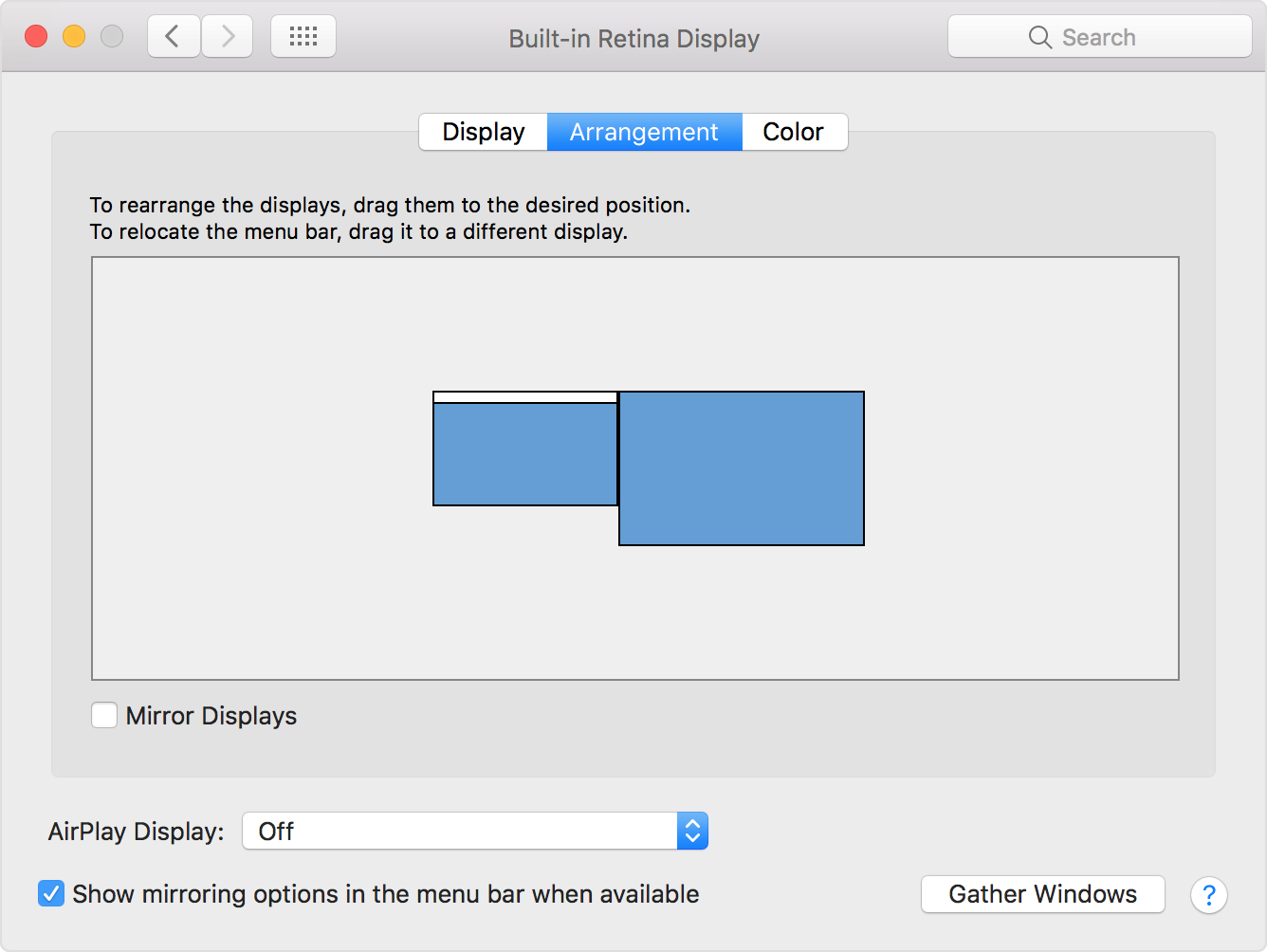
Note, this is covered in the Apple article you referred to beginning this thread. Dragging the larger blue rectangle to the left of the smaller one will make the display with the menubar be the one physically on its right hand side function as the right hand display. Dragging the white bar from one rectangle to the other will force the larger display to have the menubar, if it presently is on the smaller display as shown in the image below:


Arrange your displays

You can tell your Mac where your displays are in relation to each other. Use this feature so that your connected displays match their real-world location when you move between windows.

User uploaded file

Aug 6, 2017 12:54 PM in response to Steve Zuckerman

Apple menu -> System Preferences -> Displays lets you change the primary monitor by dragging the horizontal white bar on the display representative rectangle in the preferences from one display representative rectangle to the other. You can also use that preference to adjust which side the mouse falls off to the next display by dragging one rectangular representation to the other side.

Aug 6, 2017 4:46 PM in response to Steve Zuckerman

Thanks for your response. I probably wasn't clear. Yes I'm aware of this function in Display prefs, however I've done that... However, the OS doesn't honor that setting in all situations... As I mentioned, from a cold boot (power up), the apple progress bar appears on the Old cinema display, even though the display prefs are set correctly. After a few moments of flashing screens both monitors function as expect. However, Some apps will open on monitor 2 if I don't focus my primary monitor first. Even in FCPX, it thinks the main monitor (mon #1) is the Cinema Display!!


I've tried resetting the Pram, the Nvram... You name it. Blowing away and remaking the desktop pref files, but nothing seems to address the issue.

This thread has been closed by the system or the community team. You may vote for any posts you find helpful, or search the Community for additional answers.

Mac not respecting primary monitor assignment.

Welcome to Apple Support Community
A forum where Apple customers help each other with their products. Get started with your Apple Account.