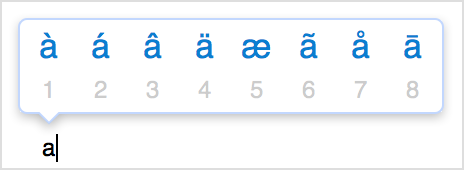
Character Accent Menu not working in High Sierra?

The character accent menu worked for me throughout the developer beta of High Sierra but has stopped working in the released version.


I've seen other reports about this around the net, but no solutions that worked for me.


Anyone? I do a lot of work with classical music and the ability to type diacritics quickly is important to me.


Thanks in advance,


Stu

MacBook Pro TouchBar and Touch ID, macOS High Sierra (10.13), late 2016 16GB RAM, 512GB SSD

Posted on Oct 6, 2017 7:53 PM

Reply
Question marked as Top-ranking reply

Posted on Apr 9, 2018 4:08 PM

I've spent some time on this trying all the suggested ways: add French or Spanish input keyboard, setting keyRepeat to OFF, etc etc.


what did it for me(I fixed this on my machine, and a co worker that brought this to my attention) was "defaults write NSGlobalDomain ApplePressAndHoldEnabled -bool true" followed by a power cycle(I didn't try restart, I went the safer route and tried shut down instead).


My key repeat is set to one tick before "Fast" and my delay until repeat is set to 3 ticks after "Long"(I believe these our default) and only have US as my input source keyboard (not US -International).


Again, it was only after setting the flag in terminal for NSGlobalDomain ApplePressAndHoldEnabled followed by a power cycle did this get fixed consistently.

hopefully this helps others

30 replies
Question marked as Top-ranking reply

Apr 9, 2018 4:08 PM in response to Stu Farnham

I've spent some time on this trying all the suggested ways: add French or Spanish input keyboard, setting keyRepeat to OFF, etc etc.


what did it for me(I fixed this on my machine, and a co worker that brought this to my attention) was "defaults write NSGlobalDomain ApplePressAndHoldEnabled -bool true" followed by a power cycle(I didn't try restart, I went the safer route and tried shut down instead).


My key repeat is set to one tick before "Fast" and my delay until repeat is set to 3 ticks after "Long"(I believe these our default) and only have US as my input source keyboard (not US -International).


Again, it was only after setting the flag in terminal for NSGlobalDomain ApplePressAndHoldEnabled followed by a power cycle did this get fixed consistently.

hopefully this helps others

Oct 6, 2017 10:20 PM in response to Stu Farnham

Verify >System Preferences>Keyboard>Keyboard> Key Repeat slider is not set to ON


Type accented characters

To type an accented or alternate version of a character, hold a key down until its alternate characters are displayed.

User uploaded file

To choose one of the characters displayed, type the number that appears under the character, or click the character you want to use. If you decide you don't want to type an accented character after holding a key, type another character, or press the escape (esc) key.

If no additional characters are available for the key you're holding, the pop-over menu doesn't appear. The menu also doesn't appear when the Key Repeat slider is set to Off in the Keyboard pane of System Preferences.

User uploaded file


ref:How to type accents, emoji, and symbols on your Mac - Apple Support

Nov 24, 2017 9:06 AM in response to Stu Farnham

Hi everyone!


I think we solved the problem over here. Based on some previous suggestions we started messing around with the different keyboard inputs. (System preferences/keyboard/input sources/+) and we added a French keyboard.


We then changed the keyboard input to the French keyboard and restarted the computer.


When the computer restarted the accent Accent Menu worked on the French keyboard and continued to work when we switched back to the English keyboard. All the accents (not just the French ones) were available in the Accent Menu.


Hope this helps!

Dec 1, 2017 7:36 AM in response to Stu Farnham

I simply restarted the computer and it came back, no need to do anything else. When this happened to me, I noticed that if I brought up the keyboard viewer, it wouldn't respond to the keyboard, but the keyboard itself still worked. So I thought "something must have happened to Apple's custom driver and the OS might be using a fallback input driver at the time". Restarted. Hold-for-accents-etc came back on. Mildly annoying.

Jan 24, 2018 10:35 PM in response to Tom Gewecke

I have had this problem for months and have tried all of the versions of rewriting the terminal code, fiddling with the keyboard slider, etc. Tom's "Any virus stuff installed? It can mess up things like this," was the mother lode. I had added the Webroot SecureAnywhere checker some months ago--about the time this happened. I turned off the virus checker and suddenly I'm back in business! Thanks, Tom. More points to you!! Webroot needs to get its act together and figure out how not to interfere with the Mac's elegant architecture.

Oct 25, 2017 5:07 PM in response to shinkyo81

shinkyo81 wrote:


Having the same problem. That was a great keyboard funcionality in MacOS and now it is gone. 😟

It's only gone for a few users with some problem in their install.


Have you tried a safe boot


macOS Sierra: Start up in safe mode


Or adding keyboards?


Or changing settings in system prefs/keyboard/keyboard?


Or setting up a new account and seeing if you have the problem when logged into that?

This thread has been closed by the system or the community team. You may vote for any posts you find helpful, or search the Community for additional answers.

Character Accent Menu not working in High Sierra?

Welcome to Apple Support Community
A forum where Apple customers help each other with their products. Get started with your Apple Account.