Voicemail is asking for a password first time ever on iphone 6

When pressing on my voicemail icon for my iPhone 6, my list of voicemails is missing and in place is a prompt to enter my voicemail password. I have never had this happen in all the years I've owned an iPhone. I tried to enter a password in my settings, and would stick on saving the password. Anyone know what's going on? I just updated to ios 11.1.

iPhone 6, iOS 11.1

Posted on Nov 4, 2017 10:53 PM

Reply
Question marked as Top-ranking reply

Posted on Nov 5, 2017 7:29 PM

Hey there, calauricella!


Thanks for visiting the Apple Supprot Communities. From your post, I understand you are having trouble accessing the Visual Voicemail app. When you tap on it, you're prompted to enter your voicemail password. When you do that, it looks as if it is saving, but never moves forward. I would be happy to help!


Based on what you've described, I would recommend the following steps from Set up Visual Voicemail on your iPhone - Apple Support :


Get help with Visual Voicemail

If you can't set up Visual Voicemail, contact your carrier to make sure that your plan supports the feature.

If you need help, try these steps. Check your Visual Voicemail after each step:

  1. Try to call someone to check your cellular network connection.
  2. Make sure that you set up your voicemail. To check, dial your phone number from your iPhone.
  3. Call your iPhone from another phone and try to leave yourself a voicemail.
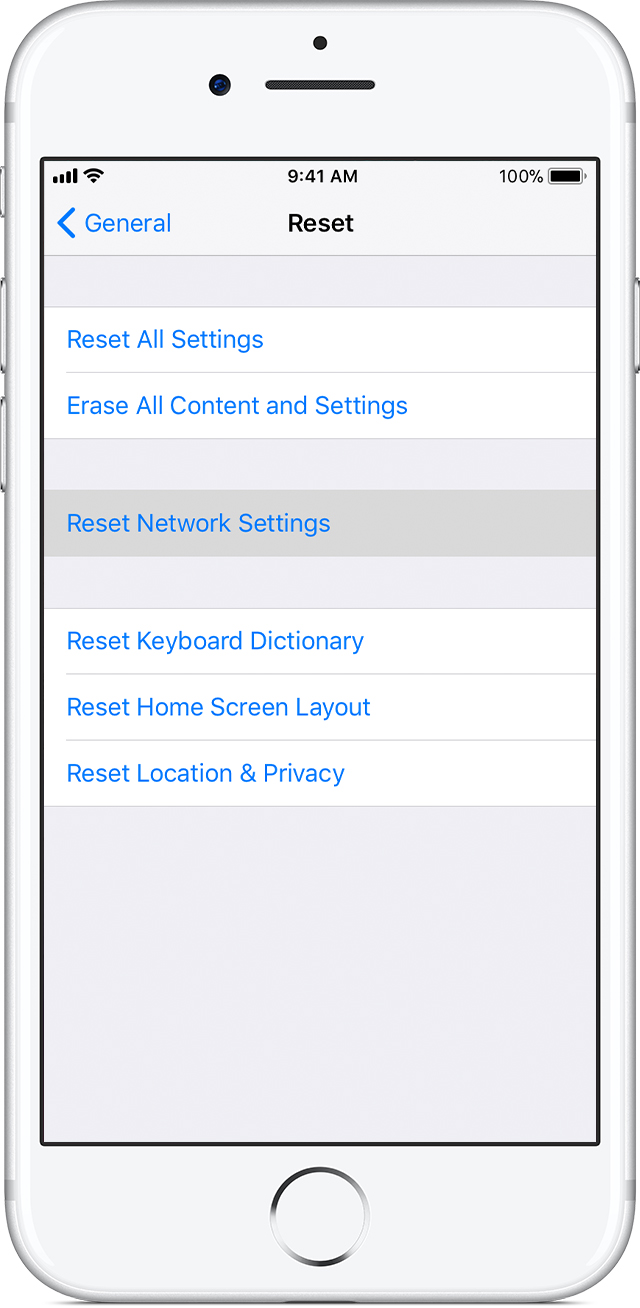
  4. Go to Settings > General > Reset and tap Reset Network Settings.
    User uploaded file


Have a lovely day!
4 replies
Question marked as Top-ranking reply

Nov 5, 2017 7:29 PM in response to calauricella

Hey there, calauricella!


Thanks for visiting the Apple Supprot Communities. From your post, I understand you are having trouble accessing the Visual Voicemail app. When you tap on it, you're prompted to enter your voicemail password. When you do that, it looks as if it is saving, but never moves forward. I would be happy to help!


Based on what you've described, I would recommend the following steps from Set up Visual Voicemail on your iPhone - Apple Support :


Get help with Visual Voicemail

If you can't set up Visual Voicemail, contact your carrier to make sure that your plan supports the feature.

If you need help, try these steps. Check your Visual Voicemail after each step:

  1. Try to call someone to check your cellular network connection.
  2. Make sure that you set up your voicemail. To check, dial your phone number from your iPhone.
  3. Call your iPhone from another phone and try to leave yourself a voicemail.
  4. Go to Settings > General > Reset and tap Reset Network Settings.
    User uploaded file


Have a lovely day!

This thread has been closed by the system or the community team. You may vote for any posts you find helpful, or search the Community for additional answers.

Voicemail is asking for a password first time ever on iphone 6

Welcome to Apple Support Community
A forum where Apple customers help each other with their products. Get started with your Apple Account.