
Close all apps With iPhone X
Hi.
I use iPhone X.
Can I close all apps simultaneoursly or only close 1 app at a time … ??
Hi.
I use iPhone X.
Can I close all apps simultaneoursly or only close 1 app at a time … ??
I couldn't disagree more. There are many reasons you would want to close apps. If you want to see recent apps or switch apps, why would you want to wade through 20 or 30 open apps to find the one you want. I don't like all that clutter, regardless of whether it affects processor or memory or anything else. Clutter is not good and not efficient. This is a problem with ios and always has been...closing apps. It's just worse with iphone X because theres another step to accomplish it.
Hello,
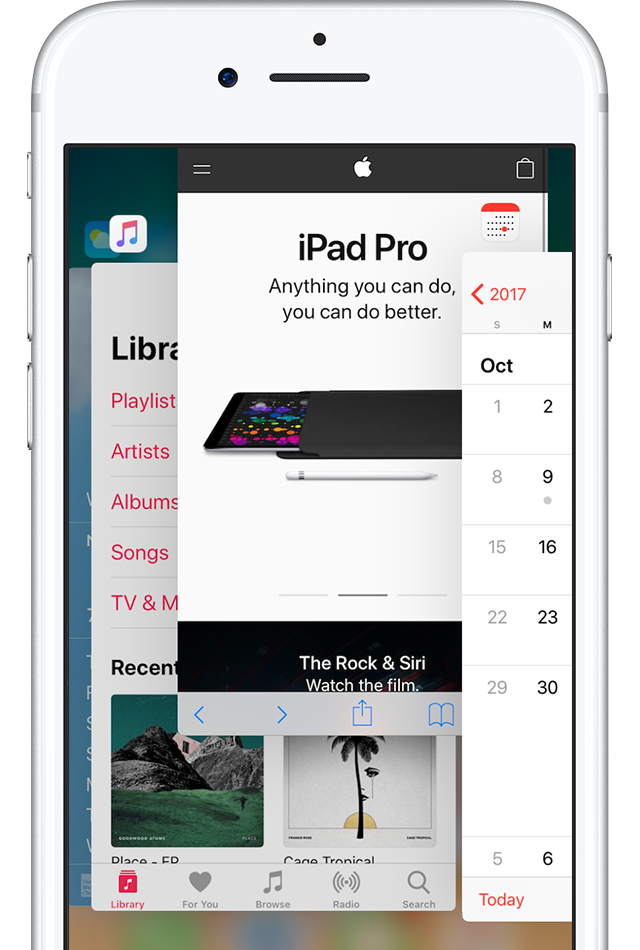
Swipe up to close
Swipe up on the app's preview to close the app. On an iPhone X, touch and hold the app, then swipe up to close it.
From:
How to force an app to close on your iPhone, iPad, or iPod touch - Apple Support
You’re wrong.
Thank you for your clear and simple solution for those who consider this to be a problem.
ah, boom.
thekylesj wrote:
There is nothing wrong with our asking Apple to provide a tool that iOS does not currently have.
No, there isn't. But there's no point in doing it here where Apple isn't reading. Use the feedback page:
Apple thinks it is wrong to close apps, as it has no benefit and actually worsens battery life. That's probably why they don't provide that functionality:
http://speirs.org/blog/2012/1/2/misconceptions-about-ios-multitasking.html
However, if you disagree with Apple let them know. You can't do that in this user-to-user forum, because Apple staff generally don't read posts in the forum. The way to let Apple know is https://apple.com/feedback.
Lets get back to the initial point, iPhone X navigation.
Good idea.
The technical answer to the initial point is no. At present, you can't close all apps on an iPhone X with a single gesture.
All other discussion about what should be is moot.
We can only deal here with what is.
Whether anyone accepts it or not, the feedback mechanism for Apple is below.
No amount of logic or passion displayed vented here will change things.
Feedback for Apple goes here >>> http://apple.com/feedback
MetChr wrote:
Hi.
I use iPhone X.
Can I close all apps simultaneoursly or only close 1 app at a time … ??
No, you can't close them all at once. There would almost never be a reason to do this. Generally, the only time an app needs to be force closed is if it isn't working properly. Closing them doesn't save battery life (and may in fact cost you a small amount when the app has to restart).
You can chose whatever workflow is best for you. However, it doesn't change the fact that, despite what people may think, it's not required to make the phone work properly. If you want to spend time removing recently used apps, it's your time to waste.
Best of luck.
Pardon me I’m not great with computers, but does having more apps open use up more iPhone CPU/processing? i.e. is it using more ram? That’s the main reason I usually close them all. It makes sense after all that the more apps that are open, the harder the phone has to work to keep them open in their state...
Masterplex wrote:
Pardon me I’m not great with computers, but does having more apps open use up more iPhone CPU/processing? i.e. is it using more ram? That’s the main reason I usually close them all. It makes sense after all that the more apps that are open, the harder the phone has to work to keep them open in their state...
No, this is a common misunderstanding and fallacy. Apps in the background are not "running" and taking up resources, when closed an app hibernates and iOS manages the system memory and CPU load as needed.
Killing apps does nothing at all except use up your time and your iPhone's battery (starting an app from scratch typically requires more energy than resurrecting a sleeping app). As stated above, the only reason to kill an app is if it is causing you a problem while using it.
Masterplex wrote:
Pardon me I’m not great with computers, but does having more apps open use up more iPhone CPU/processing? i.e. is it using more ram? That’s the main reason I usually close them all. It makes sense after all that the more apps that are open, the harder the phone has to work to keep them open in their state...
All those apps are suspended. They are not doing anything. They're not using resources. iOS is very good at managing its own memory. In fact, you make the phone work slightly harder by closing them all the time. If you then want to use the app again, rather than simply unsuspend it, the phone has to launch it.
What controls whether or not apps are doing things in the back ground is Settings>General>Background App Refresh. Turn that off for apps you don't need it on for. What you'll save is battery life.
Clutter is not good and not efficient.
Clutter may be those things, but it does not consume battery.
There are many reasons you would want to close apps.
None that save battery life, which is the urban myth surrounding the supposed need to close apps "running" in the background".
Check 'yer "Background App Refresh" and notification settings for battery life savings.
On iPhones with a home button you would hold down the power button until you get the prompt to shutdown at which point you press down on the home button until the prompt disappears and you’re back to your home screen. I have done this many time to kill everything when I noticed that my battery was constantly discharging. I have no idea how to achieve the same result on an iPhone X. And I hate having to reboot the phone to get the battery discharge to stop.
Close all apps With iPhone X




