Launchpad rearranges every time I reboot

Every time I reboot my mac, Launchpad rearranges all of its icons, eliminating the purpose of having a "quick access" menu. Is there any fix for this?

IMAC (RETINA 5K, 27-INCH, LATE 2015), macOS Sierra (10.12.6)

Posted on Dec 4, 2017 2:28 PM

Reply
5 replies

Dec 5, 2017 1:19 PM in response to oliver-hrfds

Hi oliver-hrfds,

I understand that each time you restart your iMac, the Launchpad rearranges itself. I'm happy to provide some help for this issue.

Based on your description of this issue, I recommend that you reset the permissions for your home folder, as described in the article below:

Resolve issues caused by changing the permissions of items in your home folder - Apple Support

  • Changes that you make in System Preferences aren't saved after you quit System Preferences.
  • Changes that you make to the Dock aren't saved after you log out of your user account.
  • Windows that were open the last time you logged out or quit an app (before you changed permissions) open again after you log in or open the app.

Reset permissions

If the issue started after changing the permissions of items in your home folder, reset permissions:

  1. From the Finder menu bar, choose Go > Home. Your home folder opens.
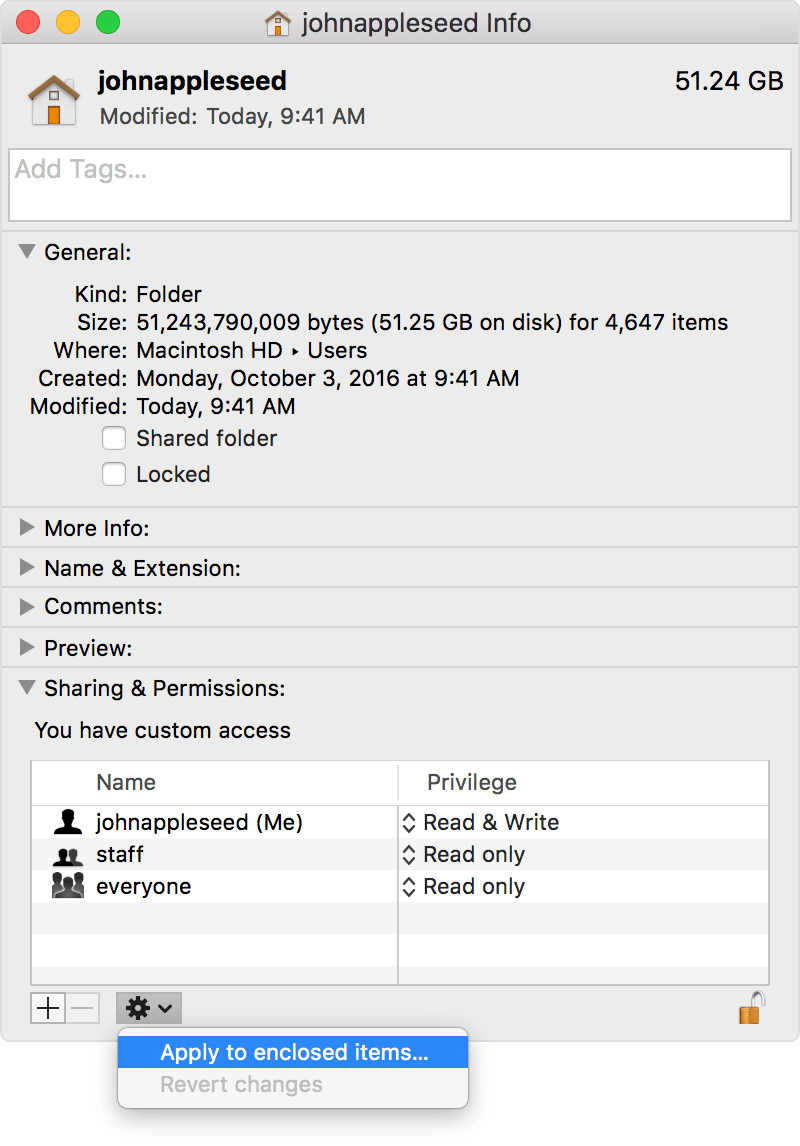
  2. Choose File > Get Info. An Info window for your home folder opens.
  3. If the Sharing & Permissions section at the bottom of the window isn't open, click the triangle User uploaded file in that section to open it.
  4. If the Lock button at the bottom of the window shows a closed lock User uploaded file , click the lock and enter an administrator name and password.
  5. Click the Action menu User uploaded file in the bottom corner of the window, then choose “Apply to enclosed items.” Click OK to confirm the action. A progress bar appears at the top of the window.
    User uploaded file
  6. When the progress bar completes, open the Terminal app, which is in the Utilities folder of your Applications folder.
  7. Paste or type this command in Terminal, then press Return:

    diskutil resetUserPermissions / `id -u`


    On U.S. keyboards, the ` character is just above the Tab key. After entering the diskutil command, if Terminal says that permissions reset on user home directory failed (error -69841), enter
    chflags -R nouchg ~
    , then enter the diskutil command again.
  8. When the process completes, quit Terminal.

Thanks for using the Apple Support Communities. Cheers!

Dec 6, 2017 5:56 AM in response to oliver-hrfds

oliver-hrfds,

Thanks for going through those steps and following up with us. I recommend that you follow the steps in the article below to test this issue in a new user account to see if it happens there as well:

How to test an issue in another user account on your Mac - Apple Support
If this issue doesn't happen with a new user account, I recommend using the following article to remove any login items:
macOS Sierra: If you think you have incompatible login items
Cheers!

This thread has been closed by the system or the community team. You may vote for any posts you find helpful, or search the Community for additional answers.

Launchpad rearranges every time I reboot

Welcome to Apple Support Community
A forum where Apple customers help each other with their products. Get started with your Apple Account.