High Sierra - battery drain (Safari browser)

Hi. I noticed that Safari in my Macbook Air (2017) drains a lot of power. I paste an activity monitor screenshot. "Average Energy Impact" is above 20 points on this screenshot. Now it is 52,14. It is not normal value I think. I don't have any idea what is going on. When I bought my new laptop it was able to work for about 10-12 hours. Now it shows 5-6... Any idea? It is brand new laptop with about 14 battery charge cycles (macOs High Sierra 10.13.2).


User uploaded file

MacBook Air, macOS High Sierra (10.13.2)

Posted on Dec 10, 2017 4:01 PM

Reply
Question marked as Top-ranking reply

Posted on Dec 11, 2017 11:31 AM

This Safari has been pretty good, sounds like the website is misbehaving & is probably the culprit; and I would also turn off all extensions until resolved.


Besides doing what John says below, if it does not totally fix the issue... Got to Safari Tab, click Preferences and go to the autofill tab and deselect all items. While there check your extensions that there all off.

Those two have caused me issues in the past with excessive battery drain, especially autofill.

If it's still an issue, go back to Safari tab in your browser and click clear history. If you have Developer enabled - go to that tab and remove Cache. If it is turned off and you have no menu then select from the Safari Menu, preferences and go to the sprocket ADVANCED setting and go to bottom and tick on the developer tab.

If that's still not resolving things, then from the desktop, click once to get then up at top of screen in Finder - move to the GO tab, and scroll down to Go to folder and enter ~/Library/Preferences/

Remove: com.apple.Safari.plist

21 replies
Question marked as Top-ranking reply

Dec 11, 2017 11:31 AM in response to jundymek

This Safari has been pretty good, sounds like the website is misbehaving & is probably the culprit; and I would also turn off all extensions until resolved.


Besides doing what John says below, if it does not totally fix the issue... Got to Safari Tab, click Preferences and go to the autofill tab and deselect all items. While there check your extensions that there all off.

Those two have caused me issues in the past with excessive battery drain, especially autofill.

If it's still an issue, go back to Safari tab in your browser and click clear history. If you have Developer enabled - go to that tab and remove Cache. If it is turned off and you have no menu then select from the Safari Menu, preferences and go to the sprocket ADVANCED setting and go to bottom and tick on the developer tab.

If that's still not resolving things, then from the desktop, click once to get then up at top of screen in Finder - move to the GO tab, and scroll down to Go to folder and enter ~/Library/Preferences/

Remove: com.apple.Safari.plist

Dec 10, 2017 10:13 PM in response to jundymek

That screenshot shows a particular website (https://www.udemy.com/) using an excessive amount of CPU time.


Some websites can be unusually demanding of system resources, but that website is not affecting my Mac in that manner. Even though it describes a different problem, the following Apple Support document may be relevant in your case: If Safari doesn't load a page or webpage items are missing - Apple Support. Read and follow the steps in Check Safari extensions. Disabling Extensions may help isolate the reason that website is not behaving properly on your Mac.


If you have no Safari Extensions installed, then write back for additional suggestions.

Dec 11, 2017 1:07 PM in response to jundymek

jundymek wrote:


I can't run Netflix or Udemy in safe mode because there are no Safari required extensions here (flash or silverlight). There is no activity monitor in that mode...


Thanks. That is helpful because it identifies either Adobe Flash Player or Microsoft Silverlight as the energy-consuming processes.


Most websites have migrated to open standards. Those that have not, should, because both of those products have already been deprecated or soon will be:


Adobe: "Flash & The Future of Interactive Content"

Microsoft: https://blogs.windows.com/msedgedev/2015/07/02/moving-to-html5-premium-media/


If you require either one of them to use that site, then your Mac will consume a lot of energy while you use it. Neither Adobe nor Microsoft are known to write efficient software, so if you are required to use them then you must accept their inefficiencies and resulting excessive power consumption as consequences.

Dec 11, 2017 10:55 AM in response to jundymek

In the absence of other demanding processes, Safari is normally the largest "significant" energy consumer.


Since that website is an obvious energy hog, I suspect that website is misbehaving. Using 100% or more CPU will cause your Mac to perform slowly and its energy consumption to increase. Like I wrote it's not doing that on my Mac, but it may have stored cookies or other information on your Mac, resulting in the problem.


First, try removing all website data associated with it. Safari menu > Preferences... > Privacy > Remove Website Data...


User uploaded file


Select it, Remove, then Done. If that does not help I'll have more suggestions.

Dec 11, 2017 12:09 PM in response to jundymek

It didn't help... CPU usage is still around 100% on Udemy site...


There are some troubleshooting steps to follow, in no particular order:


Needless to say, if you are using any non-Apple "anti-virus", "cleaning", or "Internet security" products, anything at all in that broad category of utterly useless garbage, don't. A lot of things won't work if you do.

If you don't get anywhere, you can use the following procedure to determine if the problem is internal or external to your Mac. Causes may involve your router, your ISP, the DNS Server(s) it uses, or certain user-configurable options.


  1. Shut down your Mac.
  2. Load macOS Recovery by holding and r (two fingers) while you start your Mac with a third finger.
  3. At the macOS Utilities screen, release those two fingers.
  4. Choose Get Help Online.
  5. Safari will launch, but it will lack your bookmarks, favorites, history and other preferences.


Determine if the problem persists while using Safari in that mode. After that, restart your Mac normally, and reply with your observations.


Back up your Mac prior to making any changes to its file system. To learn how to use Time Machine please read How to use Time Machine to back up or restore your Mac - Apple Support.

Dec 11, 2017 1:34 PM in response to jundymek

Regardless, those two items are KNOWN problem makers.

I'd also Open /Library/Preferences & remove anything NON Apple.

Restart, and ADD one or two things at a time, if no problem persists then it was a 3rd party app, and when it does, get rid of the offending program when narrowed down.


I'd Also look at crash logs: ~/Library/Logs/DiagnosticReports

See if something stands out.


You can also, try to log out and boot into a guest user account and see if problem persists there.


Lastly if not already done, you could run Console and check out the reports there.

Dec 11, 2017 5:25 PM in response to jundymek

jundymek wrote:


... Udemy, Netflix, any website with video use huge amount of cpu, energy.


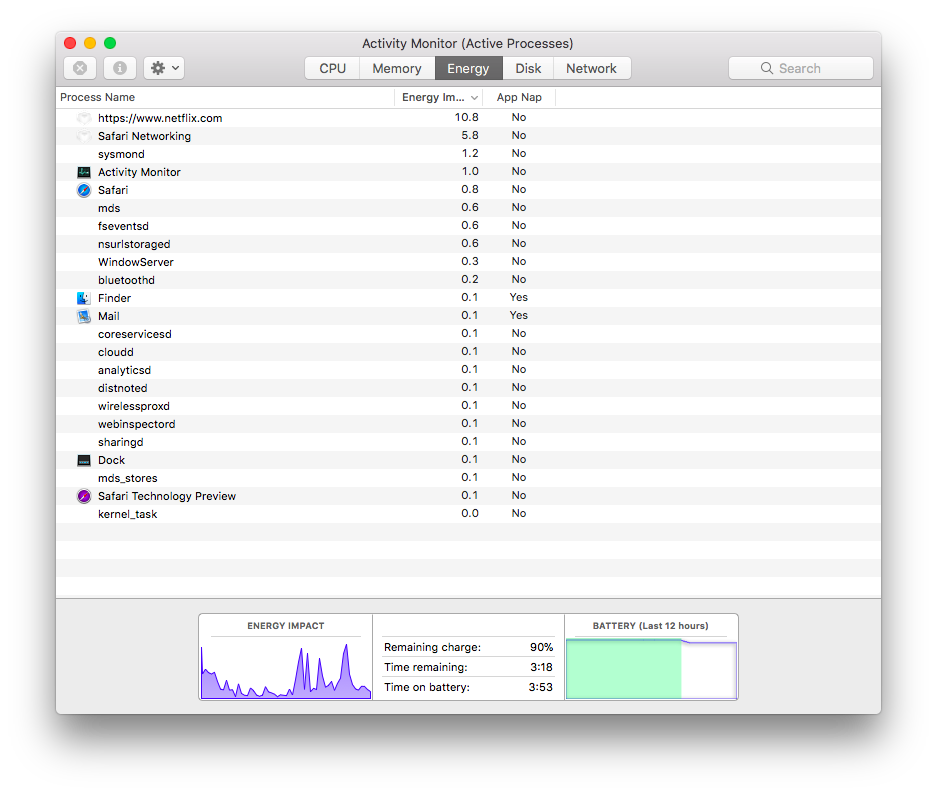
I can't use Udemy because as far as I can determine, you need to enroll in one of its courses to view their videos. However, I do use Netflix with no additional plug-ins or add-ons and it works fine. Its energy consumption is not abnormally high.


Here's a screenshot of AM with Netflix playing (which happens to be "Stranger Things"). It's a six year old MacBook Air on its original battery.

User uploaded file


Nothing remarkable.


No plug-ins are installed. No Adobe Flash Player, no Microsoft junk. Try removing those things according to their respective instructions, and determine if you can use Udemy anyway. If you can't, you can always install them again.


Netflix has had an on-and-off problem with Safari due to DRM but that's another subject altogether.


Yes, resetting the Mac's the SMC is justified, but don't use the link you posted (I didn't even read it). Follow these instructions, which will also appear in your local language: How to reset the System Management Controller (SMC) on your Mac - Apple Support.


Your English is just fine.


I doubt reinstalling macOS will help. It's nondestructive to your User Account or its data, so you can try it if you wish.


Dec 12, 2017 12:17 AM in response to John Galt

John Galt wrote:


jundymek wrote:


... Udemy, Netflix, any website with video use huge amount of cpu, energy.


I can't use Udemy because as far as I can determine, you need to enroll in one of its courses to view their videos. However, I do use Netflix with no additional plug-ins or add-ons and it works fine. Its energy consumption is not abnormally high.


Here's a screenshot of AM with Netflix playing (which happens to be "Stranger Things"). It's a six year old MacBook Air on its original battery.


User uploaded file


Nothing remarkable.


No plug-ins are installed. No Adobe Flash Player, no Microsoft junk. Try removing those things according to their respective instructions, and determine if you can use Udemy anyway. If you can't, you can always install them again.


Netflix has had an on-and-off problem with Safari due to DRM but that's another subject altogether.


Yes, resetting the Mac's the SMC is justified, but don't use the link you posted (I didn't even read it). Follow these instructions, which will also appear in your local language: How to reset the System Management Controller (SMC) on your Mac - Apple Support.


Your English is just fine.


I doubt reinstalling macOS will help. It's nondestructive to your User Account or its data, so you can try it if you wish.

I don't know what should I do. I checked adobe flash player in my mac and I saw it is not installed. I reset SMC without any result. Energy usage with Netflix is above 20-30 (up to 60) and in Udemy about 100....

Dec 11, 2017 11:42 AM in response to jundymek

Some websites will do that with my usage too.

If you must use that website, try either another browser entirely or give Technology Preview a shot... I know in the past, there were problem with some sites that worked better there... than in safari for some reason.


I have a host of browsers I keep as backups in case something causes issues with my main browser... there were a few times in the last 16 years that I could not use Safari at all, and once that most of my 18+ browsers would not load or work with the os because of a then current vulnerability.


User uploaded file


If that web page was working right, you would not have any issues with Safari. To me, that's a caution or even a severe warning flag going up.

Dec 11, 2017 1:15 PM in response to jundymek

NO reinstall is likely;

follow all trouble shooting steps I mentioned in the two post above and others have mentioned... your solution will probably be found.

In the meantime - use another browser....

I'd be interested to see if Safari Technology is giving you the same trouble!

https://developer.apple.com/safari/download/


I'd Also Un PIN any Tabs in the browser,

and close browser & see if that helps - it has helped with some strange stuff for me before. I would also quit and reload Safari holding down the SHIFT key.


If you have not run it - i'd get this program and see what it says:

https://etrecheck.com/

Dec 12, 2017 4:35 AM in response to jundymek

I don't know what should I do.


Since your Mac is new, you should contact Apple and ask: Contact Support. They will ask you to perform some of the actions you already took (such as checking Safari Extensions, and starting your Mac in "safe mode"). Perhaps they will have some other ideas. I would be very surprised if they said anything other than "it's normal" and that watching videos is an inherently power-hungry activity. If the video is delivered to your Mac in high quality (high resolution) then it will be particularly power-hungry.


You may also want to consider reinstalling macOS, but that's another action I think will not help.

Dec 11, 2017 1:28 PM in response to Mac_slide

Mac_slide wrote:


NO reinstall is likely;

follow all trouble shooting steps I mentioned in the two post above and others have mentioned... your solution will probably be found.

In the meantime - use another browser....


If you have not run it - i'd get this program and see what it says:

https://etrecheck.com/

Chrome drains energy in the same way... I have run etrecheck but I don't know what should I look for... I am very angry. Laptop was working great untill yesterday.

This thread has been closed by the system or the community team. You may vote for any posts you find helpful, or search the Community for additional answers.

High Sierra - battery drain (Safari browser)

Welcome to Apple Support Community
A forum where Apple customers help each other with their products. Get started with your Apple Account.