How do I cancel a subscription

How do I cancel a subscription

iPhone 7 Plus

Posted on Jan 3, 2018 10:02 AM

Reply
Question marked as Top-ranking reply

Posted on Jan 3, 2018 10:04 AM

Manage your subscriptions

Follow the steps to view, change, or cancel your subscriptions from your iPhone, iPad, or iPod touch; your Mac or PC; or your Apple TV 4K or Apple TV (4th generation).

Some subscriptions might offer a discounted or free trial. If you don’t cancel more than 24 hours before your renewal date, your subscription might renew.

On your iPhone, iPad, or iPod touch
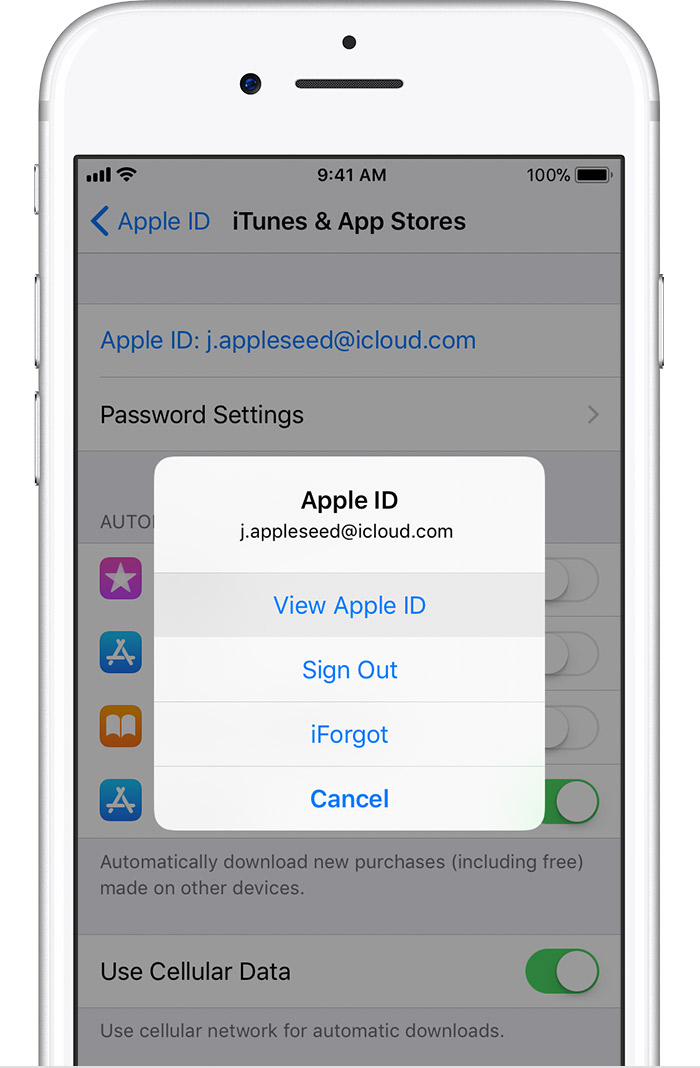
  1. Go to Settings > [your name] > iTunes & App Store.
  2. Tap your Apple ID at the top of the screen.
  3. Tap View Apple ID. You might need to authenticate your Apple ID.
    User uploaded file
  4. Tap Subscriptions.
    User uploaded file
  5. Tap the subscription that you want to manage.
    If you're being charged for a subscription, but you don't see it in your list of subscriptions, it might be billed through someone other than Apple. Learn what to do if you still can’t view your subscription.
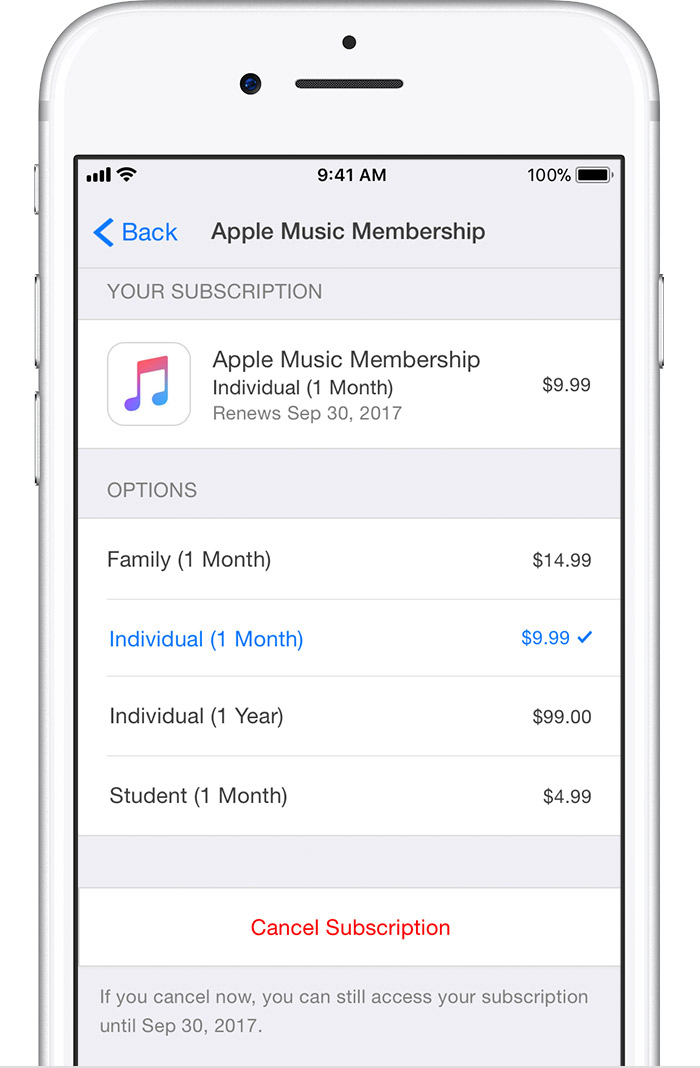
  6. Use the options to manage your subscription. You can choose a different subscription offering, or tap Cancel Subscription to cancel your subscription. If you cancel, your subscription will stop at the end of the current billing cycle.
    User uploaded file
User uploaded file


On your Mac or PC

  1. Open iTunes.
  2. If you're not signed in, sign in with your Apple ID.
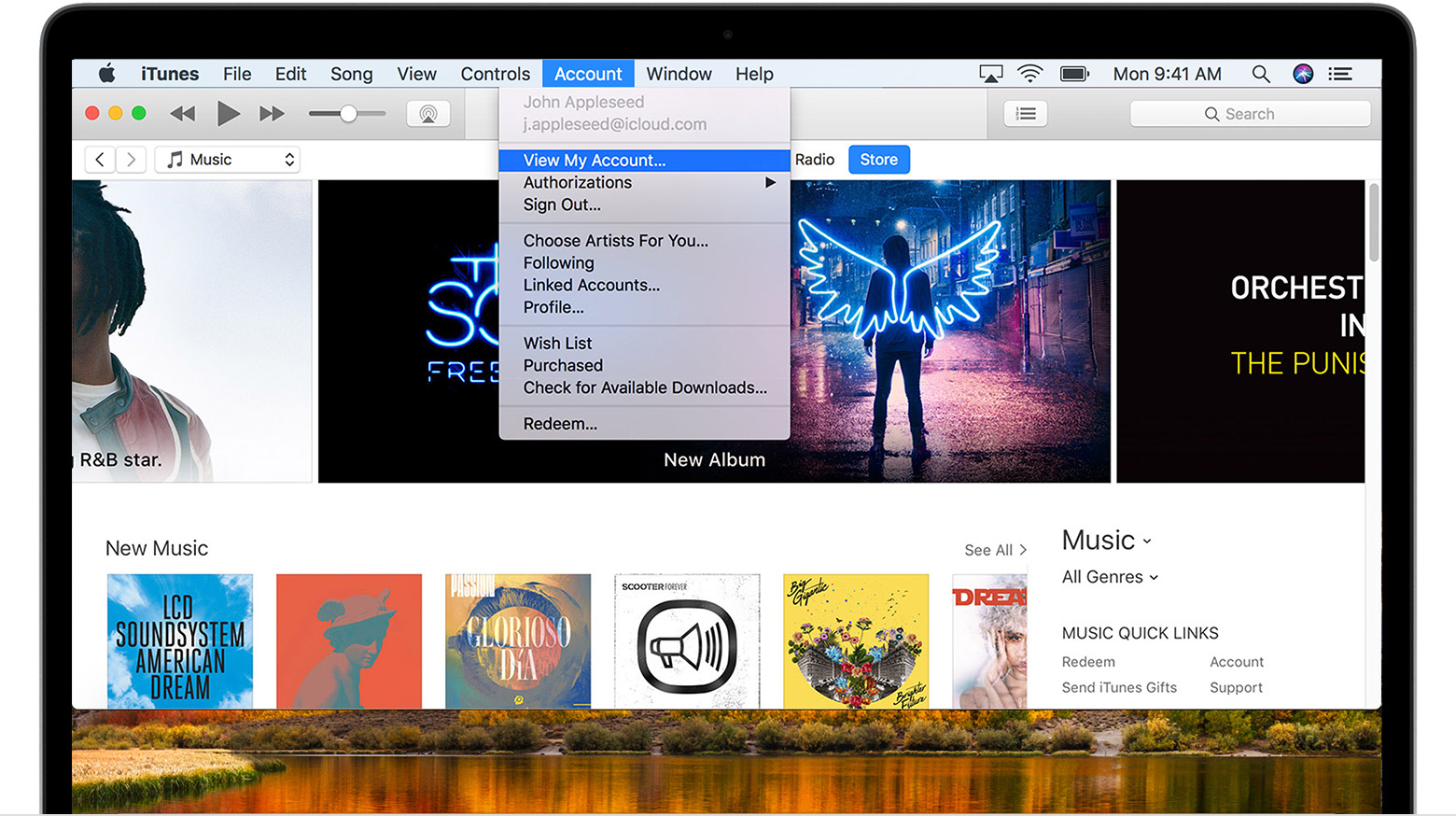
  3. From the menu bar at the top of your computer screen or at the top of the iTunes window, choose Account > View My Account.
    User uploaded file
  4. Authenticate your Apple ID, then click View Account.
On the Account Information page:
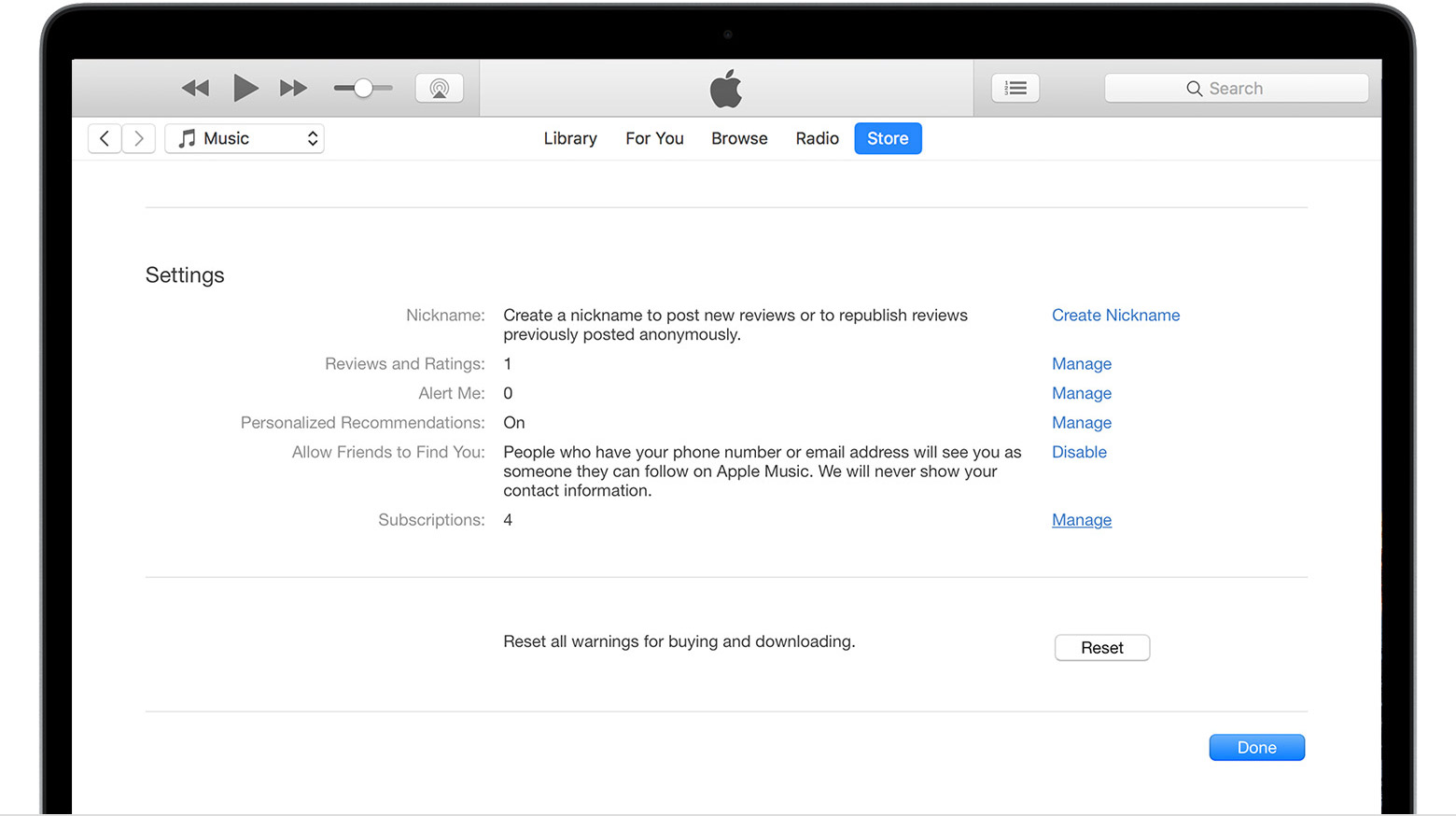
  1. Scroll to the Settings section.
  2. To the right of Subscriptions, Click Manage.
    User uploaded file
  3. To the right of the subscription you want to manage, click Edit.
    If you're being charged for a subscription, but you don't see it in your list of subscriptions, it might be billed through someone other than Apple. Learn what to do if you still can’t view your subscription.
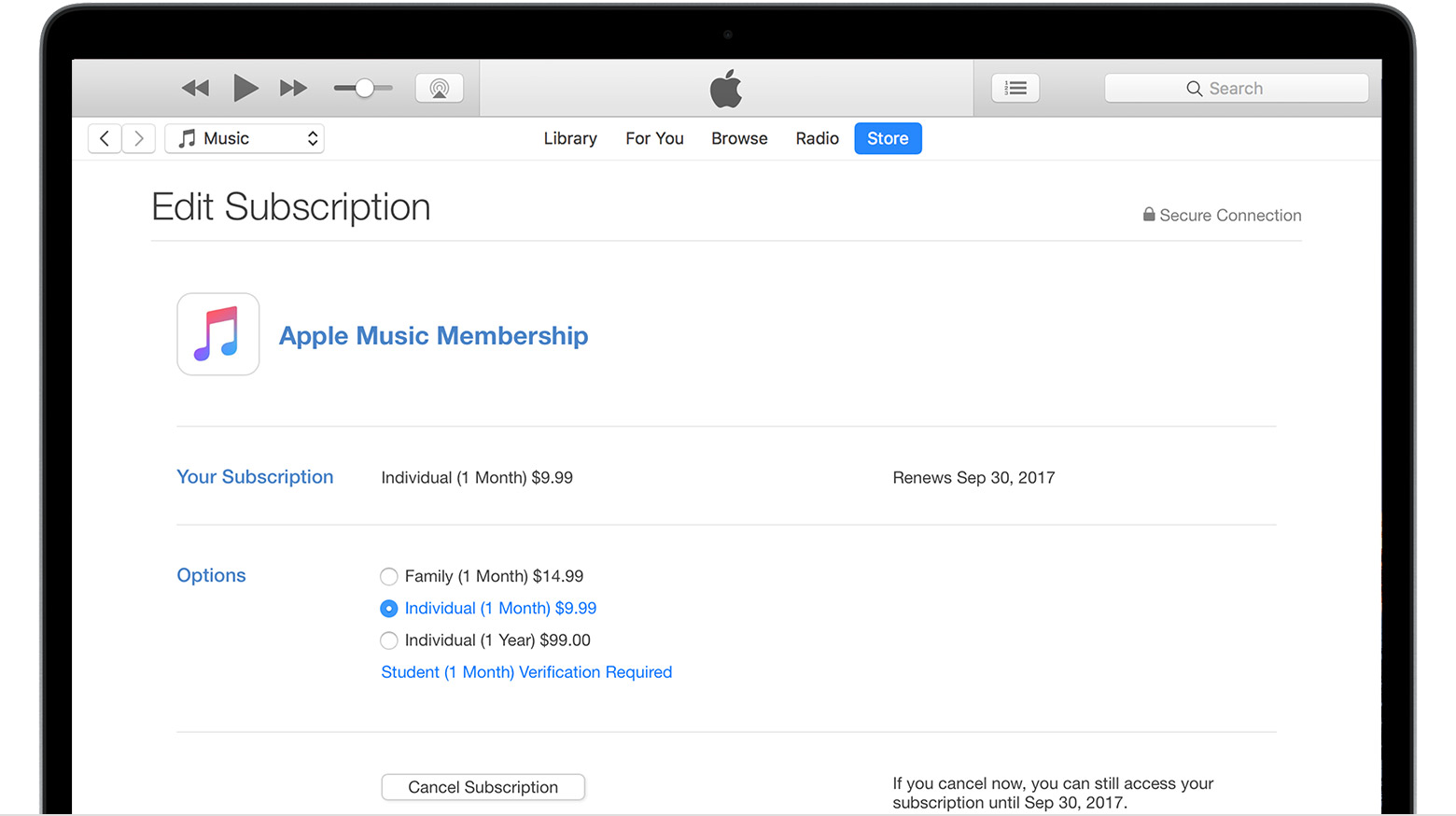
  4. Use the options to manage your subscription. You can choose a different subscription offering, or click Cancel Subscription to cancel your subscription. If you cancel, your subscription will stop at the end of the current billing cycle.
    User uploaded file

User uploaded file

On your Apple TV 4K or Apple TV (4th generation)

You can only edit subscriptions for tvOS apps that are installed on your Apple TV. For Apple TV (3rd generation or earlier), you need to use an iOS device or computer to manage your subscriptions.

  1. Open Settings.
  2. Select Accounts.
  3. Under Subscriptions, select Manage Subscriptions.
    User uploaded file
  4. Choose the subscription that you want to manage.
    If you're being charged for a subscription, but you don't see it in your list of subscriptions, it might be billed through someone other than Apple. If the subscription you want to manage isn’t installed on your Apple TV, you'll have to use your iPhone, iPad, iPod touch, Mac, or PC to change it. Learn what to do if you still can’t view your subscription.
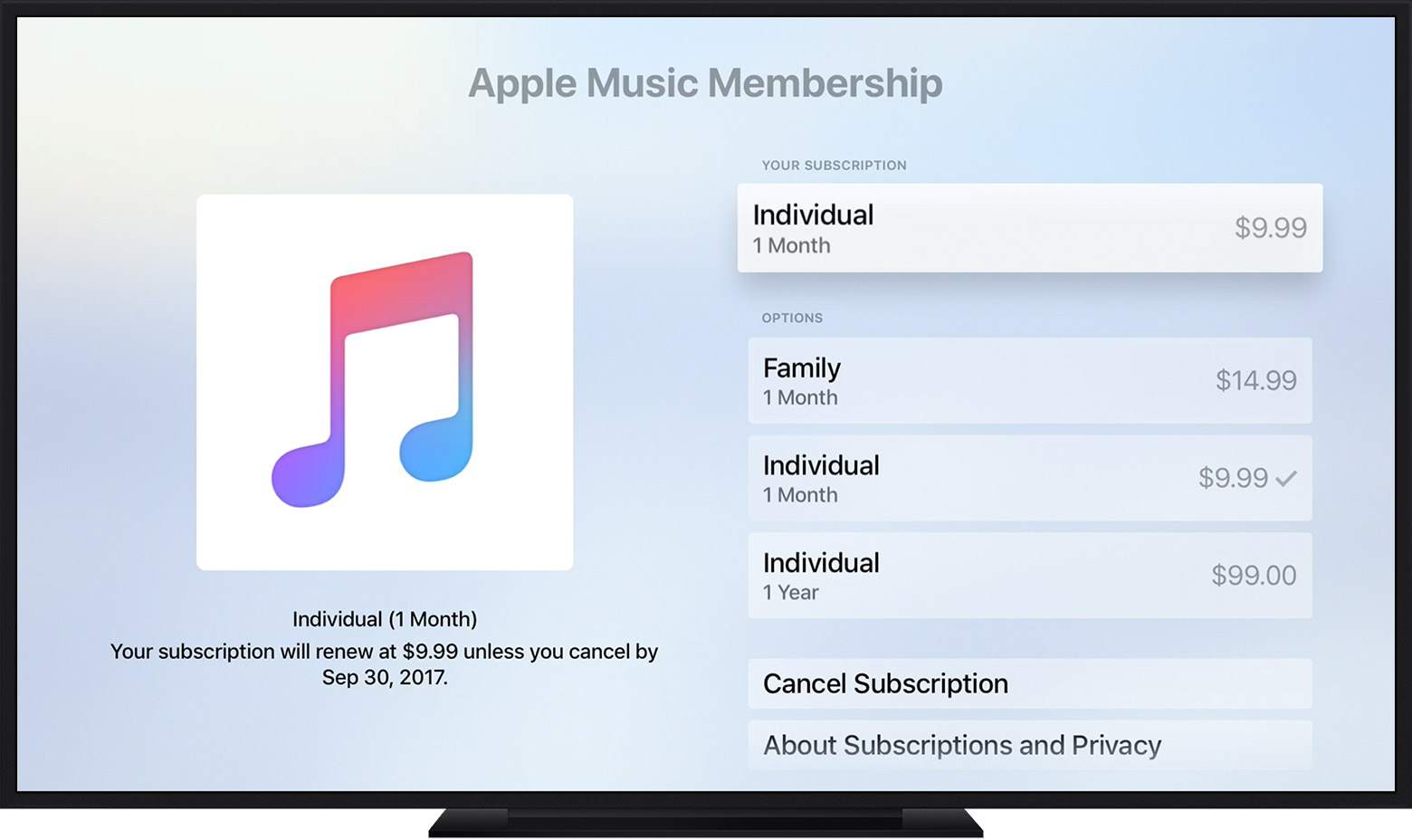
  5. Use the options to manage your subscription. You can choose a different subscription offering, or select Cancel Subscription to cancel your subscription. If you cancel, your subscription will stop at the end of the current billing cycle.
    User uploaded file
3 replies
Question marked as Top-ranking reply

Jan 3, 2018 10:04 AM in response to Mmarisa

Manage your subscriptions

Follow the steps to view, change, or cancel your subscriptions from your iPhone, iPad, or iPod touch; your Mac or PC; or your Apple TV 4K or Apple TV (4th generation).

Some subscriptions might offer a discounted or free trial. If you don’t cancel more than 24 hours before your renewal date, your subscription might renew.

On your iPhone, iPad, or iPod touch

  1. Go to Settings > [your name] > iTunes & App Store.
  2. Tap your Apple ID at the top of the screen.
  3. Tap View Apple ID. You might need to authenticate your Apple ID.
    User uploaded file
  4. Tap Subscriptions.
    User uploaded file
  5. Tap the subscription that you want to manage.
    If you're being charged for a subscription, but you don't see it in your list of subscriptions, it might be billed through someone other than Apple. Learn what to do if you still can’t view your subscription.
  6. Use the options to manage your subscription. You can choose a different subscription offering, or tap Cancel Subscription to cancel your subscription. If you cancel, your subscription will stop at the end of the current billing cycle.
    User uploaded file
User uploaded file


On your Mac or PC

  1. Open iTunes.
  2. If you're not signed in, sign in with your Apple ID.
  3. From the menu bar at the top of your computer screen or at the top of the iTunes window, choose Account > View My Account.
    User uploaded file
  4. Authenticate your Apple ID, then click View Account.
On the Account Information page:
  1. Scroll to the Settings section.
  2. To the right of Subscriptions, Click Manage.
    User uploaded file
  3. To the right of the subscription you want to manage, click Edit.
    If you're being charged for a subscription, but you don't see it in your list of subscriptions, it might be billed through someone other than Apple. Learn what to do if you still can’t view your subscription.
  4. Use the options to manage your subscription. You can choose a different subscription offering, or click Cancel Subscription to cancel your subscription. If you cancel, your subscription will stop at the end of the current billing cycle.
    User uploaded file

User uploaded file

On your Apple TV 4K or Apple TV (4th generation)

You can only edit subscriptions for tvOS apps that are installed on your Apple TV. For Apple TV (3rd generation or earlier), you need to use an iOS device or computer to manage your subscriptions.
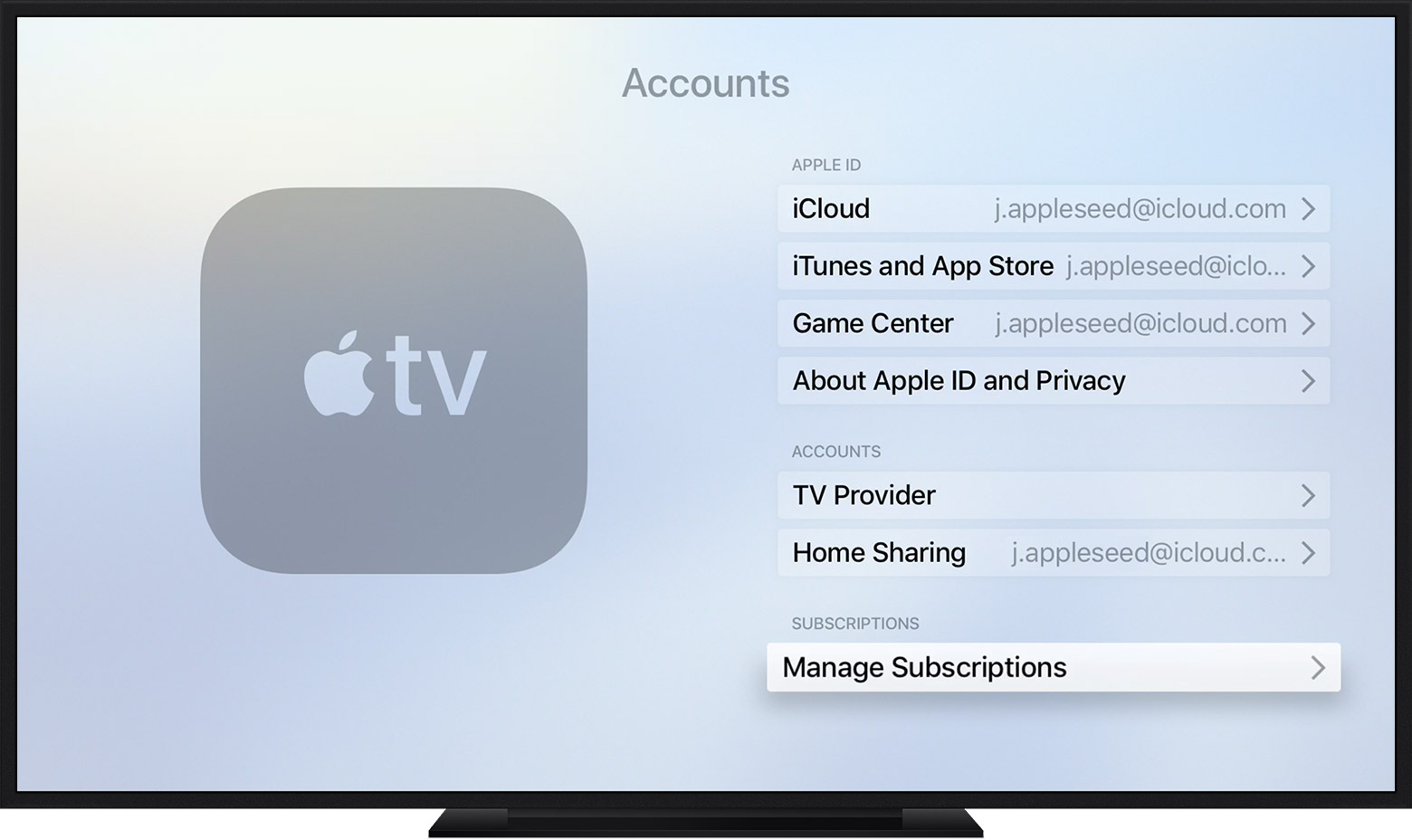
  1. Open Settings.
  2. Select Accounts.
  3. Under Subscriptions, select Manage Subscriptions.
    User uploaded file
  4. Choose the subscription that you want to manage.
    If you're being charged for a subscription, but you don't see it in your list of subscriptions, it might be billed through someone other than Apple. If the subscription you want to manage isn’t installed on your Apple TV, you'll have to use your iPhone, iPad, iPod touch, Mac, or PC to change it. Learn what to do if you still can’t view your subscription.
  5. Use the options to manage your subscription. You can choose a different subscription offering, or select Cancel Subscription to cancel your subscription. If you cancel, your subscription will stop at the end of the current billing cycle.
    User uploaded file

This thread has been closed by the system or the community team. You may vote for any posts you find helpful, or search the Community for additional answers.

How do I cancel a subscription

Welcome to Apple Support Community
A forum where Apple customers help each other with their products. Get started with your Apple Account.