BENQ RL2455 Out of Range on Macbook Pro

My monitor BENQ RL2455 is telling me the following message: Out of Range on my macbook pro.

Does anyone know how to fix this, I need to use this monitor as a second, and I'm using a usb-c cable for HDMI.
Thank you all.

Posted on Jan 21, 2018 2:08 PM

Reply
Question marked as Top-ranking reply

Posted on Jan 23, 2018 12:28 PM

Howdy pevidex,

It sounds like you are getting this message saying that something is out of range on your monitor when it is connected to your MacBook Pro. Usually that message on a monitor is referring to either the resolution or the refresh rate that the monitor is set to. Have a look at these steps from the following article about troubleshooting display issues on an external monitor:

Get help with video issues on external displays connected to your Mac


Change your display resolution

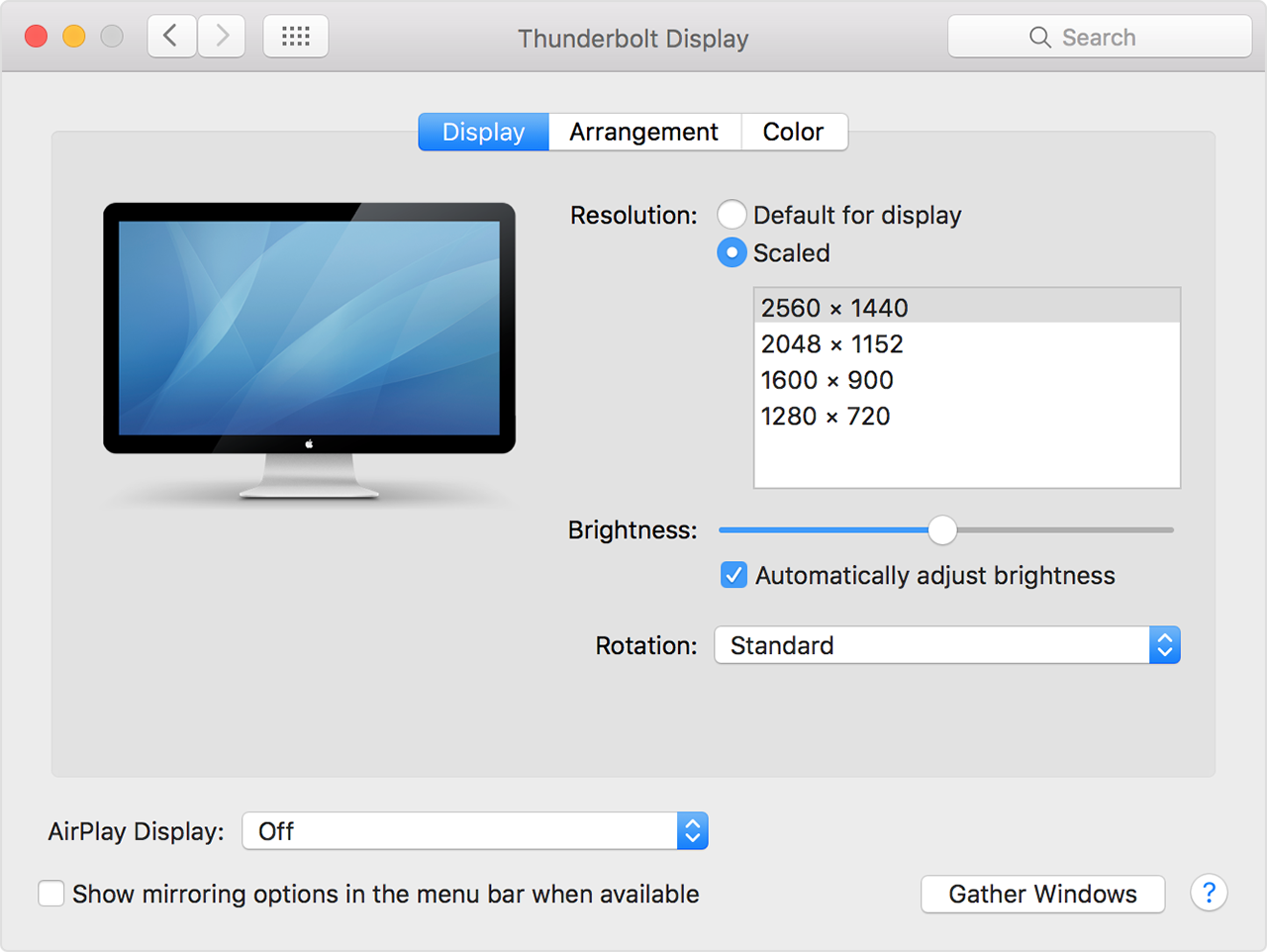
  1. From the Apple menu, choose System Preferences.
  2. Click the Displays icon.
  3. Click Default for display. If you see more than one resolution listed, choose a resolution and refresh rate. If the display turns off when you change resolutions, press the escape key to undo the change.
    User uploaded file

If you can't change the resolution of your display because you can't see an image, restart your Mac in safe mode to reset the display resolution to defaults.

If starting in safe mode doesn't resolve the issue, reset your Mac's NVRAM and SMC to reset the video ports on your Mac to their defaults.

Check for third-party display software

If your display works only when your Mac is started in safe mode, and you have display-related software installed, check with the software's developer for updates, or try temporarily uninstalling it.


Thank you for using Apple Support Communities, take care!
8 replies
Question marked as Top-ranking reply

Jan 23, 2018 12:28 PM in response to pevidex

Howdy pevidex,

It sounds like you are getting this message saying that something is out of range on your monitor when it is connected to your MacBook Pro. Usually that message on a monitor is referring to either the resolution or the refresh rate that the monitor is set to. Have a look at these steps from the following article about troubleshooting display issues on an external monitor:

Get help with video issues on external displays connected to your Mac


Change your display resolution

  1. From the Apple menu, choose System Preferences.
  2. Click the Displays icon.
  3. Click Default for display. If you see more than one resolution listed, choose a resolution and refresh rate. If the display turns off when you change resolutions, press the escape key to undo the change.
    User uploaded file

If you can't change the resolution of your display because you can't see an image, restart your Mac in safe mode to reset the display resolution to defaults.

If starting in safe mode doesn't resolve the issue, reset your Mac's NVRAM and SMC to reset the video ports on your Mac to their defaults.

Check for third-party display software

If your display works only when your Mac is started in safe mode, and you have display-related software installed, check with the software's developer for updates, or try temporarily uninstalling it.


Thank you for using Apple Support Communities, take care!

Jan 23, 2018 4:10 PM in response to pevidex

That looks like it should be a perfectly appropriate cable for this application.


The fact that your Mac knows the external display is there, and that it knows the display's name and capabilities (you never typed in the name of the display, yet the heading in displays preferences pane shows the display name) indicates that the secondary data channel is working, and the display is responding to the Mac's query, "who are you and what are your capabilities?".


So if both ends of the cable are fully seated, the next most likely possibility is your cable (or possibly one of the ports) has a sample defect, that is, this particular sample (out of all those made) is defective.


To make further progress, I think you would need some known-good parts to substitute, then see whether the problem follows the computer port, the cable, or the display.


Jan 23, 2018 3:09 PM in response to Grant Bennet-Alder

  • USB-C DIGITAL AV ADAPTER CONVERTER CABLE- it is a converter for connecting a USB-C device to HDMI enabled televisions, monitors and projectors with HDMI2.0 female port to display video and audio, share your video or images to a big display.
  • HDMI USB C CABLE AUDIO AND VEDIO OUTPUT RESOLUTION- 4K UHD resolution, supports resolution up to 4K(3840x2160) @60Hz, down compatible with 1080p,720p,480p; delivering a incredibly clear video image to the connected TV display by 60Hz refresh rates.
  • USB-C TO HDMI CABLE 6FT SUPPORT DEVICES- mainly used in notebook computer, tablet computer, mobile phone and other portable devices with usb type-c output port. NOTE: please verify your devices support DisplayPort Alternate Mode on usb type-c port(thunderbolt 3 port).
  • USB-C PORT COMPATIBLE DEVICES: Thunderbolt 3 Macbook 2015/2016, Mackbook Pro 2016/2017, 2017imac, Google Chromebook Pixel, Sumsung Chromebook Plus, ChromeBook Pixel/pixelbook, Sumsung chromebook pro/ Galaxy Tabpro S/ Galaxy S8/S8 Plus/ Galaxy Note 8, Lumia 950/950XL, LG G5/V20/V30/V30 Plus, Dell XPS 13 9350/9360, Microsoft Surface Book 2/ Surface Book 2017 etc.
  • USB TYPE-C TO HDMI CABLE CONVERTER 4K 60HZ PARAMETERS- material: aluminum alloy casing; size: 48x21x10mm(no cable); cable lenght: 6ft(1.8m); weight: about 70g; no external power and driver required; support hot plug, plug and play.
I bought this cable in amazon


User uploaded file

Jan 23, 2018 4:24 PM in response to Grant Bennet-Alder

The screen I already discarded, because before the HDMI cable I was using a USB-C to DVI and it is working properly. When I bought USB-C to HDMI it never worked.

The reset of the ports was also done, I believe now that it may be defective in this cable.

Although I tested it on another monitor and the image appeared, but with noises like an unsigned TV. I think of buying another USB-C to DVI adapter and continue using that way even and forget the HDMI.
A feather.
Thank you for your attention and your time.

This thread has been closed by the system or the community team. You may vote for any posts you find helpful, or search the Community for additional answers.

BENQ RL2455 Out of Range on Macbook Pro

Welcome to Apple Support Community
A forum where Apple customers help each other with their products. Get started with your Apple Account.