ipod content is not showing;

my ipod is not showing all music files; only when it is connected to a computer then the whole content appears; also is not being seen by itunes.

iPod nano, Windows 10, model MC072 VERS1.0.2 PC

Posted on Feb 17, 2018 1:16 PM

Reply
Question marked as Top-ranking reply

Posted on Feb 18, 2018 10:57 AM

Hi liviofabio,

I understand that not all of your music is showing up on your iPod nano, and iTunes is unable to see your iPod. I'm happy to provide some help for this issue.

First, you'll want to make sure that iTunes is able to see your iPod. I recommend going through the troubleshooting provided here:

If iTunes doesn't recognize your iPhone, iPad, or iPod - Apple Support

Once that's done, you can resolve your missing music by turning off sync, and then syncing your music again using the steps in the article below:

Sync your iPhone, iPad, or iPod touch with iTunes on your computer using USB - Apple Support


Turn off syncing in iTunes

  1. Open iTunes. Make sure that you have the latest version.
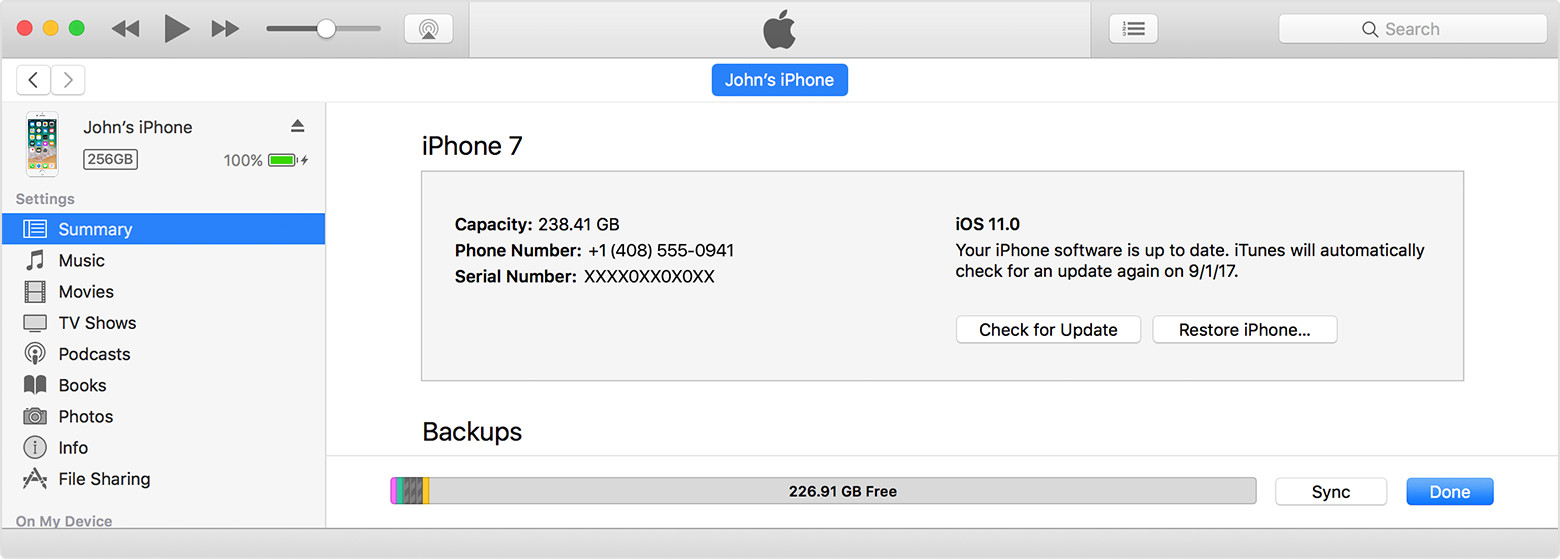
  2. Connect your device to your computer using the included USB cable. Your connected device appears as an icon in the upper-left corner of the iTunes window. Learn what to do if you don't see the icon.
  3. Click on the device icon User uploaded file .
    User uploaded file
  4. Under Settings on the left side of the iTunes Window, click the content type for which you want to turn off syncing.
  5. In the main iTunes window, uncheck the box next to Sync. All of that content type will be removed from your iOS device.
  6. Click the Apply button to save your sync settings.


Thanks for using the Apple Support Communities. Cheers!
1 reply
Question marked as Top-ranking reply

Feb 18, 2018 10:57 AM in response to liviofabio

Hi liviofabio,

I understand that not all of your music is showing up on your iPod nano, and iTunes is unable to see your iPod. I'm happy to provide some help for this issue.

First, you'll want to make sure that iTunes is able to see your iPod. I recommend going through the troubleshooting provided here:

If iTunes doesn't recognize your iPhone, iPad, or iPod - Apple Support

Once that's done, you can resolve your missing music by turning off sync, and then syncing your music again using the steps in the article below:

Sync your iPhone, iPad, or iPod touch with iTunes on your computer using USB - Apple Support


Turn off syncing in iTunes

  1. Open iTunes. Make sure that you have the latest version.
  2. Connect your device to your computer using the included USB cable. Your connected device appears as an icon in the upper-left corner of the iTunes window. Learn what to do if you don't see the icon.
  3. Click on the device icon User uploaded file .
    User uploaded file
  4. Under Settings on the left side of the iTunes Window, click the content type for which you want to turn off syncing.
  5. In the main iTunes window, uncheck the box next to Sync. All of that content type will be removed from your iOS device.
  6. Click the Apply button to save your sync settings.


Thanks for using the Apple Support Communities. Cheers!

This thread has been closed by the system or the community team. You may vote for any posts you find helpful, or search the Community for additional answers.

ipod content is not showing;

Welcome to Apple Support Community
A forum where Apple customers help each other with their products. Get started with your Apple Account.