how to place pdf files on desktop screen?
how can i change where pdf files will appear on the desktop screen? i would like them to appear in the right hand corner instead of the middle of my desktop screen.
OS X Mavericks (10.9.5)
how can i change where pdf files will appear on the desktop screen? i would like them to appear in the right hand corner instead of the middle of my desktop screen.
OS X Mavericks (10.9.5)
Hi, charlespurin.
I see that you'd like to relocate the *.pdf files on the desktop of your Mac to the upper-right corner of the screen. I'm happy to help.
Mac Basics: Desktop -- Arrange your desktop as a grid and relocate the files to the upper-right corner.
Customize your desktop
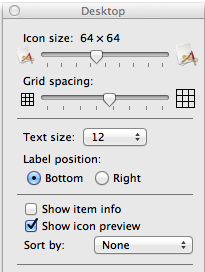
You can change the size of icons, arrange them in a grid, and set other preferences for items on your desktop by changing the view options on your desktop. To change your desktop view options, click the desktop, and then choose View > Show View Options from menu bar. You can try the different settings to see which ones you like—you will immediately see the effects of your changes.
Take care!
wow. really interesting option that you showed here. i like it especially how shows the number of items in a file.
it is a useful option. me, i found the pdfs that i make want to go to a folder position. when i moved my folder they went on the desktop screen to where the folder's old position was on the screen. i moved the folder again and the pdfs appeared in the next old position of the folder on the desktop screen. thank you for your answer this will be helpful to me because i have a small screen.
warning though. this will mess up the organization of however you previously had your files organized. there was no undo after doing.
how to place pdf files on desktop screen?