Keyboard that allows pause/break, prt screen etc?

I use Windows 10 in Bootcamp a lot, and currently I use a Logitech keyboard when using Windows and a Magic Apple keyboard when I'm using macOS.

I need the functionality of the Windows num pad keys, e.g. pause/break, etc.

Ideally, I would like to dump the Logitech keyboard as it looks not so good, and it's messy swapping keyboards all the time.

I have looked at various bolt on numpads for Mac, e.g. Belkin or Cateck, but can't see which ones will provide the functionality I need. They all seem to have keys like home/page down/end, etc. but it is not always obvious about things like the pause/break key.

Also, I know there is supposed to be a way of getting these keys using the standard Apple Magic Keyboard, e.g. Shift+Fn+F11 for print screen, but they don't work if you have the function keys set to 'standard function keys' in Bootcamp control panel.

Can anyone recommend a solution to this, e.g. a numpad type extension that works with the keys I mentioned? Does the large Apple Magic Keyboard work with all these Windows keys?

iPhone 6s, iMac late 2015, etc. etc.

Posted on Mar 8, 2018 2:36 AM

Reply

Similar questions

69 replies

Mar 21, 2018 1:21 AM in response to igmackenzie

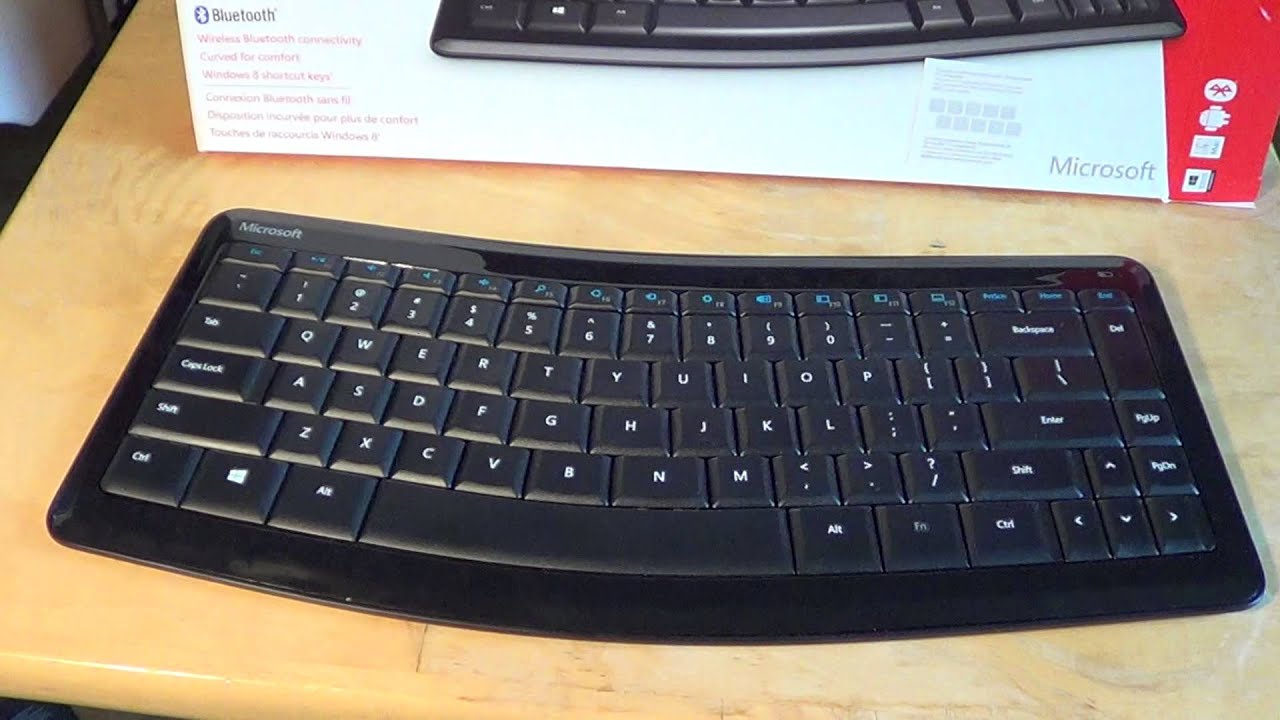
I use


Sculpt Ergonomic Desktop Keyboard & Mouse | Microsoft Hardware

and

https://i.ytimg.com/vi/1TdYak1KzjY/maxresdefault.jpg


the only apple input device I use is the magic trackpad


and then a razer mouse and some logitech bluetooth mouse


all works just great with their respective keys and at the same time all at once

use them both in macOS and windows


it's transparent for windows that it's running in bootcamp on a mac which original keyboard did not have pause/break, prt screen, it just recieve the input from the keyboard and respond in kind.

Mar 30, 2018 1:13 PM in response to igmackenzie

igmackenzie wrote:


I have to use a mouse, go to BT preferences and then select 'Connect' on the Trackpad.

All this is very irritating and time wasting.


The 'link' keys are somehow being corrupted, if you are seeing this behavior. Can you use Dual Booting Windows 7 + Mac (Mountain Lion) with both Magic Trackpad and Magic Mouse to examine the link keys? Do not make any changes.

Mar 27, 2018 12:54 PM in response to Loner T

I understand!

I am now having big problems with my Magic Trackpad and the keyboard on Windows.

The Trackpad either doesn't get recognised at boot up, or if it does, the functionality is screwed - gestures as per settings just not working - and the keyboard panel doesn't show in Bootcamp control panel at all! It sort of works, but certain keys don't, e.g. '=' on the num pad in Excel.

Mar 28, 2018 5:08 AM in response to Loner T

No difference, sadly.

The keyboard works 90% of the time in BT, and always when connected via lightning cable.

The Magic Trackpad only works when connected via cable. It is showing in Bluetooth Devices as connected, but there is nothing from it at all, no cursor movement, nothing. I have to use a mouse, which is not good!

I still get the occasional issue when the Trackpad won't connect at startup in macOS as well.

Mar 29, 2018 3:58 AM in response to igmackenzie

I think I should start another thread on this topic, however, can you just confirm if in device Manager under the Magic Trackpad and Keyboard driver info, if it should say Microsoft or Apple as manufacturer?

Mine both say Microsoft which doesn't seem right.

Also, when running the Bootcamp driver installer, I get an error saying the installer had to quit, but then when I select cancel, it seems to carry on installing.

Mar 29, 2018 3:25 PM in response to Loner T

So, today I spent the whole day trying out various strategies regarding reinstalling Windows.

I tried installing Bootcamp driver package after the initial Windows install. I also tried installing Bootcamp drivers after doing all the Windows updates, etc. and always get the same result, i.e. the Trackpad doesn't work, and the Keyboard about 90%.

Even after the bootcamp driver install, the trackpad and keyboard both show under Bluetooth devices as having a MS driver, not Apple. They both show up in the Bootcamp Control Panel, and in Bluetooth devices. Sometimes that says 'Paired' and sometimes 'Connected'.

The interesting issue is that when I boot back into macOS after a non-appearing Windows Trackpad, the Trackpad doesn't show on startup in macOS. I have to use a mouse, go to BT preferences and then select 'Connect' on the Trackpad.

All this is very irritating and time wasting.

Mar 31, 2018 8:14 AM in response to Loner T

Loner T wrote:


The 'link' keys are somehow being corrupted, if you are seeing this behavior. Can you use Dual Booting Windows 7 + Mac (Mountain Lion) with both Magic Trackpad and Magic Mouse to examine the link keys? Do not make any changes.

I'm trying to do this, but I can't get the link key on the Mac side. The sudo command doesn't work - just says the file doesn't exist - and I can't see it in System Report either.

Any help appreciated.

Mar 31, 2018 8:25 AM in response to igmackenzie

On my Mac.. I get


sudo defaults read /private/var/root/Library/Preferences/blued.plist

Password:

{

LinkKeys = {

"5c-96-9d-8d-89-54" = {

"00-07-88-65-4e-36" = <9350d93d 1418089a 2bd1dee8 94eef272>;

};

};

SMPDistributionKeys = {

"5c-96-9d-8d-89-54" = {

"08-66-98-ba-37-66" = {

Address = <086698ba 3766>;

AddressType = 0;

EDIV = <127c>;

IRK = <d25ca123 82c12988 792b2630 31bca9dd>;

LTK = <2e6821fd bf31d702 0530f7ef 09b1b7f9>;

LTKLength = <10>;

LocalEDIV = <87ab>;

LocalLTKLength = <10>;

LocalRAND = <457ac712 50528bd1>;

MITMProtection = 1;

OriginalAddressType = 1;

RAND = <35fb62fe ff19de38>;

};

"6c-96-cf-bd-4d-61" = {

Address = <6c96cfbd 4d61>;

AddressType = 0;

EDIV = <e1fb>;

IRK = <51c0c5c0 8499c6f7 65f51d9b 8c614ef2>;

LTK = <df757ca2 afb97679 13a61d58 d1f90365>;

LTKLength = <10>;

LocalEDIV = <7962>;

LocalLTKLength = <10>;

LocalRAND = <deb29ac8 e8f10429>;

MITMProtection = 1;

OriginalAddressType = 1;

RAND = <8da76366 aa85a663>;

};

"78-4f-43-89-03-d5" = {

Address = <784f4389 03d5>;

AddressType = 0;

EDIV = <49c3>;

IRK = <b5d1e8c2 17faa6d7 d057ce95 14eaae91>;

LTK = <9496e025 e1298ab9 4f534b7c 08be1d76>;

LTKLength = <10>;

LocalEDIV = <512a>;

LocalLTKLength = <10>;

LocalRAND = <246c3449 99054bd7>;

MITMProtection = 1;

OriginalAddressType = 1;

RAND = <e807850b 9b901f75>;

};

"b8-e8-56-35-bf-e3" = {

LTKLength = <10>;

LocalEDIV = <0eac>;

LocalLTKLength = <10>;

LocalRAND = <3f603973 fdf4874f>;

};

"dc-a9-04-9b-78-41" = {

Address = <dca9049b 7841>;

AddressType = 0;

EDIV = <29d2>;

IRK = <3d6b481b 1a1a0d9b a9ecec95 9bc9ae8a>;

LTK = <599146c7 edd8d1a3 fa1a435b 1eb2aa2a>;

LTKLength = <10>;

LocalEDIV = <0501>;

LocalLTKLength = <10>;

LocalRAND = <8ba35aa6 d9f259c4>;

MITMProtection = 1;

OriginalAddressType = 1;

RAND = <538bf14d 17daf456>;

};

};

};

}


In High Sierra, it was changed to


sudo defaults read /private/var/root/Library/Preferences/com.apple.Bluetoothd.plist

Mar 31, 2018 12:43 PM in response to Loner T

Both devices (Magic Trackpad 2 and Magic Keyboard with Num Pad) are matched and in reverse order.

A NVRAM reset makes no difference.

Basically, the Trackpad doesn't work at all in Windows, and if I even try to use it in Windows, it has to be re-connected in macOS on restart. If I keep it switched off in Windows (and use a mouse) then it connects OK when I boot back into macOS.

The keyboard works in both OS pretty much OK, but occasionally it doesn't work in Windows, and I have to connect it via the lightning cable to login.

I should also add that the MT2 works fine if it is plugged in via the lightning cable.

This thread has been closed by the system or the community team. You may vote for any posts you find helpful, or search the Community for additional answers.

Keyboard that allows pause/break, prt screen etc?

Welcome to Apple Support Community
A forum where Apple customers help each other with their products. Get started with your Apple Account.