macbook pro can't print to a shared printer

suddenly, without making any system changes or updates, i can't print to a shared printer from my macbook pro.

i have an iMac and a macbook pro, both running El Capitan. The iMac has a canon printer, with sharing enabled, other MacBooks can print to it, just not with my one macbook. when i try to print, the print field shows the printer as a shared printer @the correct iMac, but when i send the print job, the printer icon blinks in the dock for a fraction of a second, and then disappears.

they are in the same wireless network, i have deleted and reinstalled the printers several times, any ideas would be greatly appreciated.

macbook pro, 2015 running 10.11.6

iMac 2015 running 10.11.6

thanks

MacBook Pro, running el captain 10.11.6

Posted on Mar 20, 2018 10:30 AM

Reply

Similar questions

2 replies

Mar 21, 2018 2:24 PM in response to andrewfrompine

Hi there, andrewfrompine!
Thanks for reaching out to the Apple Support Communities! It sounds like you are having an issue printing from your MacBook Pro and I am happy to help out! You’ve tried an excellent step deleting and reinstalling the printer, and at this point, I would recommend checking out this article If you can't print from your Mac or iOS device, specifically these sections:

Reset the printing system

If the issue continues, reset the printing system on your Mac. This removes all printers and scanners—including their print jobs and settings—from Printers & Scanners preferences.

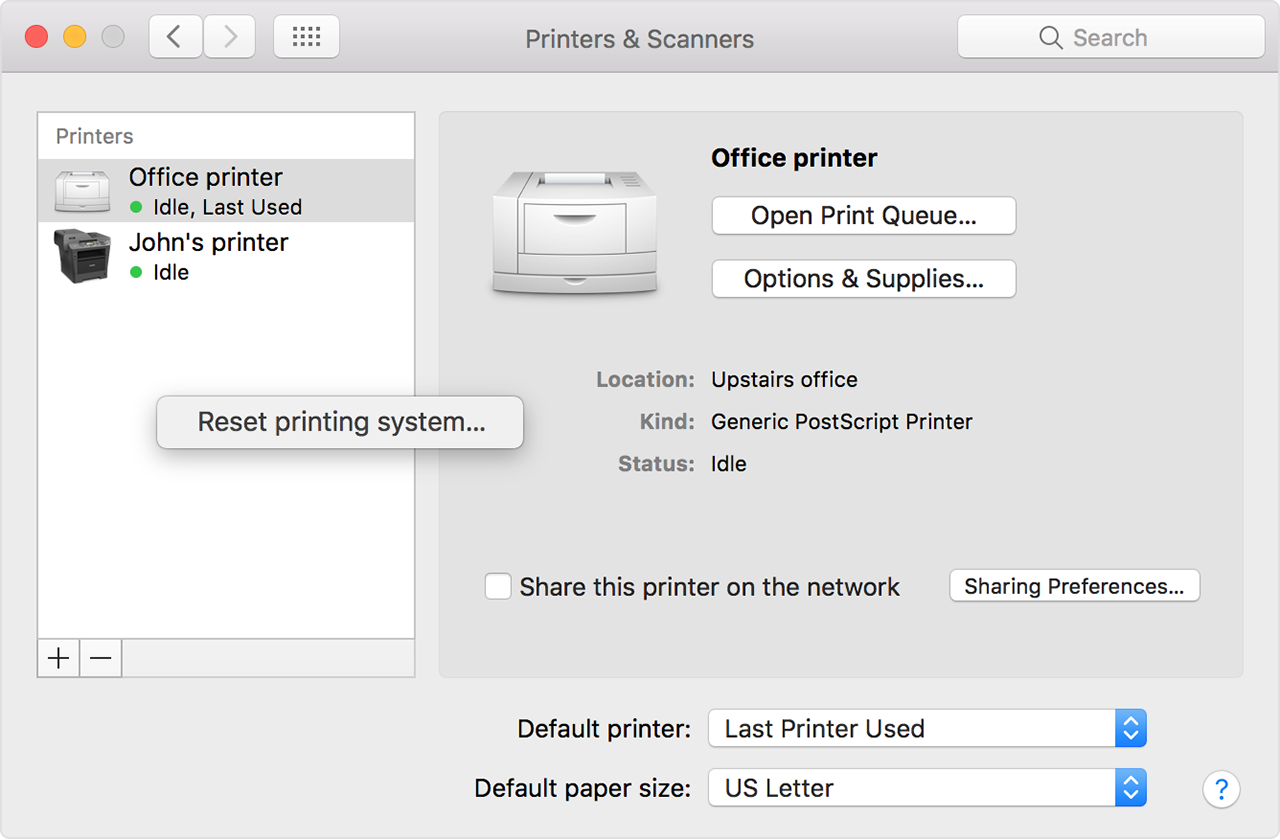
  1. Choose Apple menu > System Preferences, then click Printers & Scanners.
  2. While holding down the Control key on your keyboard, click anywhere in the list of devices.
  3. Choose “Reset printing system” from the menu that appears:

User uploaded file

Remove printer drivers

If the issue continues on your Mac after resetting the printing system, take these final steps to remove any currently installed printer drivers. These steps don't apply to AirPrint printers.

  1. From the menu bar in the Finder, choose Go > Go to Folder. Type
    /Library/Printers/
    and click Go.
  2. The Printers folder opens. Choose Edit > Select All, which selects all items in the Printers folder.
  3. Choose File > New Folder with Selection, which puts all of the selected items into a new folder named New Folder With Items. To save storage space, you can delete this folder.

If the issue continues, contact the printer manufacturer for support.

Take care!

This thread has been closed by the system or the community team. You may vote for any posts you find helpful, or search the Community for additional answers.

macbook pro can't print to a shared printer

Welcome to Apple Support Community
A forum where Apple customers help each other with their products. Get started with your Apple Account.