iPhone X ios 11.3 - Landscape - Ambient Light Sensor Malfunctions

I have an iPhone X running iOS 11.3 and after the update there has been a terrible bug involving the Ambient Light Sensor. If you turn the device to landscape, the screen will turn off/on/off/on over and over. If you can manage to keep the screen on and cover the Ambient Light Sensor with your thumb, the screen shuts off, uncover it, it turns on.


It makes landscape completely unusable. I've also noticed the screen is unresponsive at times in portrait when I tap it to turn it on. Usually it works fine, but there are many occasions where it won't turn on at all until I pick it up.


There's obviously some kind of nasty bug that is unacceptable this far along in the versioning of iOS.


Is anyone else able to replicate this?

iPhone X, iOS 11.3

Posted on Mar 31, 2018 7:56 PM

Reply
Question marked as Top-ranking reply

Posted on Apr 1, 2018 2:57 PM

Hey stevenejb,
It sounds like you’re having an issue with the ambient light sensor where your display turns on and off repeatedly when you turn the iPhone into landscape mode. I’ll be happy to look into this with you.
First, let's try toggling auto-brightness off and then on again in Settings > Display & Brightness, then restart your iPhone. Test again to see if you still experience the issues with landscape mode.
Do you have a protective case or protective film on your iPhone? If so, we recommend removing them and testing the iPhone again. Because the issue is with the ambient sensor and with the display not responding to touch sometimes, the issue could be with interference.
If the issue persists, I recommend that you reinstall iOS on your device. Before you proceed, please back up your data using the steps below:
How to back up your iPhone, iPad, and iPod touch - Apple Support
Once you've verified that your backup is current, follow the steps below to reinstall iOS on your iPhone. Keep in mind that this article was written for a different issue, but these steps will still be helpful:
If your iPhone, iPad, or iPod touch won't turn on or is frozen - Apple Support
Here’s the steps:

If your device turns on but gets stuck during start up

If you see the Apple logo or a red or blue screen during startup, try these steps:

  1. Connect your device to a computer and open iTunes. If you don't have a computer, try to borrow one, or go to an Apple Store or Apple Authorized Service Provider for help.
  2. While your device is connected, force it to restart.
    • On an iPhone X, iPhone 8, or iPhone 8 Plus: Press and quickly release the Volume Up button. Press and quickly release the Volume Down button. Then, press and hold the Side button until you see the recovery-mode screen.
    • On an iPhone 7 or iPhone 7 Plus: Press and hold the Side and Volume Down buttons at the same time. Keep holding them until you see the recovery-mode screen.
    • On an iPhone 6s and earlier, iPad, or iPod touch: Press and hold both the Home and the Top (or Side) buttons at the same time. Keep holding them until you see the recovery-mode screen.
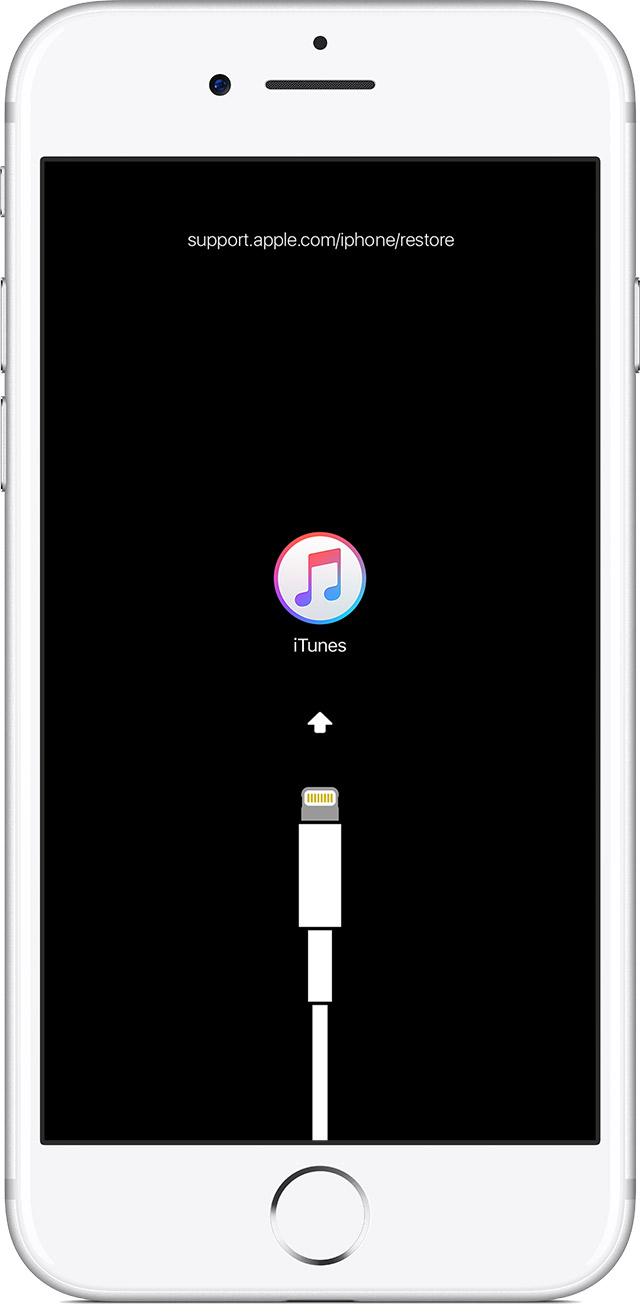
  3. Don't release the buttons when you see the Apple logo. Keep holding until you see the recovery mode screen.
    User uploaded file
  4. When you get the option to restore or update, choose Update. iTunes will try to reinstall iOS without erasing your data.
    User uploaded file

iTunes will download the software for your device. If it takes more than 15 minutes, your device will exit recovery mode and you'll need to repeat steps 2 and 3.

Take care!

Similar questions

9 replies
Question marked as Top-ranking reply

Apr 1, 2018 2:57 PM in response to stevenejb

Hey stevenejb,
It sounds like you’re having an issue with the ambient light sensor where your display turns on and off repeatedly when you turn the iPhone into landscape mode. I’ll be happy to look into this with you.
First, let's try toggling auto-brightness off and then on again in Settings > Display & Brightness, then restart your iPhone. Test again to see if you still experience the issues with landscape mode.
Do you have a protective case or protective film on your iPhone? If so, we recommend removing them and testing the iPhone again. Because the issue is with the ambient sensor and with the display not responding to touch sometimes, the issue could be with interference.
If the issue persists, I recommend that you reinstall iOS on your device. Before you proceed, please back up your data using the steps below:
How to back up your iPhone, iPad, and iPod touch - Apple Support
Once you've verified that your backup is current, follow the steps below to reinstall iOS on your iPhone. Keep in mind that this article was written for a different issue, but these steps will still be helpful:
If your iPhone, iPad, or iPod touch won't turn on or is frozen - Apple Support
Here’s the steps:

If your device turns on but gets stuck during start up

If you see the Apple logo or a red or blue screen during startup, try these steps:

  1. Connect your device to a computer and open iTunes. If you don't have a computer, try to borrow one, or go to an Apple Store or Apple Authorized Service Provider for help.
  2. While your device is connected, force it to restart.
    • On an iPhone X, iPhone 8, or iPhone 8 Plus: Press and quickly release the Volume Up button. Press and quickly release the Volume Down button. Then, press and hold the Side button until you see the recovery-mode screen.
    • On an iPhone 7 or iPhone 7 Plus: Press and hold the Side and Volume Down buttons at the same time. Keep holding them until you see the recovery-mode screen.
    • On an iPhone 6s and earlier, iPad, or iPod touch: Press and hold both the Home and the Top (or Side) buttons at the same time. Keep holding them until you see the recovery-mode screen.
  3. Don't release the buttons when you see the Apple logo. Keep holding until you see the recovery mode screen.
    User uploaded file
  4. When you get the option to restore or update, choose Update. iTunes will try to reinstall iOS without erasing your data.
    User uploaded file

iTunes will download the software for your device. If it takes more than 15 minutes, your device will exit recovery mode and you'll need to repeat steps 2 and 3.

Take care!

May 13, 2018 1:08 PM in response to jeremy_v

I started to experience this issue at random, two days ago. I am not sure what triggered the issue, since I had not updated my phone recently. This was quickly becoming a very frustrating bug since I had to remind myself to operate the phone one handed while doing anything on landscape mode. I followed the instructions provided here and it worked on the second attempt.


Thanks

This thread has been closed by the system or the community team. You may vote for any posts you find helpful, or search the Community for additional answers.

iPhone X ios 11.3 - Landscape - Ambient Light Sensor Malfunctions

Welcome to Apple Support Community
A forum where Apple customers help each other with their products. Get started with your Apple Account.