Airpods skipping to next song on their own

So I was folding laundry with my airpods in (I don't use them for music much) and they would just jump to the next song in the middle of a song (like you hit the next song button). I assume it was due to some motion I was making but it was annoying, it played 6 songs and only got to hear 1 all the way though. Is there a setting for this?


Don't know if it's relevant but I also had my Apple watch on at the time. I was not touching the phone, earpods or watch when this happened.

iPhone 7 Plus, iOS 11.3, 128, ATT

Posted on Apr 8, 2018 6:22 PM

Reply
Question marked as Top-ranking reply

Posted on Apr 9, 2018 4:24 PM

Hello, Terry Morris.

It's my understanding that your AirPods have skipped some songs while doing laundry and you want to know if you can change the settings. The answer is yes, and I may be able to help you with this. First, make sure that this doesn't continue to be an issue. Try seeing if other types of activity including not doing any movement to see if the songs still skip. If they don't then we could say that your movement caused the songs to skip.

I do have an article that will let you adjust what the double taps do for your AirPods. Check it out and try some settings to see if that helps: Learn more about your AirPods with charging case

Adjust the features of your AirPods

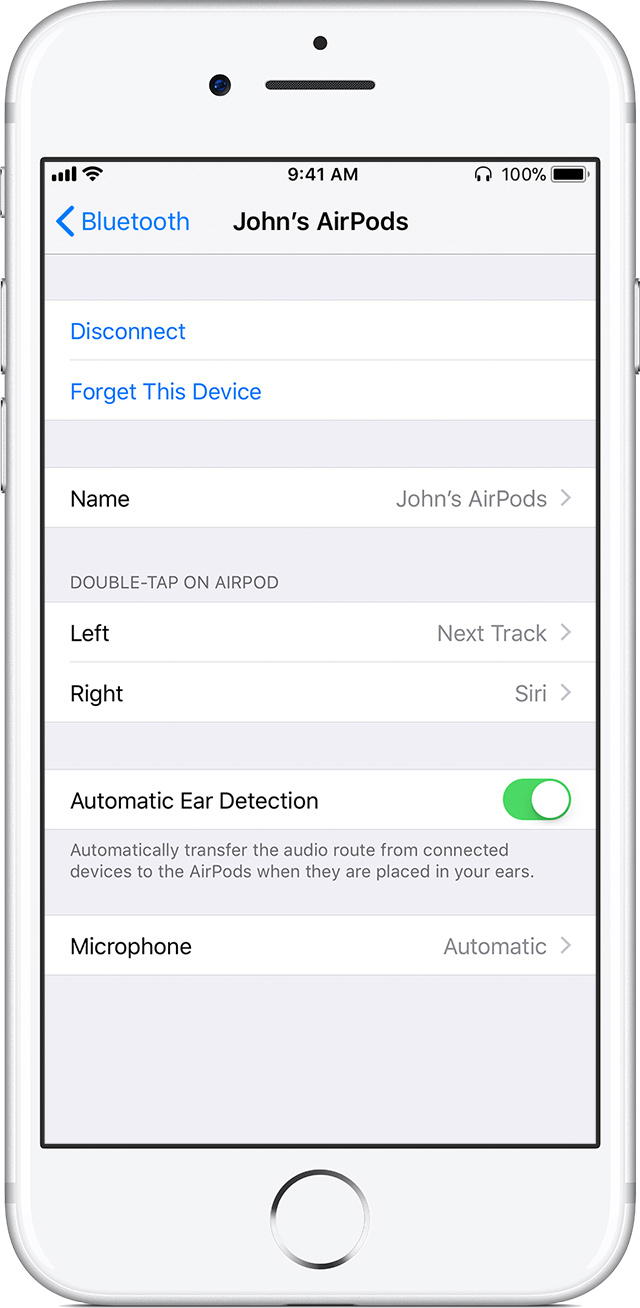
Open the AirPod Case, then go to Settings > Bluetooth on your iOS device. Tap User uploaded file next to your AirPods in the list of devices. Here's what you can do:


User uploaded file

Name your AirPods

Tap the current name. Then enter a new name for your AirPods and tap Done.

Change your double tap

Select the left or right AirPod in the Bluetooth screen and then choose what you want to happen when you double-tap the AirPod:

  • Use Siri to control your audio content, change the volume, or do anything else Siri can do
  • Play, pause, or stop your audio content
  • Skip to the next track
  • Go back to the previous track
Let me know if this helps.

Thank you for using Apple Support Communities.

Cheers!
1 reply
Question marked as Top-ranking reply

Apr 9, 2018 4:24 PM in response to Terry Morris

Hello, Terry Morris.

It's my understanding that your AirPods have skipped some songs while doing laundry and you want to know if you can change the settings. The answer is yes, and I may be able to help you with this. First, make sure that this doesn't continue to be an issue. Try seeing if other types of activity including not doing any movement to see if the songs still skip. If they don't then we could say that your movement caused the songs to skip.

I do have an article that will let you adjust what the double taps do for your AirPods. Check it out and try some settings to see if that helps: Learn more about your AirPods with charging case

Adjust the features of your AirPods

Open the AirPod Case, then go to Settings > Bluetooth on your iOS device. Tap User uploaded file next to your AirPods in the list of devices. Here's what you can do:


User uploaded file

Name your AirPods

Tap the current name. Then enter a new name for your AirPods and tap Done.

Change your double tap

Select the left or right AirPod in the Bluetooth screen and then choose what you want to happen when you double-tap the AirPod:

  • Use Siri to control your audio content, change the volume, or do anything else Siri can do
  • Play, pause, or stop your audio content
  • Skip to the next track
  • Go back to the previous track
Let me know if this helps.

Thank you for using Apple Support Communities.

Cheers!

This thread has been closed by the system or the community team. You may vote for any posts you find helpful, or search the Community for additional answers.

Airpods skipping to next song on their own

Welcome to Apple Support Community
A forum where Apple customers help each other with their products. Get started with your Apple Account.