Can't add my phone number to imessage on a macbook

I recently got a new phone number, and I deleted my old number from imessages (by going into preferences), but now i can't add a new number, it will only let me have my email connected and does not have any of the information on mine that it does on websites that tell you how to connect it. Thank you.

MacBook Air, iOS 10.3.3

Posted on Apr 17, 2018 6:15 PM

Reply
Question marked as Top-ranking reply

Posted on Apr 18, 2018 10:59 AM

Hello CatchThisShade,


Thanks for that info and choosing the Apple Support Communities. If I understand correctly, you are unable to add your new phone number in Messages on your MacBook Air. To help with this issue, please restart your MacBook Air and iPhone, and then follow these steps:

Turn your phone number on or off for your Mac

After you set up your phone number, you can turn it on or off for Messages and FaceTime on your Mac.

  1. Open Messages or FaceTime. If asked, sign in with the Apple ID you're using with Messages and FaceTime on your iPhone.
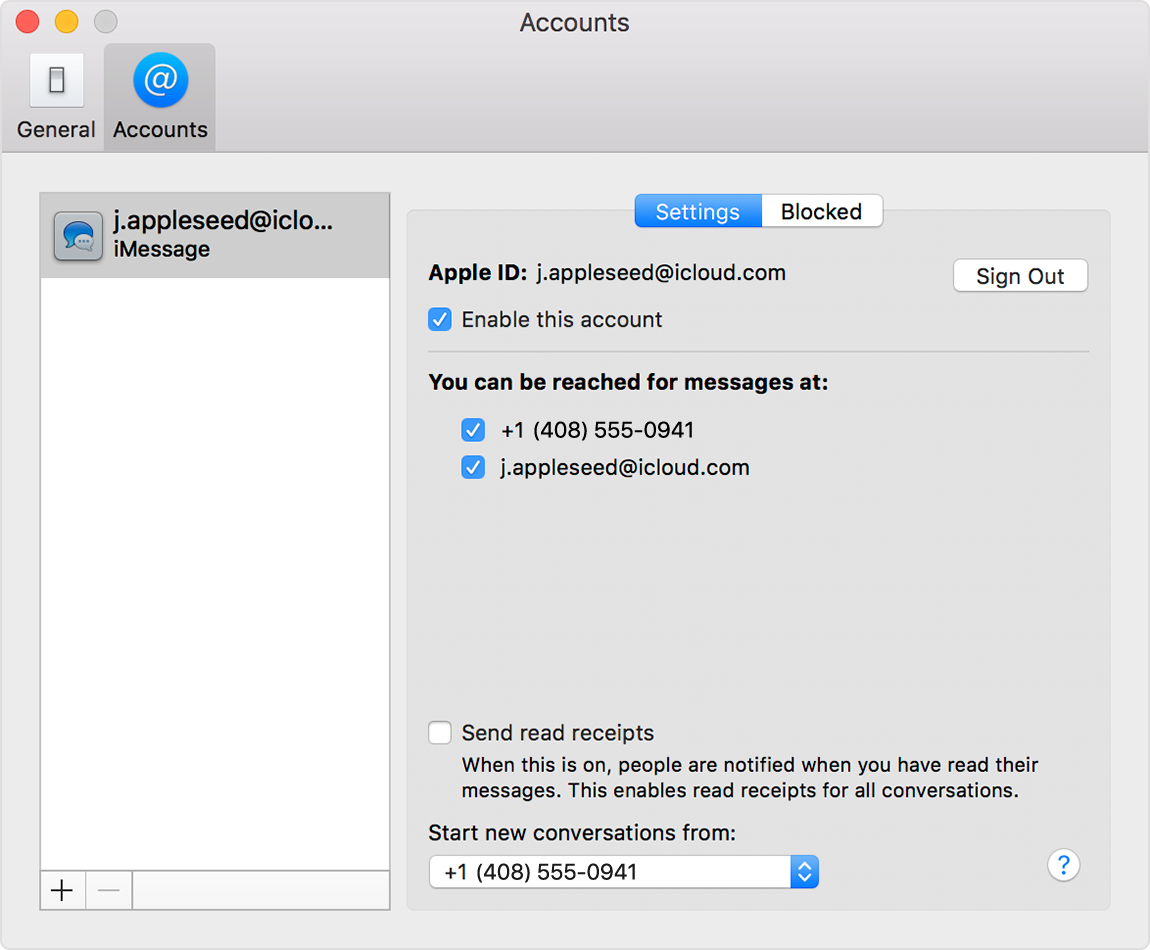
  2. In Messages, choose Messages > Preferences, then click Accounts and select your iMessage account. In FaceTime, choose FaceTime > Preferences, then click Settings.
  3. Turn your phone number on or off:
  4. If you want recipients to see your phone number and not your Apple ID, select your phone number from the “Start new conversations from” or ”Start new calls from” pop-up menu.

User uploaded file

Text messages that you send and receive on your iPhone can also be made to appear on your Mac, iPad, and iPod touch. Learn more.


Add or remove your phone number in Messages or FaceTime - Apple Support


Cheers!
1 reply
Question marked as Top-ranking reply

Apr 18, 2018 10:59 AM in response to CatchThisShade

Hello CatchThisShade,


Thanks for that info and choosing the Apple Support Communities. If I understand correctly, you are unable to add your new phone number in Messages on your MacBook Air. To help with this issue, please restart your MacBook Air and iPhone, and then follow these steps:

Turn your phone number on or off for your Mac

After you set up your phone number, you can turn it on or off for Messages and FaceTime on your Mac.

  1. Open Messages or FaceTime. If asked, sign in with the Apple ID you're using with Messages and FaceTime on your iPhone.
  2. In Messages, choose Messages > Preferences, then click Accounts and select your iMessage account. In FaceTime, choose FaceTime > Preferences, then click Settings.
  3. Turn your phone number on or off:
  4. If you want recipients to see your phone number and not your Apple ID, select your phone number from the “Start new conversations from” or ”Start new calls from” pop-up menu.

User uploaded file

Text messages that you send and receive on your iPhone can also be made to appear on your Mac, iPad, and iPod touch. Learn more.


Add or remove your phone number in Messages or FaceTime - Apple Support


Cheers!

This thread has been closed by the system or the community team. You may vote for any posts you find helpful, or search the Community for additional answers.

Can't add my phone number to imessage on a macbook

Welcome to Apple Support Community
A forum where Apple customers help each other with their products. Get started with your Apple Account.