Hi,James,
Not sure what you are trying to do. Could you describe your project in more detail?
You can line up as many videos, or trimmed down clips, as you want above a longer video, and as the playhead moves along the video will alternate back and forth between the main timeline video and the ones above. You can mute the top video so that the audio of the longer video below will play continuously. Is that what you are looking for?
Below is a copy of the Help link that shows how to work with cutaways:
"Create effects with multiple clips
You can add a cutaway clip above another clip to show two different perspectives of a single event. For example, you could show someone about to enter a surprise party, and then cut away to a view of the people waiting inside.
When you add a cutaway clip, it covers an equal portion of the video clip you added it to, so the duration of your movie doesn’t change.
Select a clip or range you want to cut away to, and drag it above a clip in the timeline.As you drag the clip, the pointer changes to the green Add icon (+), and a line appears connecting the clip you’re dragging to the clip in the timeline.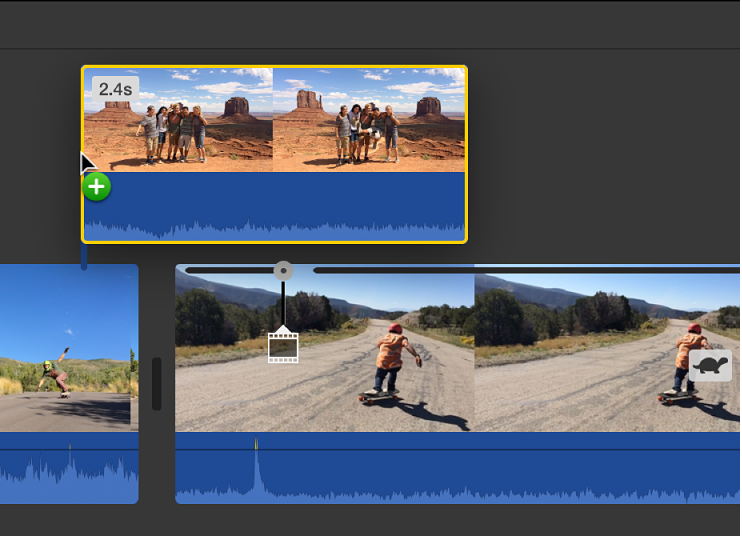 When the clip is placed where you want it, release the mouse button.To reposition the cutaway clip, drag it to a different spot within the clip, or to a different clip. You can also drag the ends to lengthen or shorten it.Note: You can also add a cutaway by dragging a clip already in the timeline above another clip in the timeline."
-- Rich
