
I have tried and tried to delete someone from a group chat by swiping left to right and right to left but it only goes directly to their entire contact info when I do that. What am I doing wrong?

I have tried and tried to delete someone from a group chat by swiping left to right and right to left but it only goes directly to their entire contact info when I do that. What am I doing wrong?
Posted on May 2, 2018 10:25 AM

Reply
Question marked as Top-ranking reply

Posted on May 3, 2018 9:05 AM

Hello Tlgarrett,


Thanks for that info and choosing the Apple Support Communities. Based on what you stated, it seems you are having issues with removing a contact from a group message thread on your iPhone. To help with this issue, restart your iPhone and then follow these steps:

Add or remove someone from a group conversation

Anyone in a group iMessage can add or remove someone from the conversation. You can remove a person from a group iMessage that has at least three other people. You can’t add or remove people from group MMS messages or group SMS messages.

Remove a person

User uploaded file

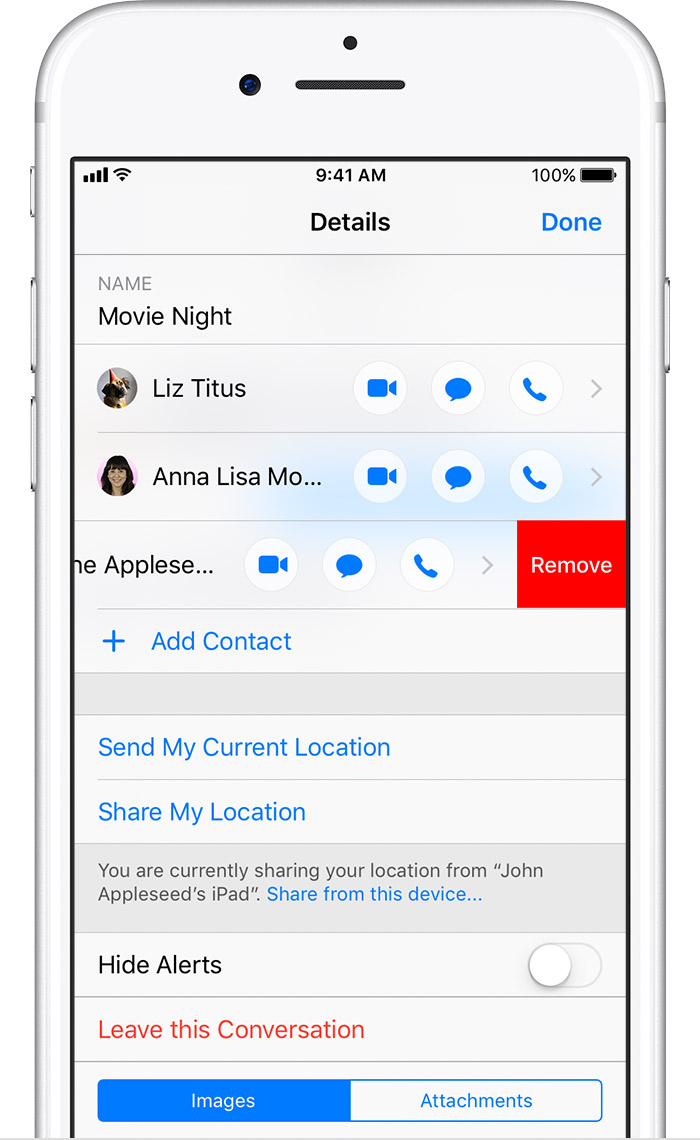
  1. Tap the group conversation that has the contact you want to remove.
  2. Tap User uploaded file, then swipe left over the name of the person you want to remove.
  3. Tap Remove, then tap Done.


Restart your iPhone, iPad, or iPod touch ​
Send a group message on your iPhone, iPad, or iPod touch - Apple Support


Cheers!
1 reply
Question marked as Top-ranking reply

May 3, 2018 9:05 AM in response to Tlgarrett

Hello Tlgarrett,


Thanks for that info and choosing the Apple Support Communities. Based on what you stated, it seems you are having issues with removing a contact from a group message thread on your iPhone. To help with this issue, restart your iPhone and then follow these steps:

Add or remove someone from a group conversation

Anyone in a group iMessage can add or remove someone from the conversation. You can remove a person from a group iMessage that has at least three other people. You can’t add or remove people from group MMS messages or group SMS messages.

Remove a person

User uploaded file

  1. Tap the group conversation that has the contact you want to remove.
  2. Tap User uploaded file, then swipe left over the name of the person you want to remove.
  3. Tap Remove, then tap Done.


Restart your iPhone, iPad, or iPod touch ​
Send a group message on your iPhone, iPad, or iPod touch - Apple Support


Cheers!

This thread has been closed by the system or the community team. You may vote for any posts you find helpful, or search the Community for additional answers.

I have tried and tried to delete someone from a group chat by swiping left to right and right to left but it only goes directly to their entire contact info when I do that. What am I doing wrong?

Welcome to Apple Support Community
A forum where Apple customers help each other with their products. Get started with your Apple Account.