I accidentally subscribed to the Family Plan for Apple Music but immediately cancelled it...

Hello,

I just accidentally signed up for the family plan on Apple Music thinking that I had the first three months free as was listed before I confirmed.


But when I confirmed, it said it charged me $14.99 and would charge another $14.99 if I didn‘t cancel before the 1 month ended.


I’d Like to get the $14.99 refunded and just sign up for the free 3 month trial...how do I get refunded please as I haven’t used the service yet and cancelled it literally 1 minute or so after I accidentally confirmed???


Thanks for your assistance!!

Posted on Jun 16, 2018 12:48 AM

Reply
Question marked as Top-ranking reply

Posted on Jun 18, 2018 2:15 PM

Hello, InquiryPerson.

Welcome to Apple Support Communities.

It's my understanding that you accidentally signed up for Apple Music Family Plan and you want a refund. First, make sure that you cancel the Apple Music subscription: Manage your Apple Music subscription on your iPhone, iPad, iPod touch, Mac, PC, or Apple TV

Cancel your subscription

You can cancel Apple Music on your iPhone, iPad or iPod touch; your Mac or PC; or your Apple TV.

If you cancel during your trial period, you'll continue to have access to the entire Apple Music catalog until the date that you would have been billed for the full price.

Your subscription might renew if you don't cancel more than 24 hours before your renewal date.

On your iPhone, iPad, or iPod touch

To view your subscription, tap this link: View my subscription. Or follow these steps:

  1. Open the Music app, then tap For You.
  2. Tap the profile icon User uploaded file or your photo in the upper-right corner.
  3. Scroll to the bottom of your profile page and tap View Account. If you haven't set up an Apple Music profile, skip to step 4.
  4. Tap View Apple ID. You might be asked to authenticate your Apple ID.
  5. Scroll to Subscriptions and tap it, then tap Apple Music. If you don't have any other subscriptions, you'll go straight to Apple Music.
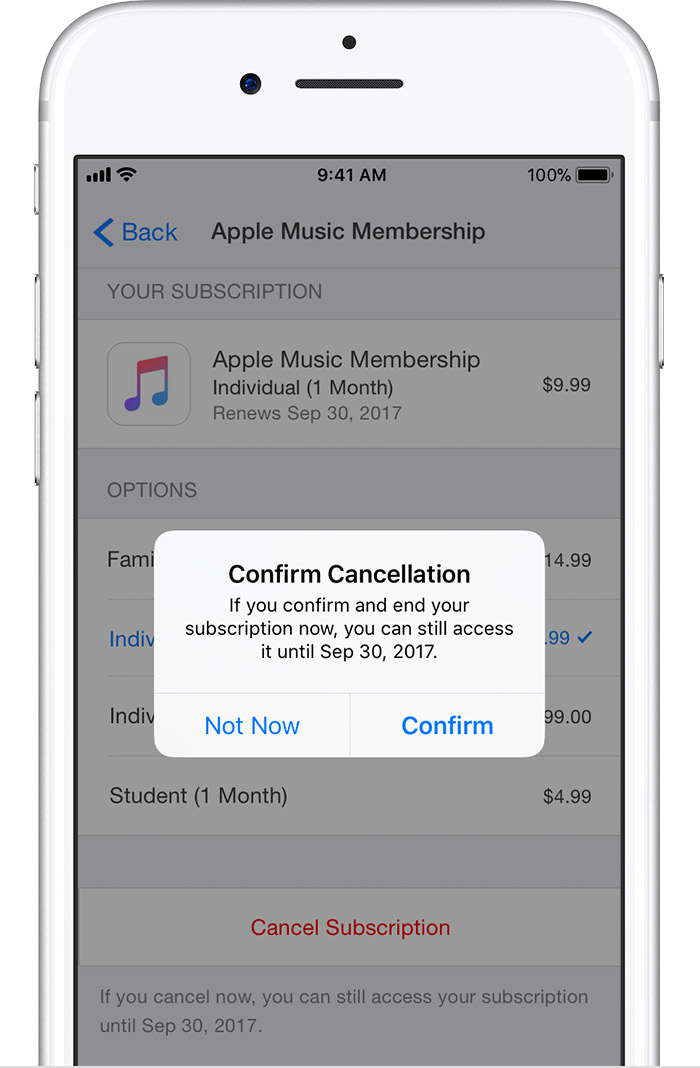
  6. Tap Cancel Subscription, then tap Confirm. After you cancel, your subscription will stop at the end of the current billing cycle.
    User uploaded file

Carrier-bundled subscriptions are managed through the carrier. Contact your carrier to cancel.

Then contact iTunes Support for your refund request.

Thank you for using Apple Support Communities.

Cheers!
1 reply
Question marked as Top-ranking reply

Jun 18, 2018 2:15 PM in response to InquiryPerson

Hello, InquiryPerson.

Welcome to Apple Support Communities.

It's my understanding that you accidentally signed up for Apple Music Family Plan and you want a refund. First, make sure that you cancel the Apple Music subscription: Manage your Apple Music subscription on your iPhone, iPad, iPod touch, Mac, PC, or Apple TV

Cancel your subscription

You can cancel Apple Music on your iPhone, iPad or iPod touch; your Mac or PC; or your Apple TV.

If you cancel during your trial period, you'll continue to have access to the entire Apple Music catalog until the date that you would have been billed for the full price.

Your subscription might renew if you don't cancel more than 24 hours before your renewal date.

On your iPhone, iPad, or iPod touch

To view your subscription, tap this link: View my subscription. Or follow these steps:

  1. Open the Music app, then tap For You.
  2. Tap the profile icon User uploaded file or your photo in the upper-right corner.
  3. Scroll to the bottom of your profile page and tap View Account. If you haven't set up an Apple Music profile, skip to step 4.
  4. Tap View Apple ID. You might be asked to authenticate your Apple ID.
  5. Scroll to Subscriptions and tap it, then tap Apple Music. If you don't have any other subscriptions, you'll go straight to Apple Music.
  6. Tap Cancel Subscription, then tap Confirm. After you cancel, your subscription will stop at the end of the current billing cycle.
    User uploaded file

Carrier-bundled subscriptions are managed through the carrier. Contact your carrier to cancel.

Then contact iTunes Support for your refund request.

Thank you for using Apple Support Communities.

Cheers!

This thread has been closed by the system or the community team. You may vote for any posts you find helpful, or search the Community for additional answers.

I accidentally subscribed to the Family Plan for Apple Music but immediately cancelled it...

Welcome to Apple Support Community
A forum where Apple customers help each other with their products. Get started with your Apple Account.