Outdoor Cycle doesn't show distance and speed

Hi,

Outdoor Cycle doesn't show distance and speed, in the Activity App as well ,

the route map in the Activity App show me the route correct.

outdoor walk and run work fine, they show me the distance .

i receive on the watch workout summary that the GPS not available

third party app like Strava works fine.

tried to unpair and pair - no success

try to reset IPhone and IWatch - no success

all Location Services , Motion & Fitness on,

could you help me with that ?


Thanks

Roni

iPhone 5, iOS 8

Posted on Jun 24, 2018 3:16 AM

Reply
5 replies

Jun 26, 2018 1:36 PM in response to roni gamliel

Hey roni gamliel,

Thanks for clarifying the software details. You mentioned that you tried to reset your Apple Watch as well as your iPhone to see if this would help but had no success. When you reset your Apple Watch, did you restore from a previous backup or setup as a new Watch? If you restored from a backup, what I'd suggest next is to erase your Apple Watch and setup as new to see if this issue continues.

Check out the resource below for more info.
Unpair your Apple Watch and iPhone

Erase your Apple Watch

If you don't have your iPhone and can't unpair, you can still erase all content and settings on your Apple Watch:

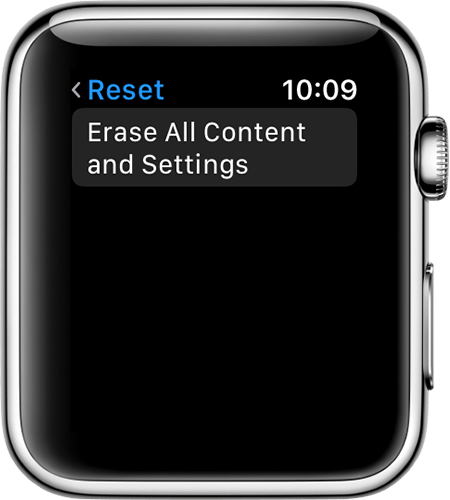
  1. On your Apple Watch, tap Settings > General > Reset > Erase All Content and Settings.
    User uploaded file
  2. For Apple Watch Series 3 (GPS + Cellular), choose to keep or remove your cellular plan.
    • If you want to pair your Apple Watch and iPhone again, keep your plan.
    • If you don't want to pair your Apple Watch and iPhone again, remove your plan. If you aren't going to pair with a different watch or iPhone, you might need to contact your carrier to cancel your cellular subscription.
  3. Tap Erase All to confirm. This resets your Apple Watch to the factory settings.

Cheers.

Jun 25, 2018 1:54 PM in response to roni gamliel

Hello Skala1975,

I understand your not getting distance and speed results when using Outdoor Cycle with your Apple Watch. It sounds like you've tried some great steps as well to try and resolve this but still no success. I can understand your concern and I'll be happy to help. It looks like you may be on an older version of iOS for your iPhone. What we'd suggest next is to back up and update your device as explained in the links below.

Update your iPhone, iPad, or iPod touch
Update your Apple Watch

From there, I'd suggest that you calibrate your watch so that it can properly calculate activity-related results.
Calibrating your Apple Watch for improved Workout and Activity accuracy

Cheers.

Jul 2, 2018 6:30 AM in response to roni gamliel

Hey roni gamliel,

Thanks for clarifying that for us. Due to the nature of the issue, you may find more information by using another one of Apple's support resources - Contact Apple Support . Alternatively, you can visit an Apple Retail Store or Apple Authorized Service Provider near you that can take a look at this for you as well from this link here: Find Locations

Thanks for using Apple Support Communities.

Take care.

This thread has been closed by the system or the community team. You may vote for any posts you find helpful, or search the Community for additional answers.

Outdoor Cycle doesn't show distance and speed

Welcome to Apple Support Community
A forum where Apple customers help each other with their products. Get started with your Apple Account.