apple music wont let me edit playlist

I’ve tried deleting and trying again but it won’t let me delete playlist and make new ones either, I can download music and add them to playlist but it doesn’t show up and if it does it doesn’t play. It just goes straight to a different song

Posted on Jul 2, 2018 1:59 PM

Reply
Question marked as Top-ranking reply

Posted on Jul 3, 2018 12:22 PM

Hello and welcome to Apple Support Communities, Emrobertss!

I understand you're trying to edit a playlist and have been unable to, as well as being unable to delete the playlist. You're also experiencing an issue where you're unable to play the songs. I'd be happy to provide you with information to help you out in this situation.

Check out this article. You may need to turn off iCloud Music Library and then reenable it. Keep in mind, this will delete any downloaded music: Turn on iCloud Music Library


On your iPhone, iPad, or iPod touch

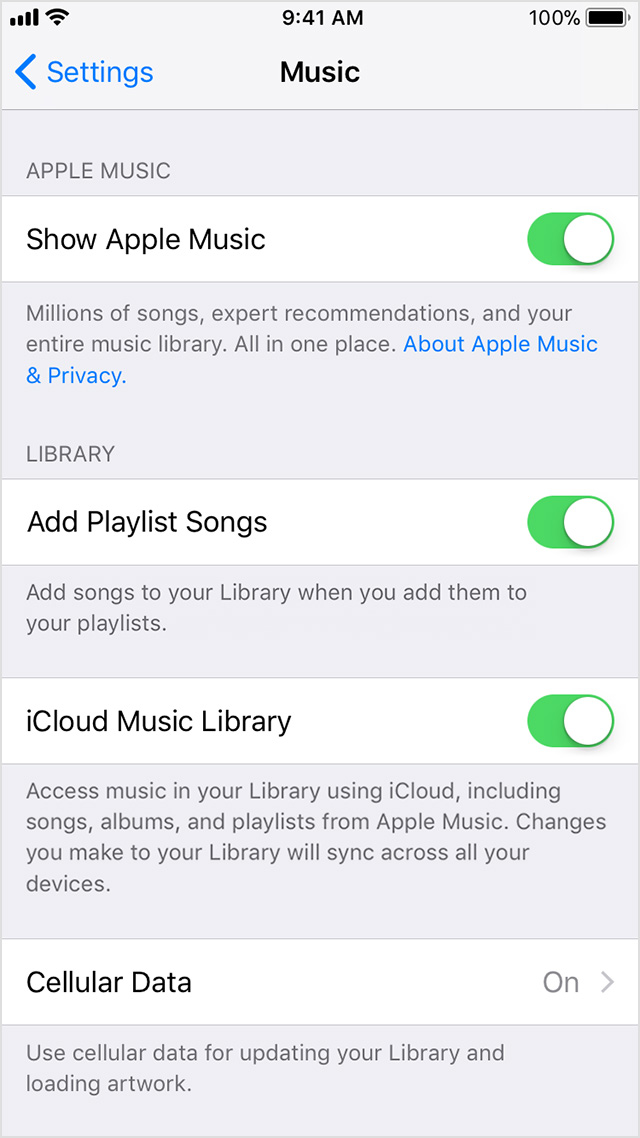
  1. Go to Settings > Music, and tap iCloud Music Library to turn it on.
    User uploaded file
  2. If you already have music on your device, you're asked if you want to keep the music that's on your device.
    If you choose Keep Music*, the music from your device adds to your iCloud Music Library.
    If you choose Delete & Replace, the music on your device is replaced with the content from your iCloud Music Library.

Once you've enabled iCloud Music Library again, try to create the playlists once more: Create and share playlists

User uploaded fileCreate a playlist

User uploaded fileShare a playlist

User uploaded fileSave a playlist

Create a playlist

You can create playlists on your iPhone, iPad, or iPod touch; your Mac or PC; or your Android phone.

User uploaded file

On your iPhone, iPad, or iPod touch

  1. In the Music app, find a song that you want to start your playlist with. Long press or use 3D Touch on the song, then choose "Add to a Playlist" > New Playlist.
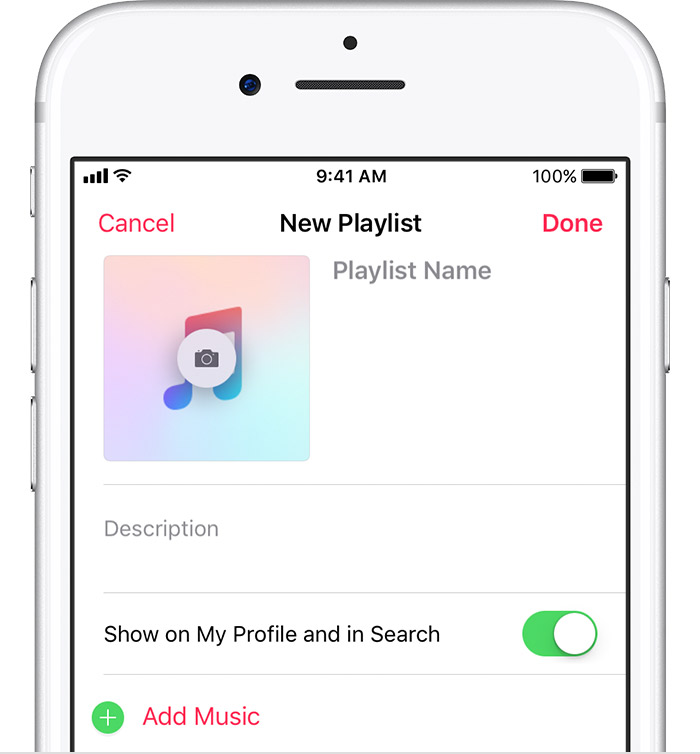
  2. Give your playlist a name, description, and cover image, then add more songs: Tap User uploaded file Add Music, then search to find a song from your Library or the Apple Music catalog, or browse through songs under Library. When you find a song that you want to add, tap User uploaded file .
  3. When you're finished adding songs, tap Done.

By default, songs that you add to playlists don't automatically add to your Library. If you want to add each song to your Library, you can change your settings.


If this still wont work, make sure your device is up-to-date!

Thank you for using Apple Support Communities.
Have a great day!

1 reply
Question marked as Top-ranking reply

Jul 3, 2018 12:22 PM in response to Emrobertss

Hello and welcome to Apple Support Communities, Emrobertss!

I understand you're trying to edit a playlist and have been unable to, as well as being unable to delete the playlist. You're also experiencing an issue where you're unable to play the songs. I'd be happy to provide you with information to help you out in this situation.

Check out this article. You may need to turn off iCloud Music Library and then reenable it. Keep in mind, this will delete any downloaded music: Turn on iCloud Music Library


On your iPhone, iPad, or iPod touch

  1. Go to Settings > Music, and tap iCloud Music Library to turn it on.
    User uploaded file
  2. If you already have music on your device, you're asked if you want to keep the music that's on your device.
    If you choose Keep Music*, the music from your device adds to your iCloud Music Library.
    If you choose Delete & Replace, the music on your device is replaced with the content from your iCloud Music Library.

Once you've enabled iCloud Music Library again, try to create the playlists once more: Create and share playlists

User uploaded fileCreate a playlist

User uploaded fileShare a playlist

User uploaded fileSave a playlist

Create a playlist

You can create playlists on your iPhone, iPad, or iPod touch; your Mac or PC; or your Android phone.


User uploaded file

On your iPhone, iPad, or iPod touch

  1. In the Music app, find a song that you want to start your playlist with. Long press or use 3D Touch on the song, then choose "Add to a Playlist" > New Playlist.
  2. Give your playlist a name, description, and cover image, then add more songs: Tap User uploaded file Add Music, then search to find a song from your Library or the Apple Music catalog, or browse through songs under Library. When you find a song that you want to add, tap User uploaded file .
  3. When you're finished adding songs, tap Done.

By default, songs that you add to playlists don't automatically add to your Library. If you want to add each song to your Library, you can change your settings.


If this still wont work, make sure your device is up-to-date!

Thank you for using Apple Support Communities.
Have a great day!

This thread has been closed by the system or the community team. You may vote for any posts you find helpful, or search the Community for additional answers.

apple music wont let me edit playlist

Welcome to Apple Support Community
A forum where Apple customers help each other with their products. Get started with your Apple Account.