Cannot use Phone Number with iMessage and Facetime

My old iPhone 6 Plus failed with a Logic board issue. So it’s completely dead, cannot turn it on, not charging etc... I bought another iPhone 6s, but I can’t use my phone number with iMessage and FaceTime, I tried all suggestions found on Google but none helped. I can’t put the SIM card back in the old phone to wipe it. Anyone had something similar and resolved it? Thanks

Posted on Jul 3, 2018 9:32 AM

Reply
Question marked as Top-ranking reply

Posted on Jul 4, 2018 6:46 AM

Hi there, David8406!
Thanks for reaching out to the Apple Support Communities! It sounds like you are having an issue with using your phone number with Messages and FaceTime on your new device and I am happy to help! Check out this article with steps for how to Add or remove your phone number in Messages or FaceTime. Specifically, I recommend you check out this section:

If you can't see or select your number in Messages or FaceTime

  1. Make sure that you're using the latest software for your Mac or iOS device.
  2. Make sure that you correctly followed the iPhone steps to set up your phone number. You should be using the same Apple ID on all of your devices.
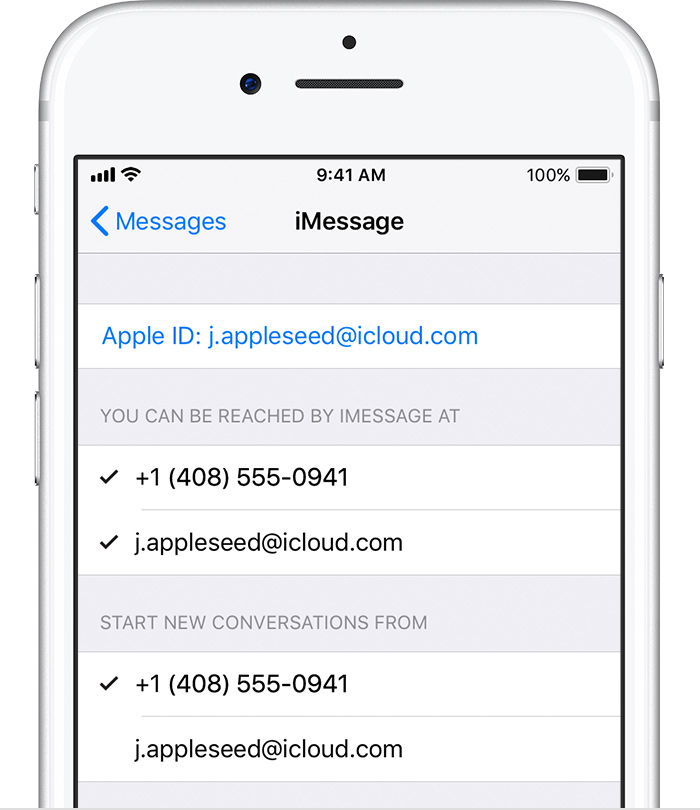
  3. In the “You can be reached” section of Messages and FaceTime settings, make sure that there are checkmarks beside your phone number and Apple ID:
    User uploaded file

If your phone number is unchecked and you can't select it, or you have some other issue, follow these steps:

  1. On your Mac:
    • In Messages, choose Messages > Preferences, then click Accounts and select your iMessage account. Click Sign Out.
    • In FaceTime, choose FaceTime > Preferences, then click Sign Out.
  2. On your iPhone, iPad, and iPod:
    • Go to Settings > Messages > Send & Receive. Tap your Apple ID, then tap Sign Out.
    • Go to Settings > FaceTime. Tap your Apple ID, then tap Sign Out.
  3. On your iPhone:
    • Go back to Settings > Messages and make sure that iMessage is turned on.
    • Tap Send & Receive, then choose “Use your Apple ID for iMessage” and sign in with your Apple ID.
  4. Using the same Apple ID, sign back in to Messages and FaceTime on your other devices.

If you still need help, change your Apple ID password and repeat the setup steps. If that doesn't work, contact Apple Support.

Take care!

6 replies
Question marked as Top-ranking reply

Jul 4, 2018 6:46 AM in response to David8406

Hi there, David8406!
Thanks for reaching out to the Apple Support Communities! It sounds like you are having an issue with using your phone number with Messages and FaceTime on your new device and I am happy to help! Check out this article with steps for how to Add or remove your phone number in Messages or FaceTime. Specifically, I recommend you check out this section:

If you can't see or select your number in Messages or FaceTime

  1. Make sure that you're using the latest software for your Mac or iOS device.
  2. Make sure that you correctly followed the iPhone steps to set up your phone number. You should be using the same Apple ID on all of your devices.
  3. In the “You can be reached” section of Messages and FaceTime settings, make sure that there are checkmarks beside your phone number and Apple ID:
    User uploaded file

If your phone number is unchecked and you can't select it, or you have some other issue, follow these steps:

  1. On your Mac:
    • In Messages, choose Messages > Preferences, then click Accounts and select your iMessage account. Click Sign Out.
    • In FaceTime, choose FaceTime > Preferences, then click Sign Out.
  2. On your iPhone, iPad, and iPod:
    • Go to Settings > Messages > Send & Receive. Tap your Apple ID, then tap Sign Out.
    • Go to Settings > FaceTime. Tap your Apple ID, then tap Sign Out.
  3. On your iPhone:
    • Go back to Settings > Messages and make sure that iMessage is turned on.
    • Tap Send & Receive, then choose “Use your Apple ID for iMessage” and sign in with your Apple ID.
  4. Using the same Apple ID, sign back in to Messages and FaceTime on your other devices.

If you still need help, change your Apple ID password and repeat the setup steps. If that doesn't work, contact Apple Support.

Take care!

This thread has been closed by the system or the community team. You may vote for any posts you find helpful, or search the Community for additional answers.

Cannot use Phone Number with iMessage and Facetime

Welcome to Apple Support Community
A forum where Apple customers help each other with their products. Get started with your Apple Account.