Phone number is not registered with iMessage

How do I register a number for iMessage on my iMac? I have been texting this number for a long time and suddenly several of my contacts will not send, giving me the phone number not registered error. Very frustrated.

iMac, iOS 10.1

Posted on Jul 7, 2018 2:04 PM

Reply
Question marked as Top-ranking reply

Posted on Jul 10, 2018 6:33 AM

Hello and welcome to Apple Support Communities, Nancy!

I understand you're trying to add your phone number to your iMac, to be able to continue texting with it. I'd be happy to provide you with some information to resolve this issue.

Check out this article: Add or remove your phone number in Messages or FaceTime

Set up your phone number

These steps work only with the phone number that belongs to your iPhone, not the phone number of a landline or other device. On your iPhone:

  1. Go to Settings > Messages and make sure that iMessage is on. You might need to wait a moment for it to activate.
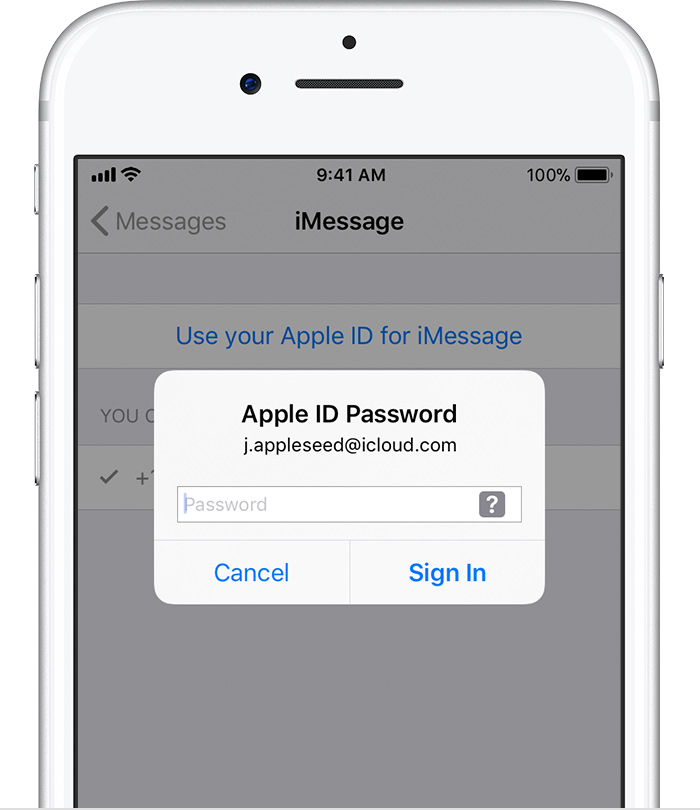
  2. Tap Send & Receive. If you see “Use your Apple ID for iMessage,” tap it and sign in with the same Apple ID that you use on your Mac, iPad, and iPod touch.
    User uploaded file
  3. In the “You can be reached” section, make sure that there are checkmarks beside your phone number and Apple ID.
  4. Go to Settings > FaceTime and follow the same steps.

On your other devices, you can now turn on the phone number that you just set up:


If you've already set this up, use these steps to Use Continuity to connect your Mac, iPhone, iPad, iPod touch, and Apple Watch

If you have an iPhone, the text messages that you send and receive on your iPhone can appear on your Mac, iPad, and iPod touch as well. You can then continue the conversation from whichever device is closest to you.

Set up SMS and MMS messaging

Use this feature with any Mac, iPhone, iPad, or iPod touch that meets the Continuity system requirements. Make sure that your devices are set up as follows:

  • Each device is signed in to iCloud with the same Apple ID.
  • On iPhone, go to Settings > Messages > Send & Receive. Make sure that the Apple ID at the top of the screen is the same Apple ID that you're using for iMessage on your other devices. Add a check to your phone number and email address, so that you can be reached by iMessage at both. Do the same on your iPad or iPod touch.
  • On iPhone, go to Settings > Messages > Text Message Forwarding, then choose which devices to allow to send and receive text messages from this iPhone. If you're not using two-factor authentication for your Apple ID, a verification code appears on each of your other devices: enter that code on your iPhone.
  • On Mac, open Messages, then choose Messages > Preferences. Click Accounts, then select your iMessage account. Make sure that the Apple ID shown here is the same Apple ID that you're using on your other devices. Add a check to your phone number and email address.


Thank you for using Apple Support Communities.
Have a great day!
2 replies
Question marked as Top-ranking reply

Jul 10, 2018 6:33 AM in response to nancy615

Hello and welcome to Apple Support Communities, Nancy!

I understand you're trying to add your phone number to your iMac, to be able to continue texting with it. I'd be happy to provide you with some information to resolve this issue.

Check out this article: Add or remove your phone number in Messages or FaceTime

Set up your phone number

These steps work only with the phone number that belongs to your iPhone, not the phone number of a landline or other device. On your iPhone:

  1. Go to Settings > Messages and make sure that iMessage is on. You might need to wait a moment for it to activate.
  2. Tap Send & Receive. If you see “Use your Apple ID for iMessage,” tap it and sign in with the same Apple ID that you use on your Mac, iPad, and iPod touch.
    User uploaded file
  3. In the “You can be reached” section, make sure that there are checkmarks beside your phone number and Apple ID.
  4. Go to Settings > FaceTime and follow the same steps.

On your other devices, you can now turn on the phone number that you just set up:


If you've already set this up, use these steps to Use Continuity to connect your Mac, iPhone, iPad, iPod touch, and Apple Watch

If you have an iPhone, the text messages that you send and receive on your iPhone can appear on your Mac, iPad, and iPod touch as well. You can then continue the conversation from whichever device is closest to you.

Set up SMS and MMS messaging

Use this feature with any Mac, iPhone, iPad, or iPod touch that meets the Continuity system requirements. Make sure that your devices are set up as follows:

  • Each device is signed in to iCloud with the same Apple ID.
  • On iPhone, go to Settings > Messages > Send & Receive. Make sure that the Apple ID at the top of the screen is the same Apple ID that you're using for iMessage on your other devices. Add a check to your phone number and email address, so that you can be reached by iMessage at both. Do the same on your iPad or iPod touch.
  • On iPhone, go to Settings > Messages > Text Message Forwarding, then choose which devices to allow to send and receive text messages from this iPhone. If you're not using two-factor authentication for your Apple ID, a verification code appears on each of your other devices: enter that code on your iPhone.
  • On Mac, open Messages, then choose Messages > Preferences. Click Accounts, then select your iMessage account. Make sure that the Apple ID shown here is the same Apple ID that you're using on your other devices. Add a check to your phone number and email address.


Thank you for using Apple Support Communities.
Have a great day!

Jul 10, 2018 11:35 AM in response to chris_g1

Hi chris-g1,


You have misread the Post.


@ Nancy615


Check your Contacts App lists the Country Code as part of the Number for your Contacts.
It used to be that Messages Added the Prefix but later versions do not.


The "Not registered iMessages" is overused by the app.

If one contact shows this then there is a good chance they are Off Line.

If they all show it then you are not logged in. There is no way to tell other than trying to send iMessages.


There can be a sort of in-between state where several Contacts appear not to work.

However these tend to be the ones where you have only their iPhone number to contact them.


User uploaded file

7:35 pm Tuesday; July 10, 2018


 iMac 2.5Ghz i5 2011 (Sierra)
 G4/1GhzDual MDD (Leopard 10.5.8)
 MacBookPro 2Gb (Snow Leopard 10.6.8)
 MacBookPro 15" 2016 (High Sierra 10.13.x)
 Mac OS X (10.6.8),
 iPhone 6 iOS 11.x and an iPad (2)

This thread has been closed by the system or the community team. You may vote for any posts you find helpful, or search the Community for additional answers.

Phone number is not registered with iMessage

Welcome to Apple Support Community
A forum where Apple customers help each other with their products. Get started with your Apple Account.