Verification required
When trying to download any app it says tap continue and sign in to view billing information but after I complete that it will just pop up again when trying to download any app.
Start here: Change or remove your Apple ID payment information
Make sure to confirm your payment information is the same as the information with your financial institution.
On your iPhone, iPad, or iPod touch
- Go to Settings > [your name] > Payment & Shipping.
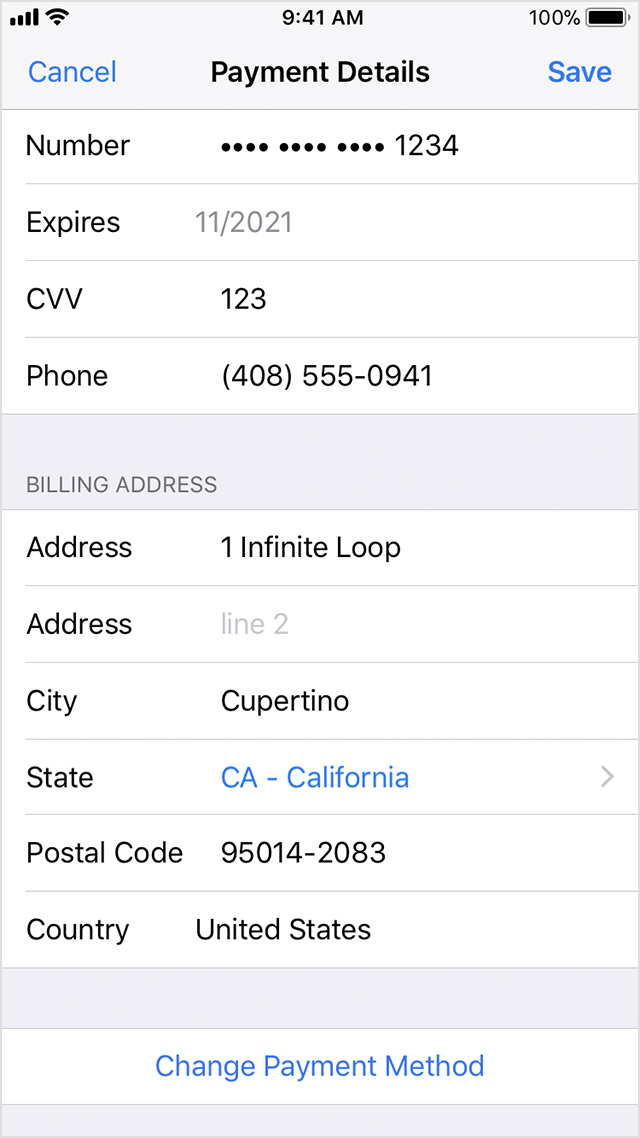
- Tap Payment Method, then edit your payment details. If you want to remove your payment method or change to a different payment method, scroll to the bottom of the Payment Details screen and tap Change Payment Method. Then select None or a different payment method.
Learn what to do if you don't see None or can't select it and if additional payment methods are available in your country or region.
- Make sure your name and billing address exactly match the information on file with your financial institution. Then tap Save.
If you change your payment method to a credit card, the iTunes Store places a temporary authorization hold on your credit card to verify your updated account information. You might also see an option to add the new card to Apple Pay.
Start here: Change or remove your Apple ID payment information
Make sure to confirm your payment information is the same as the information with your financial institution.
On your iPhone, iPad, or iPod touch
- Go to Settings > [your name] > Payment & Shipping.
- Tap Payment Method, then edit your payment details. If you want to remove your payment method or change to a different payment method, scroll to the bottom of the Payment Details screen and tap Change Payment Method. Then select None or a different payment method.
Learn what to do if you don't see None or can't select it and if additional payment methods are available in your country or region.
- Make sure your name and billing address exactly match the information on file with your financial institution. Then tap Save.
If you change your payment method to a credit card, the iTunes Store places a temporary authorization hold on your credit card to verify your updated account information. You might also see an option to add the new card to Apple Pay.
Verification required