Deregister old phone number in iMessage without access to that old number?

How to deregister an old phone number in iMessage when you don’t have access to that old number, but still using the same iPhone?


The mobile carrier changed the old phone number to the new number without changing the SIM card.

Posted on Jul 13, 2018 9:36 PM

Reply
4 replies

Jul 17, 2018 6:50 PM in response to LizSr3000

I have done several number changes including at least one like you where the same SIM got renumbered. The new number registered automatically for me and pushed out the old number. Just follow the steps above to turn off iMessage then turn on again, but I think mine just worked when I rebooted the phone. To make it clear, You don’t need the old number to unregister it, the new number overwrites it when the phone notices it has been renumbered.

Jul 19, 2018 10:40 PM in response to Branta_uk

Unfortunately, that is not the case with mine.


It has only worked after I’ve changed the Apple ID password, signed out of all my devices, powered off/on, signing back in and then turning on/off iMessage in the iCloud settings.


And this is after almost a week of following every direction, instruction, suggestion by Apple, the support communities, the web and YouTube.


Now just waiting for the ‘contactable’ details to include the new number as iMessage & FaceTime number.

Jul 16, 2018 2:32 PM in response to LizSr3000

Hello and welcome to Apple Support Communities, Liz!

I understand you want to remove your old phone number from being registered to iMessage, and only your phone number has been changed, but not your SIM card. I'd be happy to help with any information that may lead to a resolution.

Have a look at this article: Deregister iMessage on your iPhone or online

Deregister iMessage on your iPhone

If you still have your iPhone, you can deregister iMessage with these steps:

  1. If you transferred your SIM card from your iPhone to a non-Apple phone, put it back in your iPhone.
  2. Make sure that you're connected to your cellular data network.
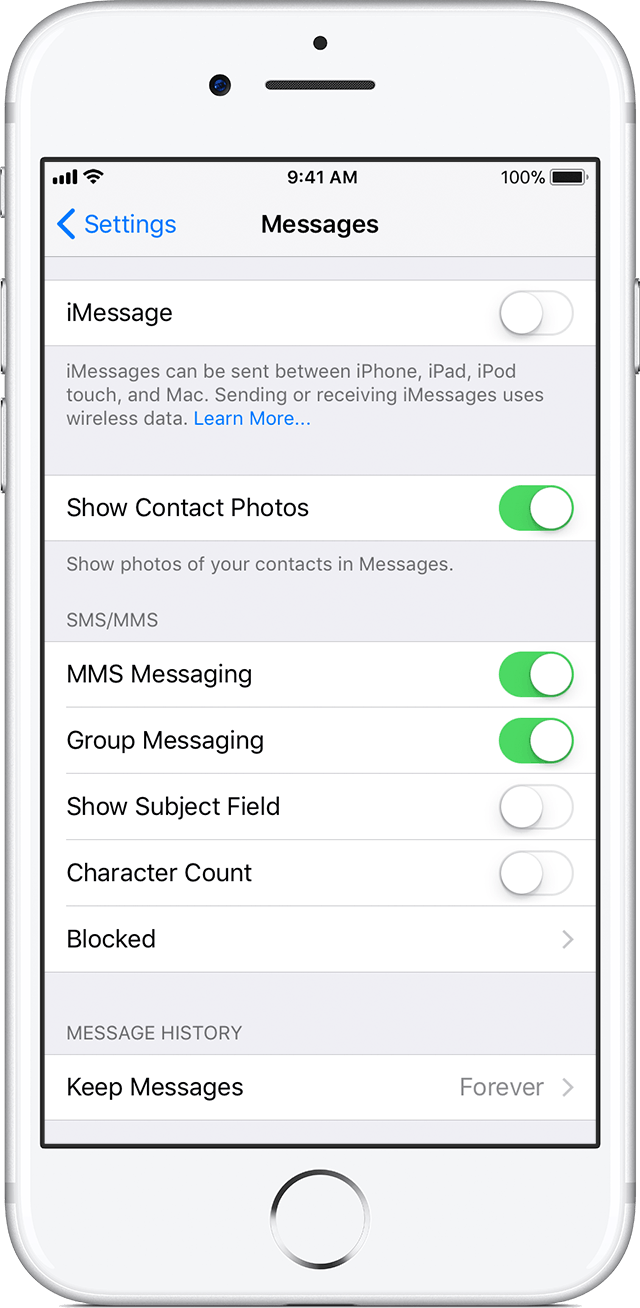
  3. Tap Settings > Messages and turn off iMessage.
    User uploaded file


Once you turn off iMessage and FaceTime, turn them back on to register your new number.

Thank you for using Apple Support Communities.
Have a great day!

This thread has been closed by the system or the community team. You may vote for any posts you find helpful, or search the Community for additional answers.

Deregister old phone number in iMessage without access to that old number?

Welcome to Apple Support Community
A forum where Apple customers help each other with their products. Get started with your Apple Account.