iTunes and ringtones

I have iTunes 12.8. I have connected my phone and added custom ringtones to a folder on my desktop. I cannot add the ringtones to iTunes. I have tried to drag and drop and to Add to Library. How Ido I get the ringtones onto iTunes so I can then sync them onto my phone?

MacBook Pro (13-inch, 2017, 2 TBT3), macOS High Sierra (10.13.6)

Posted on Jul 17, 2018 10:26 AM

Reply
6 replies

Aug 2, 2018 6:42 PM in response to brucethegirl

I had this issue and I think it may have had something to do with how they were created.


Any ones I now do (from scratch) I can actually drag and drop but you have to make sure you select the "Manage music and videos manually" on the phone summary page when you connect your iphone. I do this then sync just to be sure as sometimes if I'm inpatient the drag and drop seems to have difficulties.


I've been using https://audiotrimmer.com/ to convert MP3's straight to m4r

Jul 18, 2018 9:49 AM in response to sterling r

No, the issue I am having is getting the tones onto iTunes. I connected my phone to iTunes and selected File Sharing where the ringtones were on my phone. I made a folder on my desktop and added the tones to that folder. How do I now get them onto iTunes? I tried to make a ringtones playlist on iTunes and drag and drop them into there but it does not accept them.

Jul 22, 2018 2:42 PM in response to KTESMITH208

I am also having this problem for a number of months now. I used to have custom ring tones, then one update they all vanished. Now I can not put them on my phone.

Drag and drop DOES NOT work.

Copy and paste DOES NOT work.

Creating an AAV files, then converting it to a .m4r file DOES NOT work.

I'll even drag it to the tones page, it'll have the plus like its going to add the ringtone, but doesn't add it to the tones!

It's getting so frustrating!!

Jul 18, 2018 8:39 AM in response to KTESMITH208

Hello and welcome to Apple Support Communities, KTESMITH208.
If I understand your post correctly, you're trying to add custom ringtones to your iPhone. Customer ringtones are a great way to personalize your iPhone. I'd like to help.
Use these steps to add customer ringtones:

Move custom ringtones from iTunes to your iOS device

If you have a custom ringtone or tone in iTunes on your Mac or PC that you want to move to your iOS device, you can manually add it to your device using iTunes.

  1. Connect your device to your computer.
  2. Open iTunes. Make sure that you have the latest version.
  3. On your computer, find the ringtone or tone that you want to add to your device. If the ringtone or tone previously appeared in your iTunes library, you can find it in the Tones or Ringtones folders of your iTunes media folder. If you created a ringtone in GarageBand on Mac and then shared it to iTunes, it might be in an Import folder.
  4. Select the tone that you want to add to your device and copy it. (You can use a keyboard shortcut.)
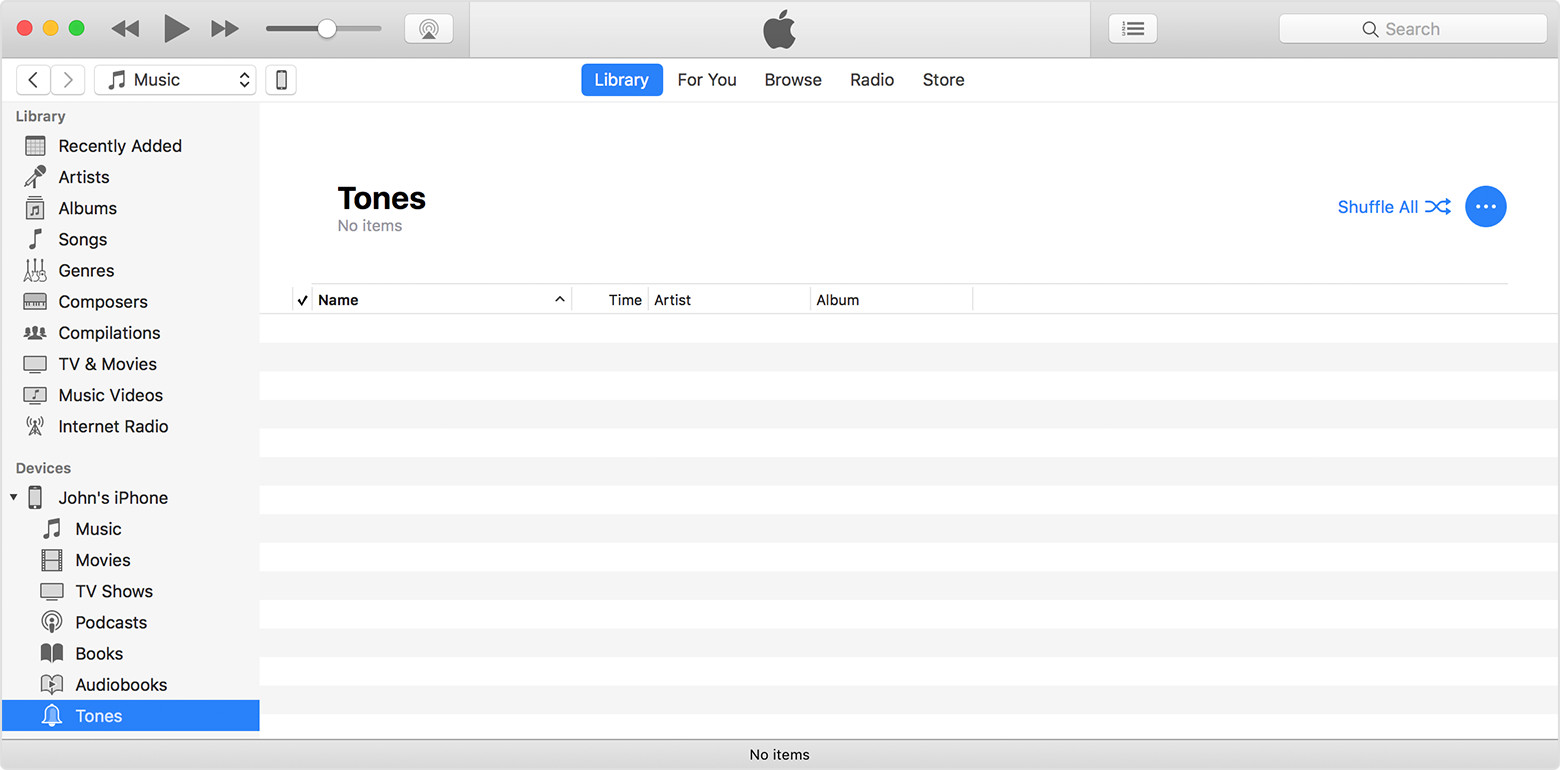
  5. Return to iTunes and go to the Library tab of Music.
  6. Click on your device in the left sidebar, then click Tones.
  7. Paste your tone. (You can use a keyboard shortcut.)
    User uploaded file

You can also drag and drop your tone file onto the name of your iOS device in the left sidebar of iTunes.

See the full article here:
Use tones and ringtones with your iPhone, iPad, or iPod touch
Let us know if that resolves this issue for you.
Thanks for using the Apple Support Communities. Take care.

This thread has been closed by the system or the community team. You may vote for any posts you find helpful, or search the Community for additional answers.

iTunes and ringtones

Welcome to Apple Support Community
A forum where Apple customers help each other with their products. Get started with your Apple Account.