Deleting backups from Time capsule

How do you delete an earlier year of backups from a TIme Capsule?


I use my 2 TB Time Capsule in Bridge Mode since I already have an Ethernet and WiFi network supported by a Verizon FIOS Quantum router. Been running since 2014 and am now using El Capitan10.11.6.


Bought a 3TB Time capsule but cannot connect it using Airport. Apple 2nd level tech says that the firmware the latest 3 TB Time Capsule does not allow this.


Thus deleting a lot of earlier backups that I never access is the only solution. I have only 15 GB left on my 2 TB Time Capsule.

iMac, OS X El Capitan (10.11.6), 8 GB RAM, 1 TB HD, 2010 vintage

Posted on Sep 7, 2018 7:12 PM

Reply
Question marked as Top-ranking reply

Posted on Sep 9, 2018 1:59 PM

• Quick erase the 2 TB Time capsule and start again

Yes, I am still recommending you clear the TC2TB .. if you want the old backups archive it to a USB drive of 2TB or larger. You cannot easily trim down the TM backups.


• Try to add the 3 TB time capsule to the network by connecting it via Ethernet to a LAN port on the 2 TB Time Capsule. The question is will I need to then use Airport Utility to set it up as a extra HD in bridge mode or will it be recognized straight away just as another HD for Time Machine to use?

You can add the TC3TB anywhere in the network you like.

It can be plugged directly into your iMac..

Place the TC next to your Mac.. unplug the ethernet from back of the Mac and plug it into the WAN port of the TC3TB. Get a short patch cable and plug LAN TC3TB to LAN port of iMac.

Or you can do same thing on the MBP.. or anywhere suitable and easy to get at.. On the FIOS .. on the TC.. anywhere in the network. It is all the same.


I think you missed the point of my info about manual setup.


The question is will I need to then use Airport Utility to set it up as a extra HD in bridge mode

What I have explained is how to do exactly what you are asking. You are setting up the TC in bridge mode.. you are doing it this way because the automatic setup is failing.

Perhaps there is a misunderstanding.

The hard disk in the TC is not in bridge. It is the same as the existing 2TB.. it will show up in shared just like 2TB. If you were thinking that you could plug TC3TB into TC2TB and make one 5TB disk.. then sorry but that is not possible. It will always be two separate network hard disks.


Once the TC is configured it will be recognised by Time Machine as another target. You can then simply direct the backup to the new TC instead of the old.. or use both.


In your prior discussion of manual setup you had the 3 TB connected to one computer via Ethernet - not clear why. I want all computers to talk to the 3TB via Ethernet or WiFi.

I connected the TC3TB to the computer by ethernet for one reason.. to do the setup. The continual failure of automatic setup is the wireless predominates in Apple's mind.. and is used by airport utility by default. But in your case wireless is configured to the FIOS.. not Apple's wifi in the TC.. and it is not able to access the TC at the end of the process. I am getting you to plug the TC directly to the Mac to break the cycle of constant setup failure.


What I outlined above.. plug the TC3TB between your Mac and the FIOS.. allows all clients to access it by either ethernet or wifi. However once you complete the setup you can place the TC anywhere you want.. as long as it is plugged into the network.. whether FIOS or old TC or between a computer and FIOS.. all ethernet goes to the source. ie the FIOS as your main router.

8 replies
Question marked as Top-ranking reply

Sep 9, 2018 1:59 PM in response to David Bailin

• Quick erase the 2 TB Time capsule and start again

Yes, I am still recommending you clear the TC2TB .. if you want the old backups archive it to a USB drive of 2TB or larger. You cannot easily trim down the TM backups.


• Try to add the 3 TB time capsule to the network by connecting it via Ethernet to a LAN port on the 2 TB Time Capsule. The question is will I need to then use Airport Utility to set it up as a extra HD in bridge mode or will it be recognized straight away just as another HD for Time Machine to use?

You can add the TC3TB anywhere in the network you like.

It can be plugged directly into your iMac..

Place the TC next to your Mac.. unplug the ethernet from back of the Mac and plug it into the WAN port of the TC3TB. Get a short patch cable and plug LAN TC3TB to LAN port of iMac.

Or you can do same thing on the MBP.. or anywhere suitable and easy to get at.. On the FIOS .. on the TC.. anywhere in the network. It is all the same.


I think you missed the point of my info about manual setup.


The question is will I need to then use Airport Utility to set it up as a extra HD in bridge mode

What I have explained is how to do exactly what you are asking. You are setting up the TC in bridge mode.. you are doing it this way because the automatic setup is failing.

Perhaps there is a misunderstanding.

The hard disk in the TC is not in bridge. It is the same as the existing 2TB.. it will show up in shared just like 2TB. If you were thinking that you could plug TC3TB into TC2TB and make one 5TB disk.. then sorry but that is not possible. It will always be two separate network hard disks.


Once the TC is configured it will be recognised by Time Machine as another target. You can then simply direct the backup to the new TC instead of the old.. or use both.


In your prior discussion of manual setup you had the 3 TB connected to one computer via Ethernet - not clear why. I want all computers to talk to the 3TB via Ethernet or WiFi.

I connected the TC3TB to the computer by ethernet for one reason.. to do the setup. The continual failure of automatic setup is the wireless predominates in Apple's mind.. and is used by airport utility by default. But in your case wireless is configured to the FIOS.. not Apple's wifi in the TC.. and it is not able to access the TC at the end of the process. I am getting you to plug the TC directly to the Mac to break the cycle of constant setup failure.


What I outlined above.. plug the TC3TB between your Mac and the FIOS.. allows all clients to access it by either ethernet or wifi. However once you complete the setup you can place the TC anywhere you want.. as long as it is plugged into the network.. whether FIOS or old TC or between a computer and FIOS.. all ethernet goes to the source. ie the FIOS as your main router.

Sep 7, 2018 10:23 PM in response to David Bailin

Bought a 3TB Time capsule but cannot connect it using Airport.

Do you mean airport utility.. ??


Apple 2nd level tech says that the firmware the latest 3 TB Time Capsule does not allow this.

This is not correct.. you can certainly plug the new TC into the old one by ethernet.. if that is what you meant by the above it will most certainly work.

If you meant connect by wireless.. that will also work although it is not a great setup and there are better ways to do things.


Explain what you are actually wanting to do and I am pretty sure we can figure out fairly easy way to do it.


How do you delete an earlier year of backups from a TIme Capsule?

Really hard to remove all the old backups.. and still have a viable backup. You can delete your own user files.. but you cannot delete any system files no matter how old they are.


The best way to handle this is to archive the remainder of your files to a USB drive.. only a very small one is needed if you have only a few GB.


Then you can wipe the old TC and reuse it.

Sep 9, 2018 3:10 PM in response to LaPastenague

Let me see if I can make this clearer by replicating (to some extent) your exact setup.

Please try it this way before you get bogged down in the manual setup I outlined above.


I am using an Asus router as the equivalent of your FIOS.. it is the main router of the network.


I have a Gen4 TC plugged into it by ethernet running in bridge mode.


User uploaded file


Now I plug another TC into the old one. LAN old TC to WAN new TC.


I reset the new TC to factory.. and do the following.


This is perhaps the most important.. I change over to ethernet in the screen below.. (the computer I am working on is plugged into the Asus by ethernet.. as well as wireless.) Then you can click on the unconfigured Time Capsule which has reverted to its default name.. Airport Time Capsule xxxxxx.


User uploaded file


The auto setup starts.. and tells me at the top it is going to extend the old TC.. this is fine.


User uploaded file


I change the base station name to my standard TCgen5b .. ie short, no spaces and pure alphanumerics. Then click next.

User uploaded file


I get a screen asking do I want to send diagnostics to apple.. up to you which you decide.. I want the diags so I say yes. (for me not apple).

User uploaded file


Now what is happening is the TC is being extended.. using Ethernet.. note very carefully the top line is correct. It must be by ethernet not wireless. When it finishes.. click done..when complete.

I think using ethernet you will get it to complete.. which it would not do before because you were trying to do it over wireless. (The FIOS is not handling Apple setup properly and so it never completes).


NOTE.. Even if it fails at this point.. due to network complications.. assume that it completed correctly.

Quit Airport utility.. perhaps unplug and restart both the TCs. perhaps also reboot the computer. Restart the airport utility. Unfortunately it can show a failure simply because it is plugged into the FIOS or using FIOS wireless. However the reboot might well show that everything is good and always was good.

User uploaded file


The new TC shows up.. A solid line indicates ethernet not wireless.. it sometimes will show up below the TCgen4b.. but with the Asus as main router and the two units bridged it comes up as one flat network.

User uploaded file


Now in the Mac I can open Finder and see both TC under shared.


User uploaded file


And I open Time Machine preferences and both TC disks are available to use by Time Machine.

hgst is my USB drive plugged into the computer.. split into two partitions.

Then you see the two Time Capsules below it.

User uploaded file


Only once you have completed all this should you worry about erase on the 2TB TC.


User uploaded file


Hope all that helps.

Sep 8, 2018 5:58 AM in response to LaPastenague

My existing 2 TB time capsule was setup using Airport utility and is in Bridge mode. It is direct connected to the FIOS router via ethernet from its WAN port. Apple and I were NOT able to replicate this setup with the new 3 TB time Capsule. Every time the setup failed to complete with an error. We tried 6 times with resets in between. The 2nd level tech said that my 2 TB setup worked for the 2 TB since it was vintage 2014. The 3 TB is 5/2018. He said that Apple no longer supports connecting a Time capsule other than via the Airport WiFi, which I have NOT setup (since I do not need 2 WiFi networks). He said the newer firmware is the cause.


Since deleting older backups (really the whole years 2014/5, which I never use) cannot be done without a lot of time and effort if at all, I have 2 options:

- Quick erase the 2 TB and start again (I clone all my computers monthly).

- Try running an ethernet cable from the FIOS router direct to the 3 TB Time capsule to its LAN (not WAN) port and turning it on. Would it work just as an external HD (without going through Airport) and Time machine could use it direct connected?


Am I clear enough?

Sep 9, 2018 11:43 AM in response to David Bailin

Thank you for your very detailed note which I have read several times.


I need to add some extra detail to my setup from what I told you before:


• I have 3 computers running 10.11.6. 2 are connected by Ethernet and 5 G WiFi to a Verizon FIOS router. The 3rd is on another floor and only connected by WiFi. Mine is a 2010 iMac with 8 GB RAM and 1 TB HD. The others are 2009 MacBook Pros with SSDs and 8 GB RAM (they are restricted to 10.11.6).


• The 2 TB Time Capsule is connected via Ethernet from its WAN port to the router. It has been used successfully with Time Machine to backup from the iMac and 1 Macbook Pro that is nearby since 2014. It has backups going back to 2015 (and I never go back other than the current year, and then VERY infrequently).


I also clone all 3 computers monthly as an extra precaution. The 2 TB still functions with only 15.2 GB free but this is slowly decreasing.


After working with Apple and then reading your material, I feel that my options are:


• Quick erase the 2 TB Time capsule and start again


• Try to add the 3 TB time capsule to the network by connecting it via Ethernet to a LAN port on the 2 TB Time Capsule. The question is will I need to then use Airport Utility to set it up as a extra HD in bridge mode or will it be recognized straight away just as another HD for Time Machine to use?


If the former, can you go over again the setup steps? In your prior discussion of manual setup you had the 3 TB connected to one computer via Ethernet - not clear why. I want all computers to talk to the 3TB via Ethernet or WiFi.


Thank you again for time you have taken in answering me so far.

Sep 9, 2018 6:11 PM in response to LaPastenague

Thank you again - you are very detailed. I was a systems manager in an operational international oil logistics function a long time ago. I started in computers in 1956. Now I do not like them (too complex and most of my languages are defunct) and am very conservative in making changes. I also do not approve of the coding standards and testing of most current IT people.


I will do this next month after I do my monthly computer clones. Will let you know what happens.


You put a lot of time into your responses. Would like to have had you on my team.

Sep 9, 2018 6:32 PM in response to David Bailin

I started in computers in 1956.

I was born in 1953 so computers were very rare and very big back then.


Now I do not like them

Fair enough.. not every advance is one we need to sign up to.


I trained as Chemical Engineer but grew up in electronics as my dad ran a repair shop.. all gone now of course as people never repair stuff.. you just throw it away and buy a new one.


Glad to help..

Sep 8, 2018 3:32 PM in response to David Bailin

Yes.. that helps loads.


Not sure which planet the Apple guy is from but he is agreeing with you to get you off the phone.


The 2nd level tech said that my 2 TB setup worked for the 2 TB since it was vintage 2014.

Is the 2TB TC the flat model.. A1409 which ceased sales in 2013? The change over to tower model was that year.. so a TC from 2014 is identical to 2018 when production ceased.


He said that Apple no longer supports connecting a Time capsule other than via the Airport WiFi, which I have NOT setup (since I do not need 2 WiFi networks). He said the newer firmware is the cause.

I can and have setup two Time Capsules in series with ethernet. Of any age and any mix. You can have old in front of new or new in front of old. I do understand the automatic setup can fail.. that is NO BIGGIE to fix.. and a level 2 support should know enough networking to help you.. !!


BTW Apple have documented how to do this for transferring the backups.. just so you know the Support guy is using his hat as a filter.


How to move Time Machine backups from one AirPort Time Capsule to another - Apple Support

I will not use exactly this method because it is going to maybe work and maybe not depending on how the old TC is configured.


- Try running an ethernet cable from the FIOS router direct to the 3 TB Time capsule to its LAN (not WAN) port and turning it on. Would it work just as an external HD (without going through Airport) and Time machine could use it direct connected?

First thing to understand.. The FIOS is your main router. A Time Capsule in bridge is a dumb switch from the ethernet ports and totally transparent.. so it makes absolutely no difference if you plug the new TC(I will call TC3TB) into the FIOS router or the TC2TB. To the TC3TB it is identical setup.

And yes, it definitely will work. Time Machine being fairly unreliable now since Sierra may still have issues.. but we can figure out most of those.


When things go wrong with the automagical setup.. which seems to happen to me more than most.. just not magical enough.. I use the manual method.


Here are a couple of

Preliminary items.

Do a full factory reset.


1. Factory reset universal

Power off the TC.. ie pull the power cord or power off at the wall.. wait 10sec.. hold in the reset button.. be gentle.. power on again still holding in reset.. and keep holding it in for another 10sec. You may need some help as it is hard to both hold in reset and apply power. It will show success by rapidly blinking the front led. Release the reset.. and wait a couple of min for the TC to reset and come back with factory settings. If the front LED doesn’t blink rapidly you missed it and simply try again. The reset is fairly fragile in these.. press it so you feel it just click and no more.. I have seen people bend the lever or even break it. I use a toothpick as tool.

N.B. None of your files on the hard disk of the TC are deleted.. this simply clears out the router settings of the TC.

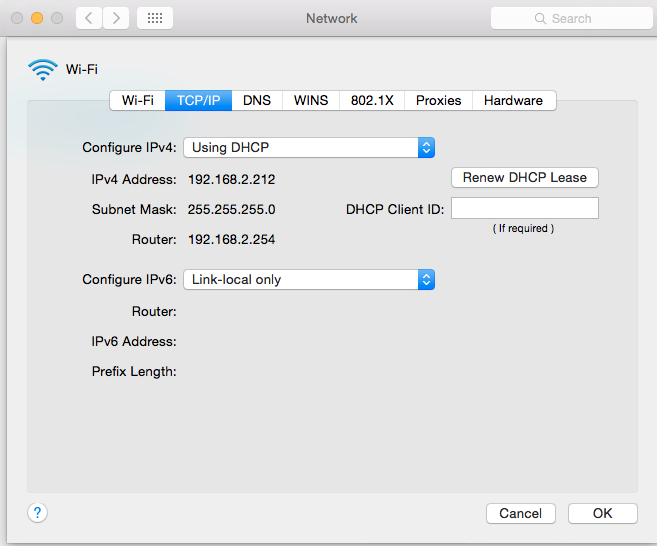
2. Set IPv6 correctly.

Go to the wireless and ethernet on the computer and make sure you have IPv6 set correctly to link local only. eg..

This is IMPORTANT.. discovery of the Airport depends on the correct settings of IPv6.
User uploaded file

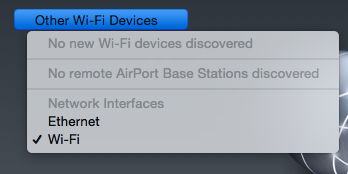
3. Strange need to change to ethernet.

You may need to change over to ethernet if you have problems though.

In the airport utility now ethernet is under Other Wi-Fi Devices.. which makes no sense at all. Ethernet will only show up when it is connected and working.
User uploaded file

So here we go.

Full manual configuration.

Plug WAN TC3TB into FIOS OR TC2TB.. makes no difference which. Plug ethernet LAN TC3TB into the computer.. this is going to require ethernet so you need a Mac with ethernet.

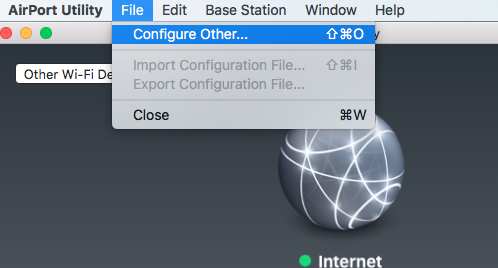
1. In Airport Utility

Click on File in top menu and Configure Other.
User uploaded file

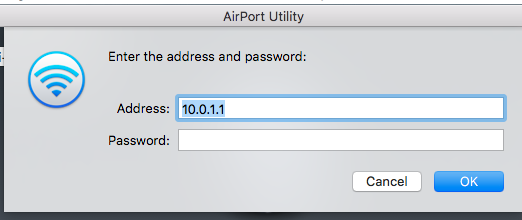
2. Type in the IP address.. always 10.0.1.1 after a reset. No password needed yet.
User uploaded file

3. Now you can see all the parts of the setup.. you will go to each tab to do the setup.

(This example is done on Extreme and at different times.. but it makes no difference.. all firmware behaves the same contra Apple Support).
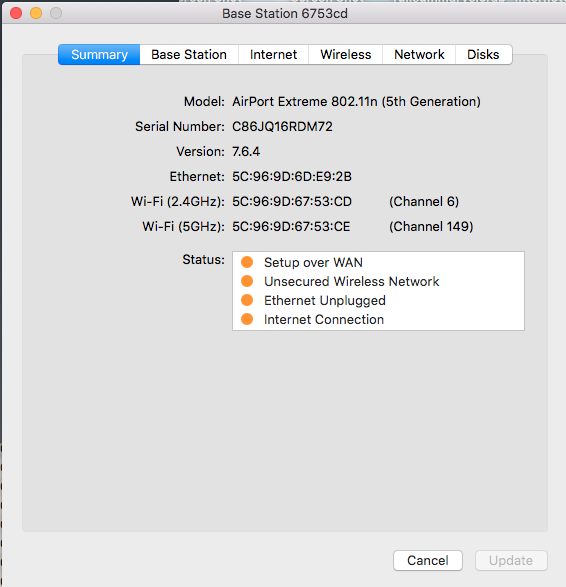
User uploaded file

4. First is Base Station.. Here you will set the base station name and main password ..

For the least issues.. keep names short, no spaces and pure alphanumerics.. highly, strongly recommended.

Same for any passwords.
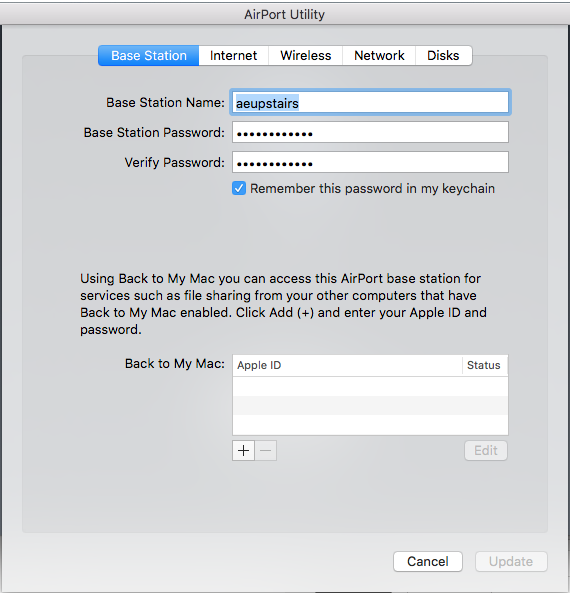
User uploaded file

5. Next tab is Internet.. this is just left at default DHCP for now. We might need to fix the IP here for greater stability later.
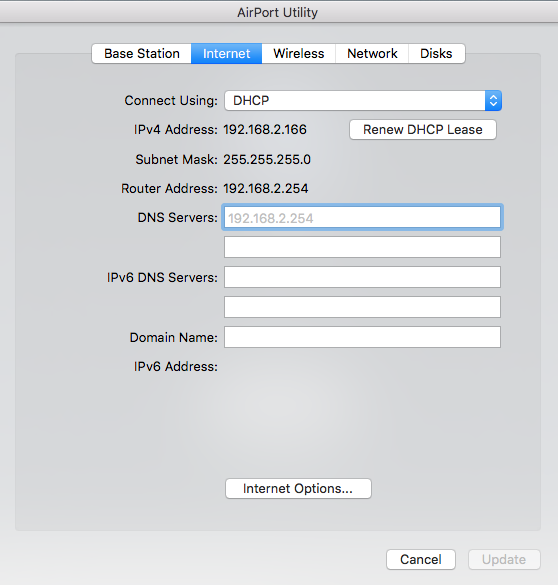
User uploaded file

6. Wireless.. on your new TC3TB there is no reason you cannot use wireless with the same Wireless Name (SSID) as the FIOS.. but up to you .. select between Create a wireless network and off.

Same rule for names.. short, no spaces and pure alphanumerics.. passwords.. same rules but can be longer.
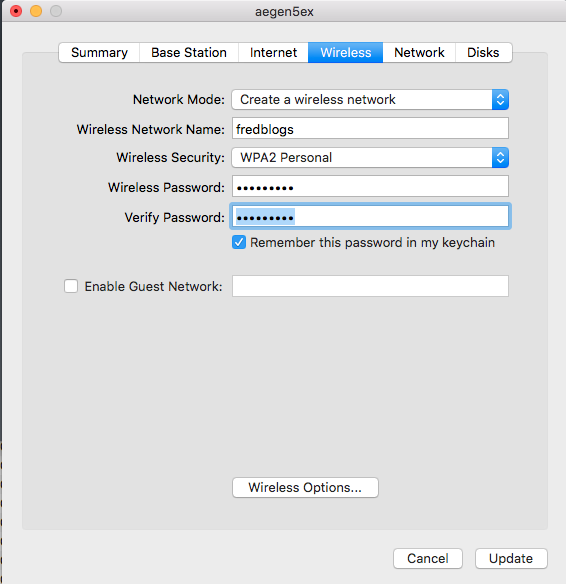
User uploaded file

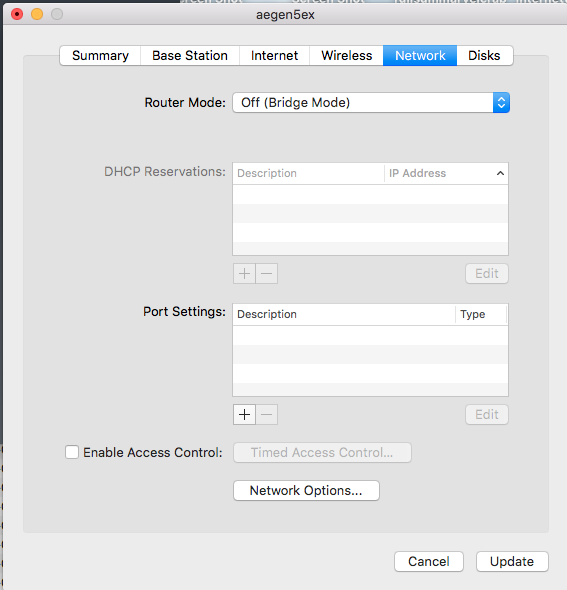
7. Then network.. pick what you want yourself.. you are now in control.

For most people they will set DHCP and NAT or Off (Bridge Mode) For your setup it will be as screenshot.. Off (bridge mode)
User uploaded file

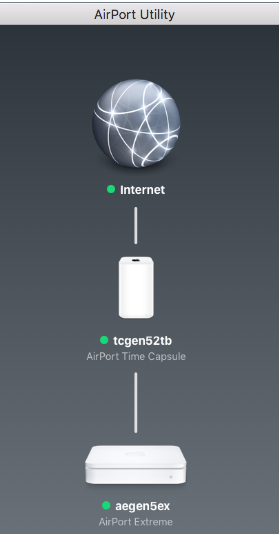
8. Once you finish making changes.. use Update to configure them to the TC.. and wait for it to reboot..

If all is good it will come up on the main utility.
User uploaded file

If this still has errors just click the TC icon and go back into the setup and fix anything there.

Any step fails tell me which one..

Take a screenshot and post it helps loads to solve where and what is going wrong.

This thread has been closed by the system or the community team. You may vote for any posts you find helpful, or search the Community for additional answers.

Deleting backups from Time capsule

Welcome to Apple Support Community
A forum where Apple customers help each other with their products. Get started with your Apple Account.
