Can't cancel a Boomerang App Subscription

Hello. I've followed the instructions on the App, Website, everything I can find...I for the life of me I can not find a place to cancel my subscription for the Boomerang App. Please help...do not want to be billed any more. Thanks!

iPhone 7 Plus

Posted on Sep 18, 2018 6:54 AM

Reply
Question marked as Top-ranking reply

Posted on Sep 19, 2018 9:35 AM

Good morning jcestes1974!

I see you're having some trouble canceling your subscription from the Boomerang app. I'll be happy to help.

Just to confirm, are these the steps you followed to cancel your subscription?

On your iPhone, iPad, or iPod touch

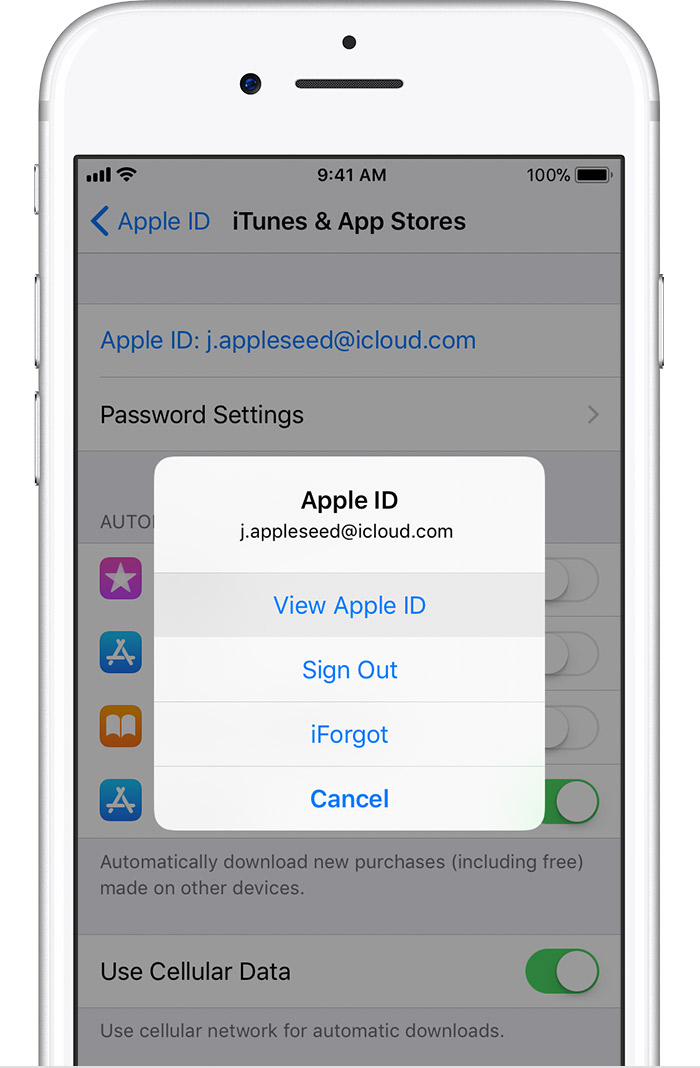
  1. Go to Settings > [your name] > iTunes & App Store.
  2. Tap your Apple ID at the top of the screen.
  3. Tap View Apple ID. You might need to authenticate your Apple ID.
    User uploaded file
  4. Tap Subscriptions.
    User uploaded file
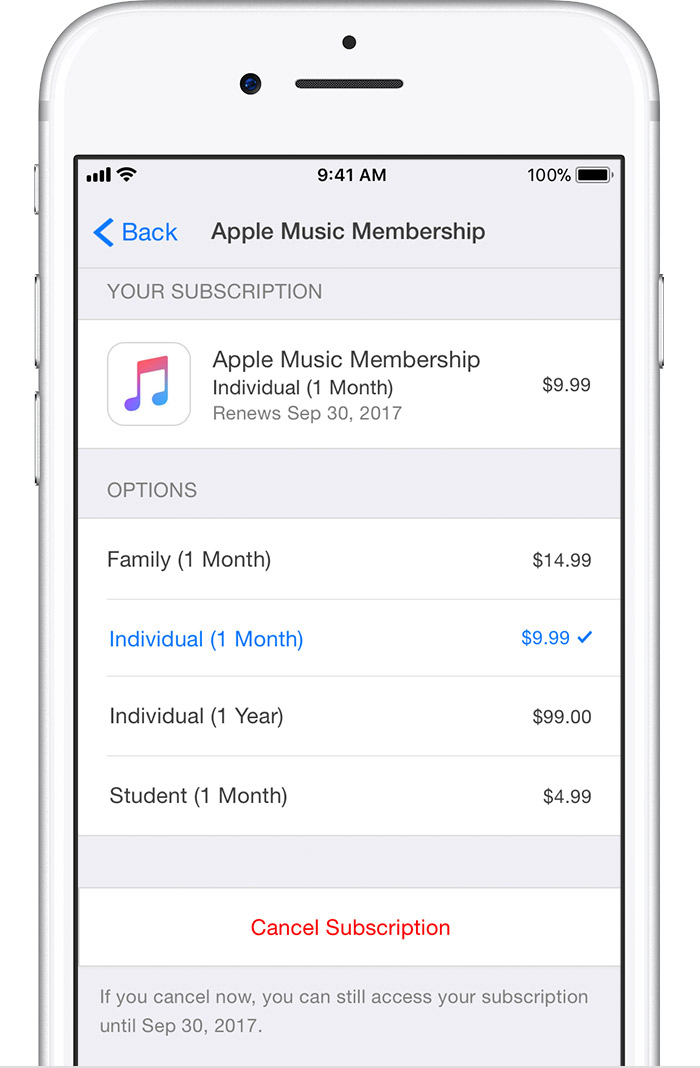
  5. Tap the subscription that you want to manage.
    If you're being charged for a subscription, but you don't see it in your list of subscriptions, it might be billed through someone other than Apple. Learn what to do if you still can’t view your subscription.
  6. Use the options to manage your subscription. You can choose a different subscription offering, or tap Cancel Subscription to cancel your subscription. If you cancel, your subscription will stop at the end of the current billing cycle.
    User uploaded file


View, change, or cancel your subscriptions - Apple Support
If you're still not able to cancel your subscription, Contact iTunes Support for further investigation. Cheers!

1 reply
Question marked as Top-ranking reply

Sep 19, 2018 9:35 AM in response to jcestes1974

Good morning jcestes1974!

I see you're having some trouble canceling your subscription from the Boomerang app. I'll be happy to help.

Just to confirm, are these the steps you followed to cancel your subscription?

On your iPhone, iPad, or iPod touch

  1. Go to Settings > [your name] > iTunes & App Store.
  2. Tap your Apple ID at the top of the screen.
  3. Tap View Apple ID. You might need to authenticate your Apple ID.
    User uploaded file
  4. Tap Subscriptions.
    User uploaded file
  5. Tap the subscription that you want to manage.
    If you're being charged for a subscription, but you don't see it in your list of subscriptions, it might be billed through someone other than Apple. Learn what to do if you still can’t view your subscription.
  6. Use the options to manage your subscription. You can choose a different subscription offering, or tap Cancel Subscription to cancel your subscription. If you cancel, your subscription will stop at the end of the current billing cycle.
    User uploaded file


View, change, or cancel your subscriptions - Apple Support
If you're still not able to cancel your subscription, Contact iTunes Support for further investigation. Cheers!

This thread has been closed by the system or the community team. You may vote for any posts you find helpful, or search the Community for additional answers.

Can't cancel a Boomerang App Subscription

Welcome to Apple Support Community
A forum where Apple customers help each other with their products. Get started with your Apple Account.