Fix sides of video from being cut off

Hello,


When I add my video to my timeline the sides of the video are cut off ever so slightly. I've done other research for similar issues. The clip's crop setting is set to "fit" which does not fix it. It appears as though it's "fitting" my video vertically which is causing the issue. Is there any way to fix this?


If not maybe someone has a suggestion. I'm recording my screen through QuickTime yet there's no way to get precise resolutions of my recording that iMovie likes. Does anyone have any tips they use to get past this problem?


Only things I can think of are:


  1. Try to find some other screen recording software that'll give me precise resolutions.
  2. Maybe some software that'll allow me to resize my video.
  3. Painstakingly fiddle with QuickTime and try to eyeball a size that'll make iMovie happy.
  4. Don't use iMovie? 🙂


Thanks!

iMovie 10, OS X El Capitan (10.11.6)

Posted on Sep 18, 2018 5:46 PM

Reply
4 replies

Sep 20, 2018 1:27 PM in response to bmurphy88

Just to help others like myself who experience this problem I figured I'd share how I solved my issue. From what I can tell iMovie is simply strict about it's Aspect Ratios so if your video's dimensions aren't of that ratio iMovie will crop parts of it automatically. I had to change my video dimensions to be precisely 1920x1080 via some software to fix it. I used Handbrake as it's free and pretty decent. My original video dimensions were 1955x1080 or something and that's what caused it in the first place.


Cheers

Sep 19, 2018 5:46 PM in response to bmurphy88

Greetings bmurphy88,

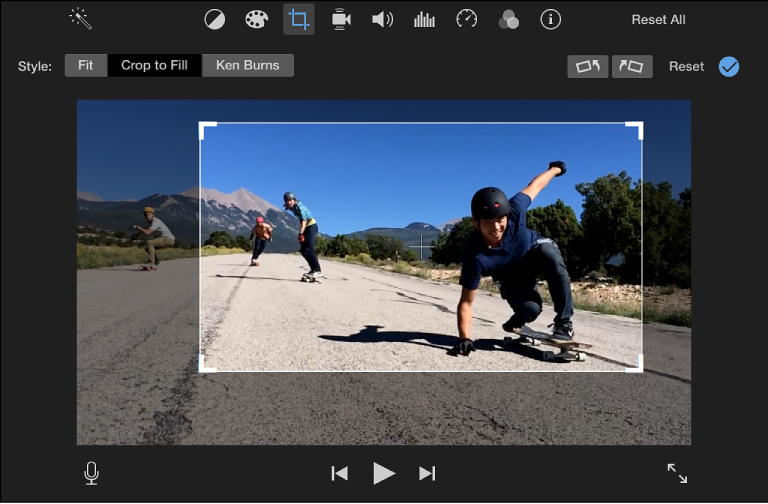
Thank you for using Apple Support Communities. It seems like you have a movie that has a resolution that is larger than the videos aspect ratio. If the crop is set to fit but is still too large, you may need to crop it manually. With Crop to Fill, you can adjust the size of the frame.


  1. Click the Crop to Fill button.

    An adjustable frame appears on top of the clip in the viewer.

    Note: This frame is constrained to a 16:9 aspect ratio.

    User uploaded file
  2. Move and resize the frame until you’re satisfied with the result.

iMovie for Mac: Crop a clip


Take care.

This thread has been closed by the system or the community team. You may vote for any posts you find helpful, or search the Community for additional answers.

Fix sides of video from being cut off

Welcome to Apple Support Community
A forum where Apple customers help each other with their products. Get started with your Apple Account.