Mac problem report
My MacBook automatically restarts 3 times today. I don't know what happened. Should I send it to repair?
MacBook Pro with Retina display, iOS 10.3.3, null
My MacBook automatically restarts 3 times today. I don't know what happened. Should I send it to repair?
MacBook Pro with Retina display, iOS 10.3.3, null
If your Mac spontaneously restarts or displays a message that it restarted or shut down because of a problem
In rare cases, your Mac might spontaneously restart, become unresponsive, turn off, display a message that your computer restarted because of a problem, or display a message that you shut down your computer because of a problem.
About unexpected restarts
In rare cases, your Mac might encounter an unrecoverable issue affecting all open apps. When this happens, your Mac must be restarted. This is sometimes due to what is known as a "kernel panic" because an underlying part of the operating system (the "kernel") has determined there is an issue that requires a restart.
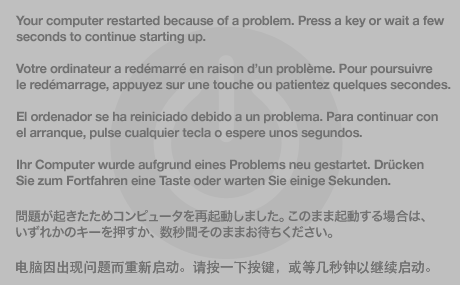
If your computer experiences a kernel panic, a message may appear for a few seconds explaining that the computer has been restarted: "Your computer restarted because of a problem. Press a key or wait a few seconds to continue starting up." After a moment, the computer continues starting up.
If your Mac spontaneously restarts or displays a message that it restarted or shut down because of a problem
In rare cases, your Mac might spontaneously restart, become unresponsive, turn off, display a message that your computer restarted because of a problem, or display a message that you shut down your computer because of a problem.
About unexpected restarts
In rare cases, your Mac might encounter an unrecoverable issue affecting all open apps. When this happens, your Mac must be restarted. This is sometimes due to what is known as a "kernel panic" because an underlying part of the operating system (the "kernel") has determined there is an issue that requires a restart.
If your computer experiences a kernel panic, a message may appear for a few seconds explaining that the computer has been restarted: "Your computer restarted because of a problem. Press a key or wait a few seconds to continue starting up." After a moment, the computer continues starting up.
Machine Check Architecture MCA is telling that Hardware detected a fault. CATERR says the processor Catastrophic Error signal has been asserted, either by the regular processor or by an Integrated or related chip in the processor chip set. None of the usual Kernel panic information could be collected, so it dumped the device tree so that there was something to look at.
Machine Check is almost always caused by Hardware problems. Are you having other difficulties with this machine?
If not, you should get it evaluated for problems.
In countries where there are Apple-owned stores, an appointment for evaluation at an Apple-owned store should be free. Apple Authorized Service Providers may charge an evaluation fee. Be sure to ask fro a refund of this fee if they make warranty repairs or repairs for a fee.
Mac problem report