I need my IMEI number for my iPhone my phone won't turn on so I need IMEI number so I can transfer to a different phone

Hi I'm trying to transfer my account to another phone because my phone won't turn on so I need the IMEI number to my iPhone

iPhone 6, iOS 12

Posted on Sep 20, 2018 8:03 AM

Reply
Question marked as Top-ranking reply

Posted on Sep 20, 2018 8:08 AM

If you don't have your device

There are several places to check that might show your device's serial or IMEI/MEID number.

  1. Go to your Apple ID account page (appleid.apple.com) in a web browser on your computer.
  2. Sign in with the Apple ID that you use on the device that you need the serial or IMEI/MEID of.
  3. Scroll down to the section called Devices. To see a device's serial and IMEI/MEID number, select that device.

If you still need help, here's what to try next:

  • Do you have a different iOS device with iOS 10.3 or later that's signed in to your Apple ID? On that device, tap Settings > [Your name]. Scroll down to see any devices signed in to your Apple ID. To view the serial and IMEI/MEID number, tap the device name.
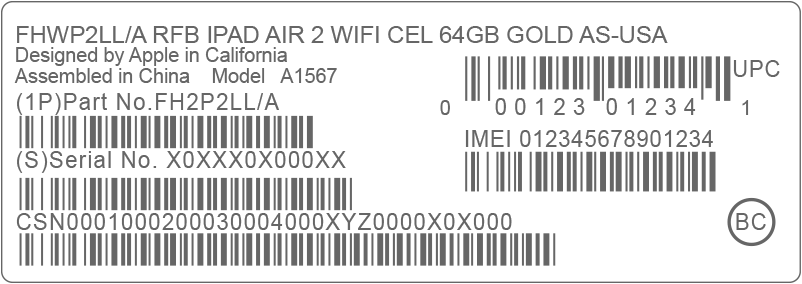
  • Do you still have your device's original package? Find the serial number and IMEI/MEID on the barcode:
    User uploaded file
  • Still can't find the number that you need? Contact Apple Support by selecting your device from this list:

Find the serial number or IMEI on your iPhone, iPad or iPod touch - Apple Support

1 reply
Question marked as Top-ranking reply

Sep 20, 2018 8:08 AM in response to diamondfromendicott

If you don't have your device

There are several places to check that might show your device's serial or IMEI/MEID number.

  1. Go to your Apple ID account page (appleid.apple.com) in a web browser on your computer.
  2. Sign in with the Apple ID that you use on the device that you need the serial or IMEI/MEID of.
  3. Scroll down to the section called Devices. To see a device's serial and IMEI/MEID number, select that device.

If you still need help, here's what to try next:

  • Do you have a different iOS device with iOS 10.3 or later that's signed in to your Apple ID? On that device, tap Settings > [Your name]. Scroll down to see any devices signed in to your Apple ID. To view the serial and IMEI/MEID number, tap the device name.
  • Do you still have your device's original package? Find the serial number and IMEI/MEID on the barcode:
    User uploaded file
  • Still can't find the number that you need? Contact Apple Support by selecting your device from this list:

Find the serial number or IMEI on your iPhone, iPad or iPod touch - Apple Support

This thread has been closed by the system or the community team. You may vote for any posts you find helpful, or search the Community for additional answers.

I need my IMEI number for my iPhone my phone won't turn on so I need IMEI number so I can transfer to a different phone

Welcome to Apple Support Community
A forum where Apple customers help each other with their products. Get started with your Apple Account.