Why is my contact card info disappearing?

I recently bought a ne iPhone 8 and updated it to iOS 12. Now I'm trying to setup my contact card, but every time I leave the app and I enter ir again, the info just disappears. What should I do to fix this?

iPhone 8, iOS 12

Posted on Sep 20, 2018 5:51 PM

Reply
Question marked as Top-ranking reply

Posted on Sep 21, 2018 12:02 PM

Hi ​rodcro55,

Welcome to Apple Support Communities. I understand that you're having trouble updating your contact card on your iPhone 8 with iOS 12. I know it's important to keep this information up-to-date; I'd like to help. First, if you haven't already, close the Contacts app and restart your iPhone: How to force an app to close on your iPhone, iPad, or iPod touch

Test to see if you're able to modify your information, and also check to see if you're able to add a new test contact to the app. If the behavior continues, use the steps here to delete the Contacts app from your iPhone and reinstall it. Your contact information will stay within the Phone app and should automatically repopulate when you reinstall the Contacts app.

Delete a built-in app from your device

  1. On your iOS device, touch and hold the app lightly until it jiggles. If the app doesn't jiggle, make sure that you're not pressing too hard.
  2. Tap on the app, then tap Delete.
  3. Press the Home button to finish.

If you have an Apple Watch, deleting an app from your iPhone also deletes that app from your Apple Watch.

User uploaded file

Restore a built-in app that you deleted

  1. On your iOS device, go to the App Store.
  2. Search for the app. Make sure that you use the exact name of the app. Find the correct name of built-in apps.
  3. Tap User uploaded file to restore the app.
  4. Wait for the app to restore, then open it from your Home screen.

If you have an Apple Watch, restoring an app to your iPhone also restores that app to your Apple Watch.

Delete built-in Apple apps on your iOS 12 or later device or Apple Watch

Let me know what you find.


​Best Regards.
4 replies
Question marked as Top-ranking reply

Sep 21, 2018 12:02 PM in response to rodcro55

Hi ​rodcro55,

Welcome to Apple Support Communities. I understand that you're having trouble updating your contact card on your iPhone 8 with iOS 12. I know it's important to keep this information up-to-date; I'd like to help. First, if you haven't already, close the Contacts app and restart your iPhone: How to force an app to close on your iPhone, iPad, or iPod touch

Test to see if you're able to modify your information, and also check to see if you're able to add a new test contact to the app. If the behavior continues, use the steps here to delete the Contacts app from your iPhone and reinstall it. Your contact information will stay within the Phone app and should automatically repopulate when you reinstall the Contacts app.

Delete a built-in app from your device

  1. On your iOS device, touch and hold the app lightly until it jiggles. If the app doesn't jiggle, make sure that you're not pressing too hard.
  2. Tap on the app, then tap Delete.
  3. Press the Home button to finish.

If you have an Apple Watch, deleting an app from your iPhone also deletes that app from your Apple Watch.

User uploaded file

Restore a built-in app that you deleted

  1. On your iOS device, go to the App Store.
  2. Search for the app. Make sure that you use the exact name of the app. Find the correct name of built-in apps.
  3. Tap User uploaded file to restore the app.
  4. Wait for the app to restore, then open it from your Home screen.

If you have an Apple Watch, restoring an app to your iPhone also restores that app to your Apple Watch.

Delete built-in Apple apps on your iOS 12 or later device or Apple Watch

Let me know what you find.


​Best Regards.

Sep 21, 2018 4:15 PM in response to rodcro55

Hi ​rodcro55,

Thanks for taking the time to work through those steps. Next, I'd suggest that you create a current backup of your iPhone:
Then, use the steps below to reinstall the iOS software; this process erases the software currently installed on your iPhone and replaces it with a fresh copy. Be sure to closely follow step four during this process in order to prevent data loss: How to back up your iPhone, iPad, and iPod touch
  1. Make sure that you're using the latest version of iTunes.
  2. If iTunes is already open, close it. Connect your device to your computer and open iTunes. If you don't have a computer, borrow one from a friend or go to an Apple Retail Store or Apple Authorized Service Provider for help.
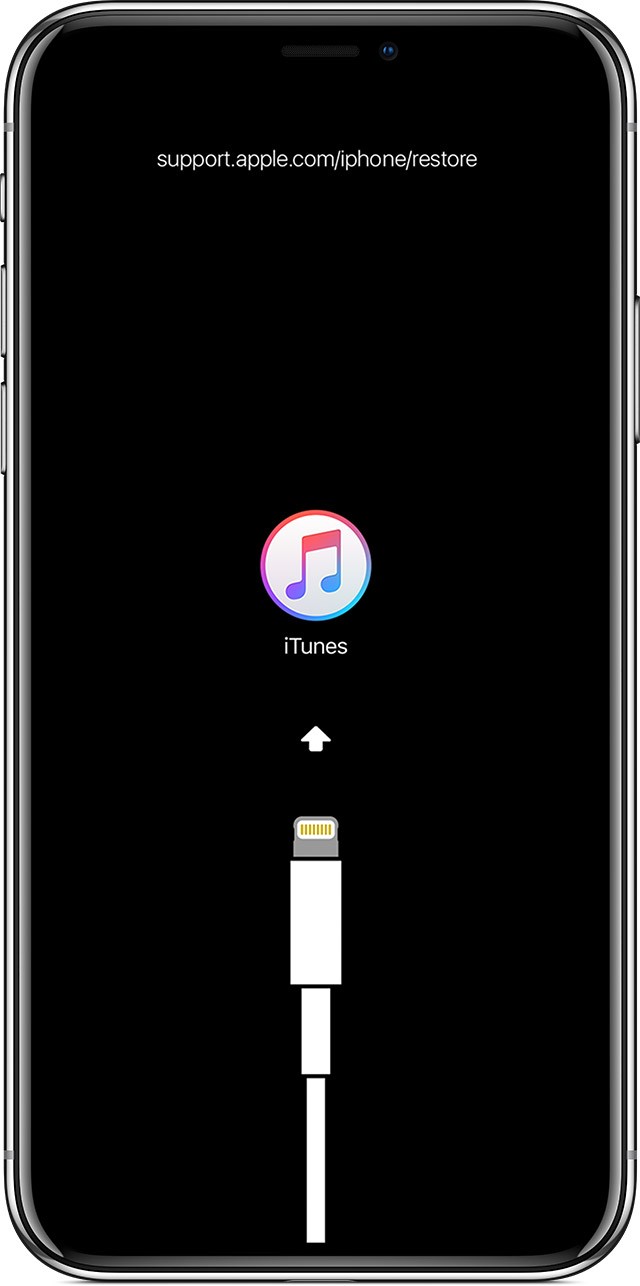
  3. While your device is connected, force restart it with these steps, but don't release the buttons when you see the Apple logo, wait until the connect to iTunes screen appears:
    • On iPhone 8 and later: Press and quickly release the Volume Up button. Press and quickly release the Volume Down button. Then, press and hold the Side button until you see the connect to iTunes screen.
    • On an iPhone 7 or iPhone 7 Plus: Press and hold the Side and Volume Down buttons at the same time. Keep holding them until you see connect to iTunes screen.
    • On an iPhone 6s and earlier, iPad, or iPod touch: Press and hold both the Home and the Top (or Side) buttons at the same time. Keep holding them until you see the connect to iTunes screen.
      User uploaded file
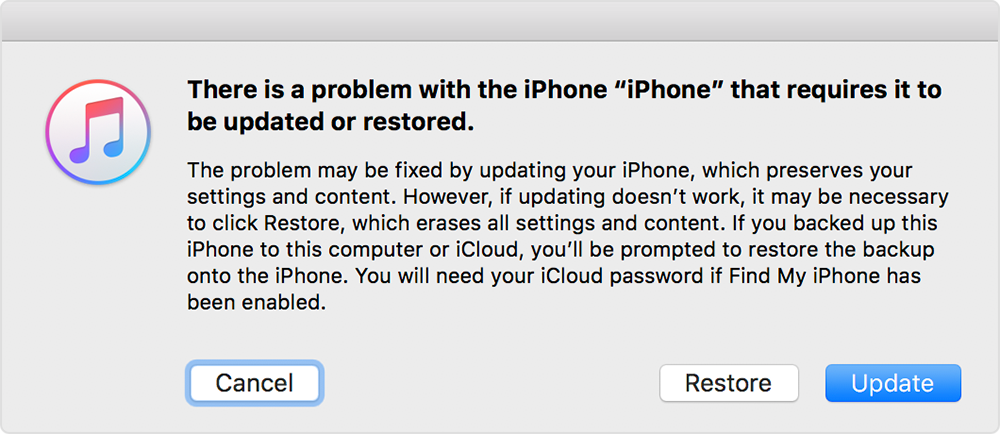
  4. When you see the option to Restore or Update, choose Update. iTunes will try to reinstall iOS without erasing your data. Wait while iTunes downloads the software for your device. If the download takes more than 15 minutes and your device exits the connect to iTunes screen, let the download finish, then repeat step 3.
    User uploaded file
  5. After the Update or Restore completes, set up your device.
If you can't update or restore your iPhone, iPad, or iPod touch

Test again for the behavior with your contact card when this process is complete and let me know what you find.


Warmest Regards.

This thread has been closed by the system or the community team. You may vote for any posts you find helpful, or search the Community for additional answers.

Why is my contact card info disappearing?

Welcome to Apple Support Community
A forum where Apple customers help each other with their products. Get started with your Apple Account.