Siri Shortcuts iCloud Issue

Hi,


My Siri shortcuts app won't sync across iOS devices, when I try and share a shortcut from my iPad to my iPhone it comes up with a message saying "In order to do this, you must be signed into iCloud". I'm already logged into iCloud and can edit all iCloud settings from within the settings app. I can send shortcuts I've created from my iPhone to my iPad but not the other way. Have tried doing a hard restart of my iPad and nothing has changed. Any ideas?


Thanks

iPad 2 Wi-Fi

Posted on Sep 29, 2018 5:41 PM

Reply
Question marked as Top-ranking reply

Posted on Sep 30, 2018 3:15 PM

Hi JKELL_99,

Thanks for the post in Apple Support Communities. I see that you may be running into an issue when sharing a Shortcut between two iOS devices.

Generally speaking, if you're signed in with the same Apple ID on both devices, your shortcuts should sync automatically instead of needing to be shared. In this link, you can find details on how to Use Siri Shortcuts with iCloud.

Are both devices running iOS 12?

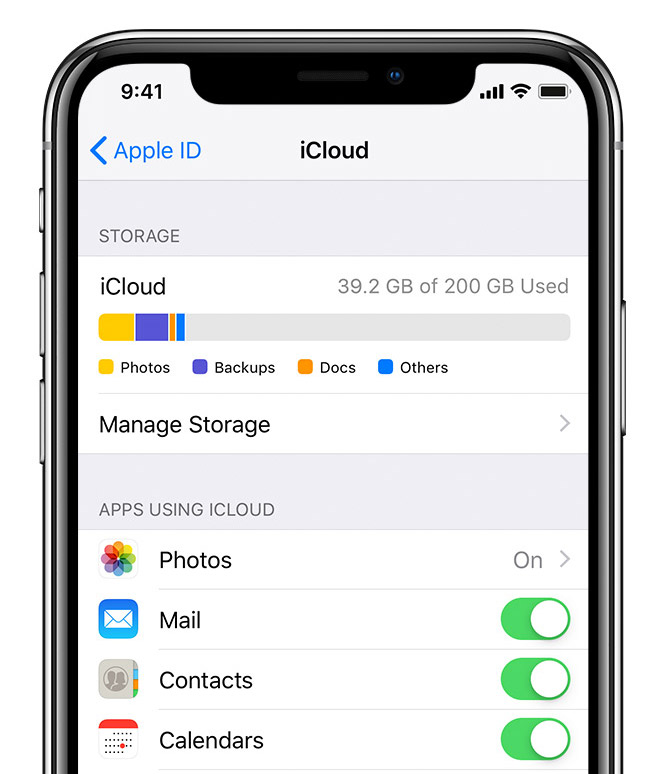
Also, is Shortcuts enabled in your iCloud settings? You mentioned you're already signed in, and you can check this by tapping Settings, then tapping your name at the top. Then, tap iCloud and scroll down to make sure that Shortcuts is enabled here. You'll find a visual for this here, in the article titled Set up iCloud on your iPhone, iPad, or iPod touch :

Check your iCloud settings

Go to Settings, tap [your name], then select iCloud. Choose the apps—like Photos, Contacts, Calendars, and third-party apps—that you want to use with iCloud.

Set up iCloud on your other devices to keep your content up to date everywhere.


User uploaded file


I hope this helps so you can sync your shortcuts across your devices.

Take care.

Similar questions

2 replies
Question marked as Top-ranking reply

Sep 30, 2018 3:15 PM in response to JKELL_99

Hi JKELL_99,

Thanks for the post in Apple Support Communities. I see that you may be running into an issue when sharing a Shortcut between two iOS devices.

Generally speaking, if you're signed in with the same Apple ID on both devices, your shortcuts should sync automatically instead of needing to be shared. In this link, you can find details on how to Use Siri Shortcuts with iCloud.

Are both devices running iOS 12?

Also, is Shortcuts enabled in your iCloud settings? You mentioned you're already signed in, and you can check this by tapping Settings, then tapping your name at the top. Then, tap iCloud and scroll down to make sure that Shortcuts is enabled here. You'll find a visual for this here, in the article titled Set up iCloud on your iPhone, iPad, or iPod touch :

Check your iCloud settings

Go to Settings, tap [your name], then select iCloud. Choose the apps—like Photos, Contacts, Calendars, and third-party apps—that you want to use with iCloud.

Set up iCloud on your other devices to keep your content up to date everywhere.


User uploaded file


I hope this helps so you can sync your shortcuts across your devices.

Take care.

This thread has been closed by the system or the community team. You may vote for any posts you find helpful, or search the Community for additional answers.

Siri Shortcuts iCloud Issue

Welcome to Apple Support Community
A forum where Apple customers help each other with their products. Get started with your Apple Account.