How to change resolution of iPhone 8 plus pictures?

I took 1000+ iPhone (8+) pictures in Italy. I like to print some in 8 x 10 or larger size. However, most appear to be only 1 - 2 MB because of space-saving setting. Apparently full-size resolutions has been saved in the Cloud. I changed various settings on my iPhone and my Mac laptop & iMac but no success. Despite reading multiple explanations on how to download the full-resolution images from the Cloud, I have not figured out how to do this.

I appear not to be alone in this quest. Can someone help?

MacBook Air, Mac OS X (10.6.8)

Posted on Oct 20, 2018 10:14 AM

Reply
Question marked as Top-ranking reply

Posted on Oct 21, 2018 1:18 PM

Hello frisian,

Thank you for using Apple Support Communities. It's my understanding that you need assistance downloading full resolution images from iCloud Photos. You've come to the right place! I'm happy to help.

Use the steps below to download an original photo or video:

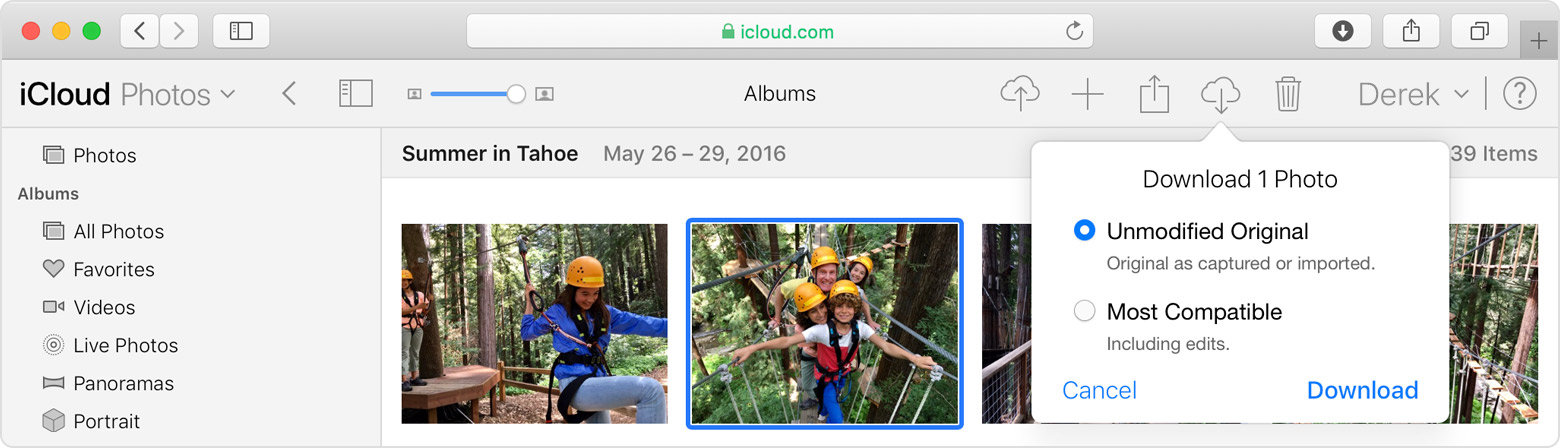
On iCloud.com, click Photos, and select one or more photos and videos that you want to download. Click and hold User uploaded file in the upper-right corner of the window. If you want to download your content as it was originally captured or imported, choose Unmodified Original. For JPEG or H.264 format — including edits, and even if it was orginally in HEIF or HEVC format — choose Most Compatible. Click download.

User uploaded file

On iOS, tap Photos and select one or more photos or videos. Tap User uploaded file, and select the device that you want to share with. If you need help, learn what to do.

On Mac, click Photos. Select one or more photos. Drag the content to your desktop, or right-click and select Share > AirDrop.

Set up and use iCloud Photos

Based on the information you've provided, it sounds like you've enabled Optimize Storage. With this feature your original photos and videos are stored in iCloud and space-saving versions are kept on your device. If you don't want to use Optimize Storage, it can be turned off using the steps below:
1. On your iPhone Tap Settings > [your name] > iCloud > Tap Photos > Choose Download and Keep Originals.

2. On your Mac Open the Photos app > click Photos in the menu bar > Click Preferences > Go to the iCloud tab and choose a storage setting.

Let us know the results. Please include any additional steps you may have tried.

Have a great day!
1 reply
Question marked as Top-ranking reply

Oct 21, 2018 1:18 PM in response to frisian

Hello frisian,

Thank you for using Apple Support Communities. It's my understanding that you need assistance downloading full resolution images from iCloud Photos. You've come to the right place! I'm happy to help.

Use the steps below to download an original photo or video:

On iCloud.com, click Photos, and select one or more photos and videos that you want to download. Click and hold User uploaded file in the upper-right corner of the window. If you want to download your content as it was originally captured or imported, choose Unmodified Original. For JPEG or H.264 format — including edits, and even if it was orginally in HEIF or HEVC format — choose Most Compatible. Click download.

User uploaded file

On iOS, tap Photos and select one or more photos or videos. Tap User uploaded file, and select the device that you want to share with. If you need help, learn what to do.

On Mac, click Photos. Select one or more photos. Drag the content to your desktop, or right-click and select Share > AirDrop.

Set up and use iCloud Photos

Based on the information you've provided, it sounds like you've enabled Optimize Storage. With this feature your original photos and videos are stored in iCloud and space-saving versions are kept on your device. If you don't want to use Optimize Storage, it can be turned off using the steps below:
1. On your iPhone Tap Settings > [your name] > iCloud > Tap Photos > Choose Download and Keep Originals.

2. On your Mac Open the Photos app > click Photos in the menu bar > Click Preferences > Go to the iCloud tab and choose a storage setting.

Let us know the results. Please include any additional steps you may have tried.

Have a great day!

This thread has been closed by the system or the community team. You may vote for any posts you find helpful, or search the Community for additional answers.

How to change resolution of iPhone 8 plus pictures?

Welcome to Apple Support Community
A forum where Apple customers help each other with their products. Get started with your Apple Account.