Encrypted data

I broke my old iPhone and the screen is smashed so I can’t get any access to it. I’m trying to finish setting up my apple id settings. (Keep getting a notification on the screen asking me to do this)

as I can’t access another device I get this message:


if you can’t approve this iPhone from another device, you can reset your end to end encrypted data to finish setting up iCloud.


If I follow this instruction and say I can’t approve what will happen?

Hope this makes sense.User uploaded file


Thanks.

Posted on Oct 21, 2018 3:56 AM

Reply
1 reply

Oct 22, 2018 9:18 AM in response to kirstyfromworthing

Hi kirstyfromworthing,

Thanks for using Apple Support Communities. From your post, I see you have a question about iCloud Keychain on a new device.

If you're unable to access your old iPhone to approve this one, there are a few possibilities to consider. The article titled If you enter your iCloud Security Code incorrectly too many times has some great information on this type of situation. If you have another device that may be approved, see this:

If you can access an approved device that uses your iCloud Keychain

You can create a new iCloud Security Code from another device that also uses your iCloud Keychain.

On an iPhone, iPad, or iPod touch:

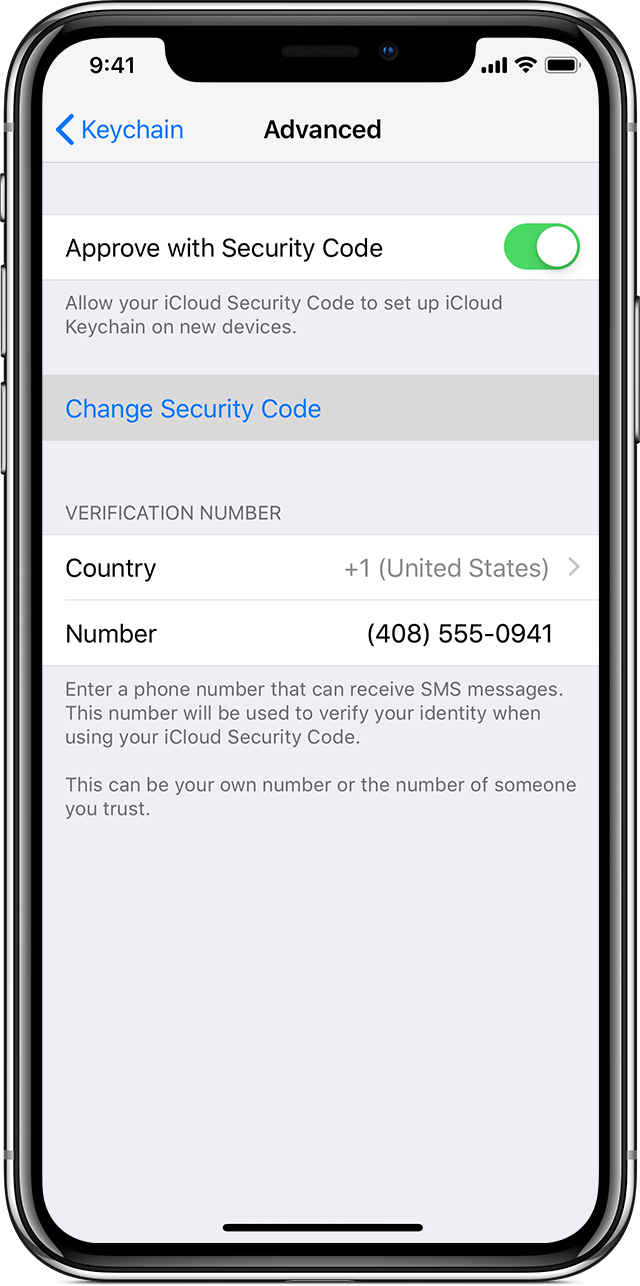
  1. Tap Settings > [your name] > iCloud > Keychain > Advanced. If you're using iOS 10.2 or earlier, tap Settings > iCloud.
  2. Tap Change Security Code.
    User uploaded file
  3. Enter your Apple ID password when asked.
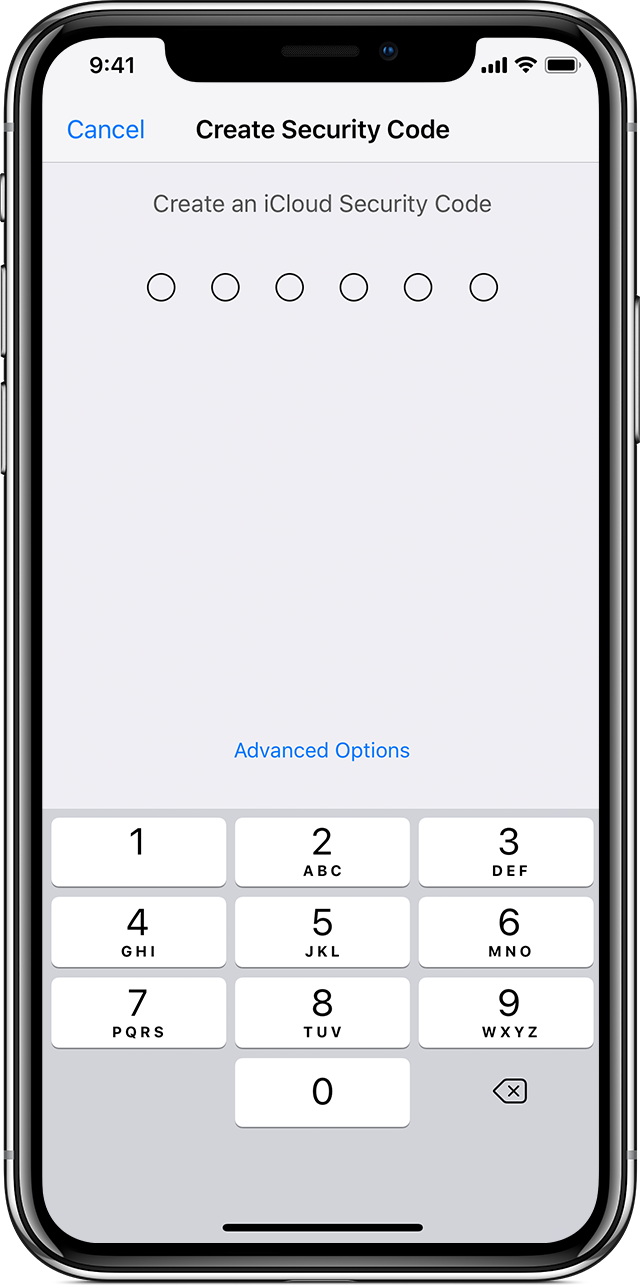
  4. Enter a new iCloud Security Code.
    User uploaded file

On a Mac with OS X Yosemite or later:

  1. Choose Apple User uploaded file menu > System Preferences, then click iCloud.
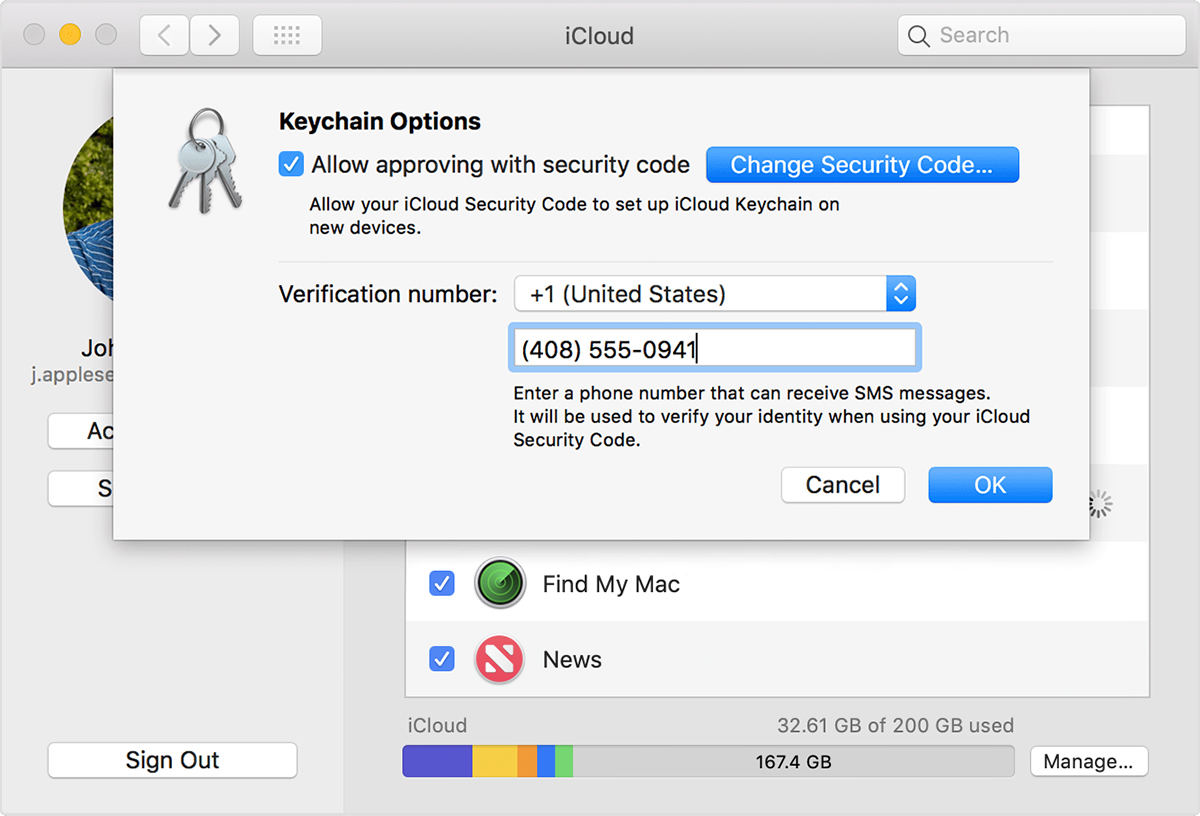
  2. Click Options next to Keychain.
  3. Click Change Security Code and enter a new iCloud Security Code.
    User uploaded file

On the device where iCloud Keychain was disabled, create a new iCloud Keychain that contains the username, passwords, and other keychain items from the device:

  • On your iPhone, iPad, or iPod touch: Tap Settings > [your name] > iCloud > Keychain and turn on iCloud Keychain. If you're using iOS 10.2 or earlier, tap Settings > iCloud.
  • On your Mac: Choose Apple User uploaded file menu > System Preferences. Click iCloud, then select Keychain.

An approval notification appears on the device that you used to create the new iCloud Security Code. Approve to add the new iCloud Keychain to your device.


If you don't have access to another device, following the prompt you shared will be your next best step. By doing that, you'll be able to reset your iCloud Keychain and create a new one.

I hope this is helpful.

Kindest regards.

This thread has been closed by the system or the community team. You may vote for any posts you find helpful, or search the Community for additional answers.

Encrypted data

Welcome to Apple Support Community
A forum where Apple customers help each other with their products. Get started with your Apple Account.