Epson printer error since update to osMac 10.14 Mojave

I cannot print to my Epson XP-620 printer. I am connected via USB. This has started happening since the upgrade to osMac 10.14 Mojave.


I keep getting the error 'Stopped - 'Filter' failed, 1 page. This happens with .pdf, .jpg and .docx files.


I removed the Epson drivers and downloaded the latest version which I installed and still no better.

IMAC (RETINA 5K, 27-INCH, LATE 2015), macOS Mojave (10.14)

Posted on Oct 30, 2018 5:19 AM

Reply
Question marked as Top-ranking reply

Posted on Oct 30, 2018 5:34 PM

Hello wislonp.

If I'm understanding correctly, you are having trouble printing since upgrading your macOS. I rely on my ability to print as well, and I'll be glad to assist.

You have already performed some good trouble shooting on your own. Let's reset your printing system as shown below, to see if it helps from our article: If you can't print from your Mac or iOS device

Reset the printing system

If the issue continues, reset the printing system on your Mac. This removes all printers and scanners—including their print jobs and settings—from Printers & Scanners preferences.

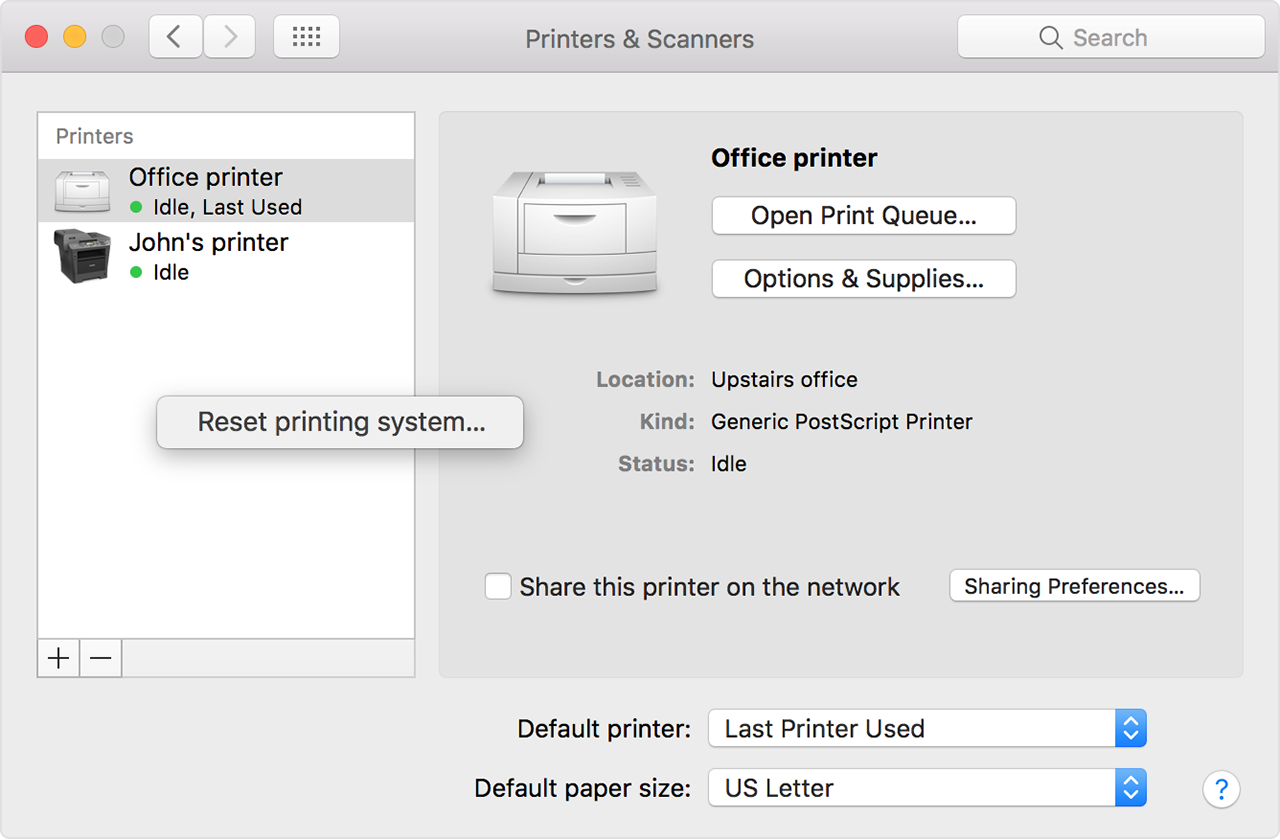
  1. Choose Apple menu > System Preferences, then click Printers & Scanners.
  2. While holding down the Control key on your keyboard, click anywhere in the list of devices.
  3. Choose “Reset printing system” from the menu that appears:

User uploaded file


Cheers.

Similar questions

2 replies
Question marked as Top-ranking reply

Oct 30, 2018 5:34 PM in response to wislonp

Hello wislonp.

If I'm understanding correctly, you are having trouble printing since upgrading your macOS. I rely on my ability to print as well, and I'll be glad to assist.

You have already performed some good trouble shooting on your own. Let's reset your printing system as shown below, to see if it helps from our article: If you can't print from your Mac or iOS device

Reset the printing system

If the issue continues, reset the printing system on your Mac. This removes all printers and scanners—including their print jobs and settings—from Printers & Scanners preferences.

  1. Choose Apple menu > System Preferences, then click Printers & Scanners.
  2. While holding down the Control key on your keyboard, click anywhere in the list of devices.
  3. Choose “Reset printing system” from the menu that appears:

User uploaded file


Cheers.

This thread has been closed by the system or the community team. You may vote for any posts you find helpful, or search the Community for additional answers.

Epson printer error since update to osMac 10.14 Mojave

Welcome to Apple Support Community
A forum where Apple customers help each other with their products. Get started with your Apple Account.