My Apple Watch alarm when I set it it would show me the screen the alarm when Off but it does not ring or sound and my sound I full volume and still don’t work how can I fix it
How to fix alarm sound if don’t work
Set an alarm
You can ask Siri to set an alarm for you. Say something like “Set an alarm for 7 a.m.” or “Wake me up at 19:00.”
Or, set an alarm from your iPhone, then push it to your Apple Watch:
- Set the alarm on your iPhone.
- Open the Apple Watch app on your iPhone.
- Tap My Watch, tap Clock, then turn on Push Alerts from iPhone.
The alarm on your Apple Watch is separate from the alarms on your iPhone. When you set an alarm, make sure that your Apple Watch and your iPhone aren't in silent mode. To set or adjust an alarm for Nightstand mode, use your Apple Watch:
- Open the Alarms app on your Apple Watch.
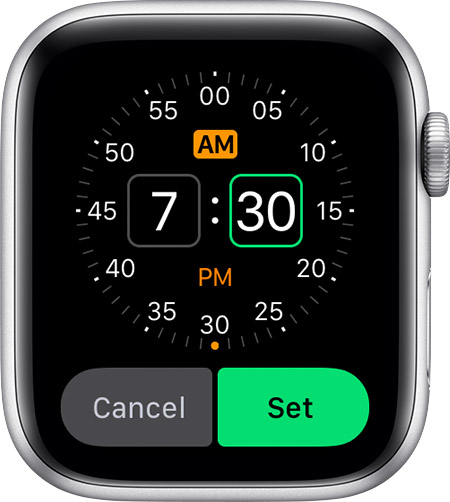
- Tap Add Alarm. Or tap an existing alarm, then tap Change time.
- Tap AM or PM, then tap the hours or minutes. Turn the Digital Crown to adjust the time.
- Tap Set.
When your alarm begins, your Apple Watch makes a sound and the text turns orange. To turn off your alarm, press the side button. To snooze the alarm for 9 minutes, press the Digital Crown.
Set an alarm
You can ask Siri to set an alarm for you. Say something like “Set an alarm for 7 a.m.” or “Wake me up at 19:00.”
Or, set an alarm from your iPhone, then push it to your Apple Watch:
- Set the alarm on your iPhone.
- Open the Apple Watch app on your iPhone.
- Tap My Watch, tap Clock, then turn on Push Alerts from iPhone.
The alarm on your Apple Watch is separate from the alarms on your iPhone. When you set an alarm, make sure that your Apple Watch and your iPhone aren't in silent mode. To set or adjust an alarm for Nightstand mode, use your Apple Watch:
- Open the Alarms app on your Apple Watch.
- Tap Add Alarm. Or tap an existing alarm, then tap Change time.
- Tap AM or PM, then tap the hours or minutes. Turn the Digital Crown to adjust the time.
- Tap Set.
When your alarm begins, your Apple Watch makes a sound and the text turns orange. To turn off your alarm, press the side button. To snooze the alarm for 9 minutes, press the Digital Crown.
My Apple Watch alarm when I set it it would show me the screen the alarm when Off but it does not ring or sound and my sound I full volume and still don’t work how can I fix it