Yellow Flash while watching Videos

Hello,

I have a 13 inch MacBook Air, and today I started noticing that when I watch (for example) YouTube the black bars on the side start flashing Yellow, and sometimes stay Yellow. When I use my MacBook normally I do not have that problem. When I look at a black picture everything stays normal, but when I watch a video it starts flashing Yellow.


Details:

2017 MacBook Air 13 inch

Intel HD Graphics 6000 1536 MB


Thank You

Ben Martin

MacBook Air

Posted on Nov 7, 2018 10:22 PM

Reply
1 reply

Nov 9, 2018 7:06 AM in response to benaagemartin

Hi benaagemartin,

Thank you for posting in the Apple Support Communities. I see you have yellow bars when you're watching web content on your MacBook Air.

Which web browser are you using? If you try another browser for testing, how does that work? This would help narrow things down a bit.

Which software version are you using on the Mac? If you're not running the latest macOS version, here's How to update the software on your Mac . If you need to update, be sure to Back up your Mac with Time Machine .

If you're updated already, try a quick restart of your Mac and then test again. You can restart by clicking the Apple menu () > Restart.

If the issue persists and you're using Safari as your web browser, I recommend these steps next, from the article If Safari doesn't load a page or webpage items are missing :

If Safari doesn't load pages from multiple sites

In OS X Yosemite, you can delete website data for the past hour, or past few days if websites or pages stopped loading recently.

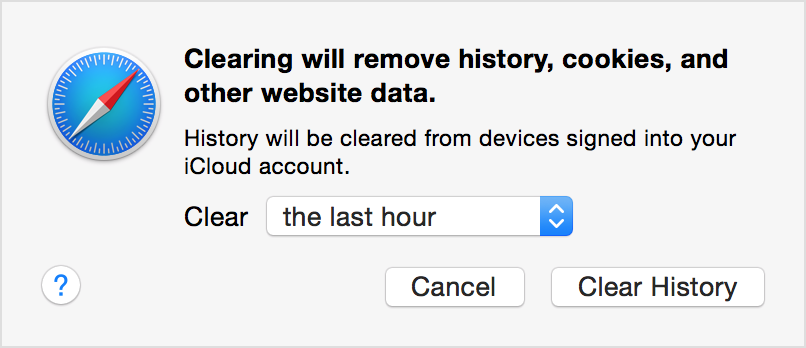
  1. Choose History > Clear History and Website Data.
  2. In the sheet that appears, choose the range of data you want to remove from the Clear pop-up menu.
  3. Click Clear History.
    User uploaded file

If you want to remove website data for all of the sites and pages you've ever visited, choose "all history" from the Clear pop-up menu. The option to Remove All Website Data in the Privacy pane of Safari preferences does this, too. These options also reset your browsing history and Top Sites.


I hope the information I've provided helps.

Warm regards.

This thread has been closed by the system or the community team. You may vote for any posts you find helpful, or search the Community for additional answers.

Yellow Flash while watching Videos

Welcome to Apple Support Community
A forum where Apple customers help each other with their products. Get started with your Apple Account.