All of a sudden my Face ID stopped working any help?
my phone will not set up Face ID anymore. It stopped working out of no where.
iPhone XS Max, iOS 12.1
my phone will not set up Face ID anymore. It stopped working out of no where.
iPhone XS Max, iOS 12.1
Learn what to do if you see a message on the Home screen or in Settings that says "Face ID has been disabled."
What the message says
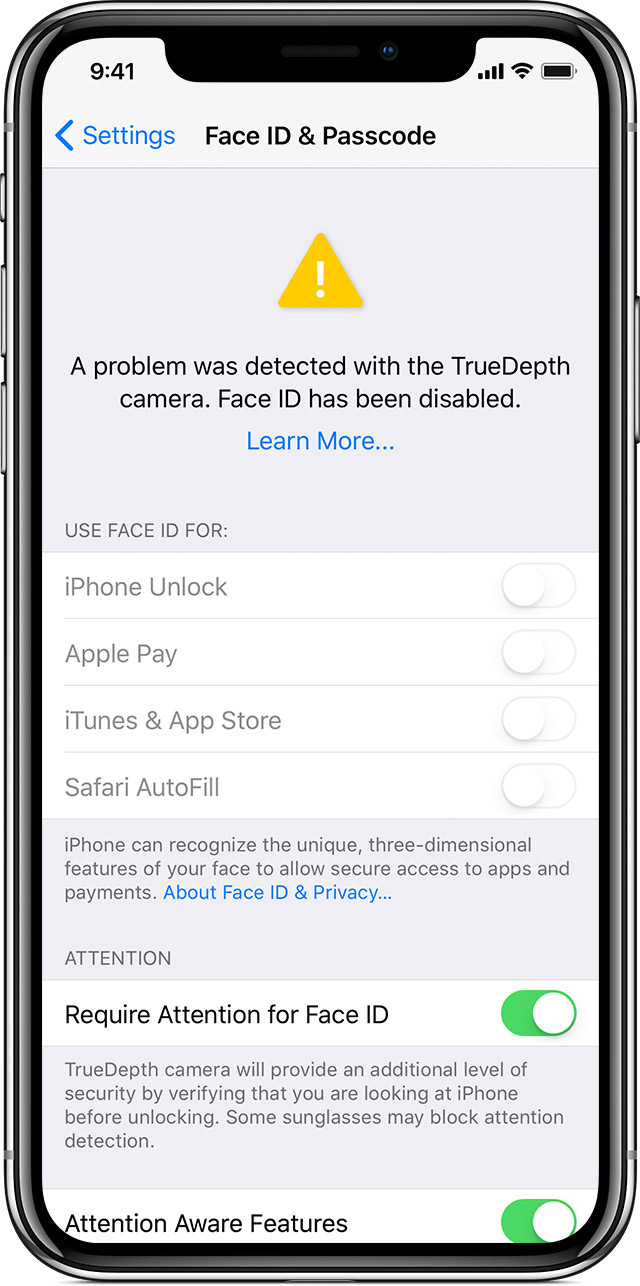
On iPhone X or later, iPad Pro 12.9-inch (3rd generation), or iPad Pro 11-inch, you might see a message that says "A problem was detected with the TrueDepth Camera. Face ID has been disabled."
Why the message appears
Using diagnostics in iOS, we’ve detected an issue with your TrueDepth camera that might cause it to not function as expected. This won’t prevent you from using your iPhone or iPad, but you won’t be able to use Face ID, Animoji, Memoji, and some other features using the front camera until your iPhone or iPad is serviced.
What to do next
Take your iPhone or iPad to an Apple Authorized Service Provider or make a Genius Bar reservation at the Apple Store. You can also contact Apple Support.
Learn what to do if you see a message on the Home screen or in Settings that says "Face ID has been disabled."
What the message says
On iPhone X or later, iPad Pro 12.9-inch (3rd generation), or iPad Pro 11-inch, you might see a message that says "A problem was detected with the TrueDepth Camera. Face ID has been disabled."
Why the message appears
Using diagnostics in iOS, we’ve detected an issue with your TrueDepth camera that might cause it to not function as expected. This won’t prevent you from using your iPhone or iPad, but you won’t be able to use Face ID, Animoji, Memoji, and some other features using the front camera until your iPhone or iPad is serviced.
What to do next
Take your iPhone or iPad to an Apple Authorized Service Provider or make a Genius Bar reservation at the Apple Store. You can also contact Apple Support.
All of a sudden my Face ID stopped working any help?