Trackpad 2 not working on fresh Windows 10 boot camp install

I can’t get the trackpad 2 to work on Windows 10 boot camp. This is a fresh install of Windows 10. Trackpad works fine on the Mac side (Mojave). Touchpad and other external mice work fine on both Windows 10 and Mojave. I installed all the boot camp drivers by downloading from boot camp assist and putting them on a thumb drive. Any suggestions?

Posted on Dec 2, 2018 2:31 PM

Reply
26 replies

Dec 5, 2018 7:44 AM in response to Loner T

I'm attaching a screenshot of the "Hardware Ids" description for each of these devices, which I think contains the information you are asking about. There was no "Hardware Id" for "Bluetooth" under "Software devices."

  • Under "mice and other pointing devices" I see three instances of "HID-compliant mouse"
  • User uploaded file
  • User uploaded file
  • User uploaded file
  • Under "software devices" I see a hidden device called "Bluetooth."
  • User uploaded file
  • Under "human interface devices" I see three "USB input devices" and one "Bluetooth Serial UHE HID"

User uploaded file

User uploaded file

User uploaded file

Dec 2, 2018 7:07 PM in response to Loner T

Interesting, I still can't get it to work wirelessly. I found this thread discussing collaboration - is this what you're talking about? Is anybody else struggling with an intermittent connection when using the Magic Mouse/Trackpad ONLY on Boot Camp?


That thread instructs: "Control Panel > Device Manager > Network Adapters > Broadcom 802.11n Network Adapter (right click and choose "Properties". Under the "Advanced" tab, highlight the setting named "Bluetooth Collaboration", then change it to Enable. Then click OK." Unfortunately I don't see "Bluetooth Collaboration" when I follow that path. Any other suggestions?


These are the options I do see at that path:

User uploaded file

Dec 3, 2018 8:44 PM in response to Loner T

I still don't see any Bluetooth category when I reveal hidden devices. A few things to come up that I'm assuming aren't relevant, such as printers. Potentially relevant ones:

  • Under "mice and other pointing devices" I see three instances of "HID-compliant mouse"
  • Under "software devices" I see a hidden device called "Bluetooth."
  • Under "human interface devices" I see three "USB input devices" and one "Bluetooth Serial UHE HID"

Dec 8, 2018 10:17 AM in response to Loner T

I ran both resets but didn't notice anything new on device manager.


I played around with an unspecified device on device manager and was able to get the Bluetooth radio back up and running. However, now back to square one where I can't seem to switch the driver from the default Windows driver to the Apple boot camp bluetooth driver. No matter how many times I uninstall the Bluetooth driver and the trackpad, I can't seem to permanently disable or uninstall them. Right now, I have Bluetooth support services disabled to try and prevent Windows from automatically installing Windows Bluetooth drivers.
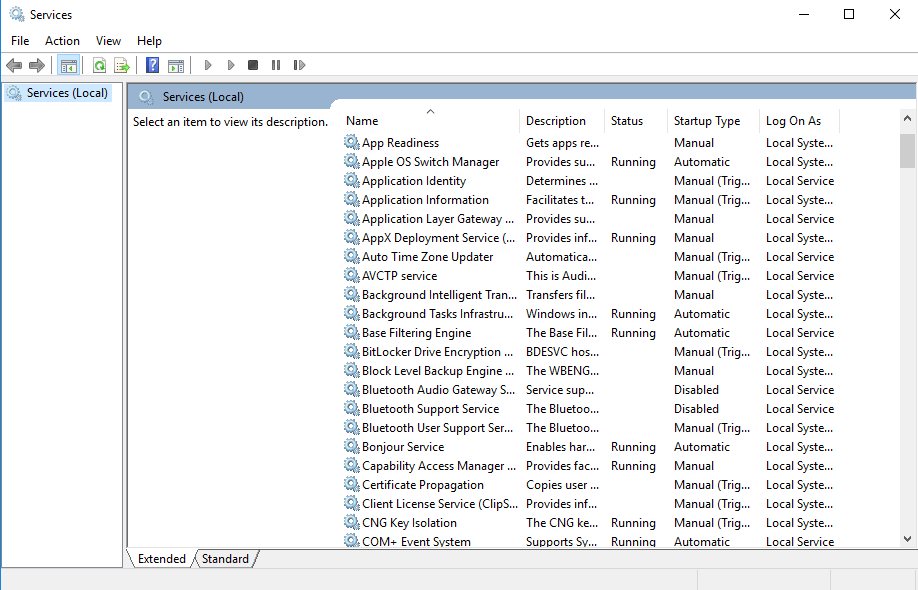

I also have disabled automatic download of manufacturer apps and custom icons under "device installation settings." Somehow I seem to have stopped the automatic installation of Windows drivers. But even with this in place, nothing happens after I run the boot camp set up again to try and reinstall Boot Camp drivers.


I tried right clicking on the Bluetooth radio --> update driver --> browse my computer for driver software --> search for drivers in this location --> select D:\WindowsSupport\BootCamp\Drivers\Broadcom, but this doesn't work.


I also tried right clicking on the Bluetooth radio --> update driver --> browse my computer for driver software --> let me pick from a list of available drivers on my computer --> have disk, but even if I navigate to D:\WindowsSupport\BootCamp\Drivers\Broadcom, it won't let me select anything because it looks like it requires file type .inf


Finally, I tried right clicking on the Bluetooth radio --> update driver --> browse my computer for driver software --> let me pick from a list of available drivers on my computer --> uncheck "show compatible hardware" --> "Apple broadcom built-in Bluetooth version: 6.1.6700.0 [10/4/2016]. The installation was unsuccessful. Here's the screenshot after this method. As you can see, that driver isn't functioning. My trackpad is also still somehow registering as a hidden device, even though it has been uninstalled, isn't on, and isn't even paired on the MacOS side.
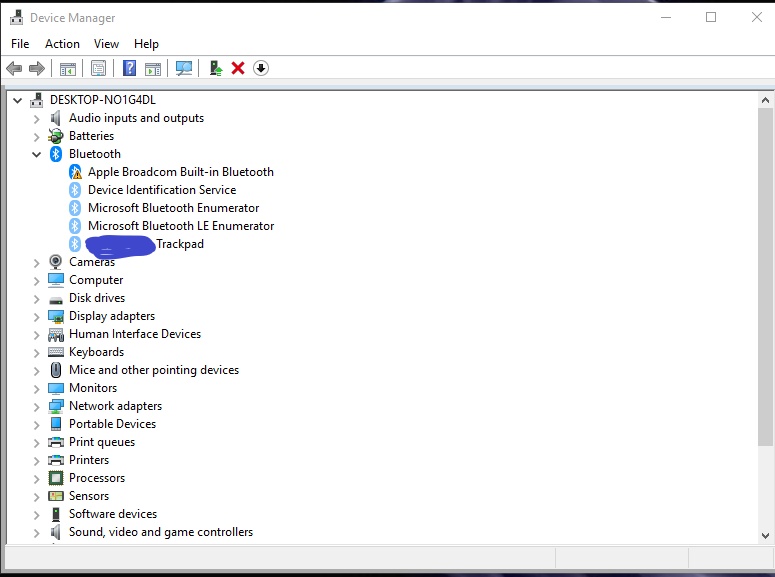


Any other suggestions?

Dec 3, 2018 8:07 PM in response to Loner T

I've tried uninstalling and reinstalling drivers a bunch of times. In most instances, the Windows drivers would automatically reinstall themselves as he suggested. This last go around, I unplugged the trackpad, uninstalled all Bluetooth drivers, and restarted. With the trackpad unplugged, the Bluetooth drivers from Windows did not automatically reinstall. However, even after running the boot camp set up again from a thumb drive and also trying to individually install the Bluetooth drivers from within the boot camp set up files, I can't get Bluetooth running. Now my device manager shows no Bluetooth. Any suggestions?

Dec 8, 2018 3:37 PM in response to twobitrye

There is an entry in the INF file which has

[Apple.NTamd64]
%AppleBuildInBt%=AppleBtBc, USB\VID_05ac&PID_8213

This matches the device you have.


If you run Windows Update and let it find the driver, instead of using the oem0.inf, we need to see what it actually finds. In most cases, it seems to use just a VID match and install a driver, which does not have OEM features.

Dec 8, 2018 8:01 PM in response to Loner T

I ran Windows update and let it find the driver. I now see three things under Bluetooth in device manager:

-Bluetooth Radio, inf is bth.inf (info here: https://pastebin.com/gJxRFaHv)

-Microsoft Bluetooth Enumerator, info is bth.inf

-Microsoft Bluetooth LE Enumerator, info is bthleenum.inf (info here: https://pastebin.com/CRqCEJKQ)


I don't see a VID/PID in any of these devices. Any other suggestions? I really appreciate your help with this. It's driving me crazy.

Dec 9, 2018 6:01 AM in response to twobitrye

The closest Broadcom you have in the Generic drivers is

[Broadcom.NTamd64]
Blutonium BCM2035 Bluetooth 2.4 GHz Single Chip Transceiver= BthUsb, USB\VID_0A5C&PID_200A
BCM2033 Bluetooth 2.4 GHz Single Chip Transceiver= BthUsb, USB\VID_0A5C&PID_200F
ANYCOM USB-200/250 Bluetooth Adapter=      BthUsb, USB\VID_0A5C&PID_2111


From the oem0.inf, we have


DriverVer=10/04/2016,6.1.6700.0


From bth.inf, we have


DriverVer = 06/21/2006,10.0.17134.441


The OEM driver is the better driver, yet Windows refuses to install it. Can you post the question on a Microsoft forum?


Typically, in these cases, we delete the generic driver, uninstall the generic driver, remove it from DrvStore, remove/scan for hardware and install the OEM driver.


This thread has been closed by the system or the community team. You may vote for any posts you find helpful, or search the Community for additional answers.

Trackpad 2 not working on fresh Windows 10 boot camp install

Welcome to Apple Support Community
A forum where Apple customers help each other with their products. Get started with your Apple Account.
