Crossover cable query

Hi again,

I want to transfer my non-corrupt stuff from my old iMac to my "new" old iMac. They're both early G3s, one's tray loading and the other's slot loading; both blueberry, if that matters.

I have nothing to use to save anything from my first iMac (my Zip drive did the eternal click thing a long time ago). So I figured I can set up a mini intranet network with myself. I read that I need Belkin's crossover cables. I was at the supermarket yesterday and I saw Belkins cables, but I think they were called network cables or something. It showed a few diagram with computers hooked up to modems and routers, but not to each other. Is this a different cable than what I want. My guess is that it's the same one I use to connect to DSL from my computer, and it doesn't seem to want to engage in intranet. Any suggestions; also if there's a place that's real cheap? And can I do this through ethernet? Do I need anything additional like software? Finally, is Appleshare involved? Thanks!

iMac G3 350 MHz 256 MB 20 GB Hard Drive, Mac OS 8.6 or Earlier, Using Firefox and Linux temporarily (until OS comes)


Posted on Apr 23, 2007 4:43 PM

Reply
8 replies

Apr 23, 2007 5:07 PM in response to allano

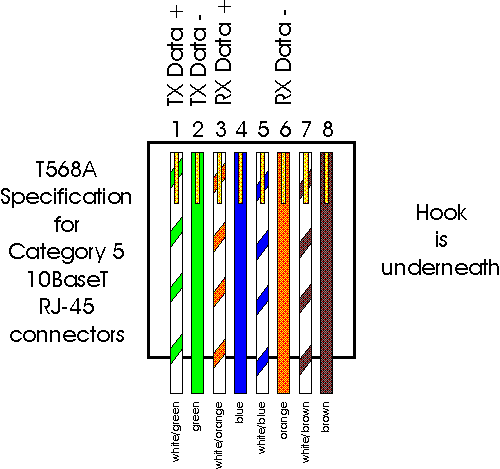
an ethernet crossover able will indeed do what you want. the way to check is to look at both ends of the cable, and if you see a pair swapped (eg white-orange and orange swapped for white-green and green) between the two ends, it's a crossover. if the two ends are in the same order, it's a regular "straight-through" cable. if they are flipped, aka rolled, it's not for network use at all.

Once you cable them together, give them both addresses on the same subnet, but not the exact same address. for example:
iMac A:
IP address: 192.168.100.2
subnet mask: 255.255.255.0
gateway: 192.168.100.1

iMac B:
IP address: 192.168.100.3
subnet mask: 255.255.255.0
gateway: 192.168.100.1

Even though you have no gateway, it shouldn't matter. you can also put the opposite iMac's address in for the gateway.

Once you've done this, you can test for connectivity by opening up terminal and typing:
ping 192.168.100.3
if on iMac A, and if you get returns, it is working.

then share up the drive(s), and you should be god to go.

Apr 23, 2007 7:51 PM in response to gruisinger

Thanks for the reply. I'm kind of a novice, so I need a little help. First, do you mean the color order, like orange-white and the other side has a white-orange end?

And where do I enter the addresses? And the "ping" info? Is it one of the control panels? Do I use the Chooser (I think that's where the hard drives show up, right? And you "choose" them?).

A little help should do it. Thanks.

Apr 23, 2007 11:22 PM in response to allano

With the G3 iMac and later, you should not need to get a Crossover Cable,
instead a standard Ethernet data transfer cable should work just fine.

The "new world" Macs can automatically use the standard cable, according
to several points of reference I have read (and do not have a handy link to.)

Since both machines do not have FireWire ports, the easiest means to
move files between Macs is not available to you. Target Disk Mode and
a FireWire cable are superior since you don't need to file-share to use it.

But that doesn't help right now, does it?! 🙂

Apr 24, 2007 8:26 AM in response to allano

The Belkin line of cables and adapters sold by the major retailers (Office Depot, Staples, CompUSA, etc.) are high-profit items, costing the buyer much more than he needs to spend. If there are any computer stores (doesn't need to be a Mac dealer) in your area, check their prices for a crossover cable.

Apr 24, 2007 9:00 AM in response to allano

here is an example of the wiring:
http://www.en-consult.ca/cat5.gif

notice there are some elements which are solid colors, and some are stripes. the striped ones are the ones I called white-orange and white-green.

as for where to make the network settings, I have no idea. Haven't used anything besides OS X in ages, especially OS 8. I would imagine some googling would bring you the answer here was the top hit for my search:
http://docs.info.apple.com/article.html?artnum=106657

Apr 24, 2007 10:12 PM in response to Duane

Thanks for the refresher... I have a cross-over cable and never needed it;
and now I really don't need it with the newer hardware I've primarily used.
The older Macs I had seldom were used with ethernet; and one DSL
router I had said it had to be used with a crossover cable, but found it
didn't need one. It just automatically worked. Been using G4s since.

[ Apple Products that Require an Ethernet Crossover cable ]

Yes, I found it was still bookmarked in my browser from two years ago.

This thread has been closed by the system or the community team. You may vote for any posts you find helpful, or search the Community for additional answers.

Crossover cable query

Welcome to Apple Support Community
A forum where Apple customers help each other with their products. Get started with your Apple Account.